How to Use TOPDON Topscan for Complete Car Diagnostics
The TopScan is a Bluetooth OBD2 adapter that turns your phone into a full-system diagnostic tool. Pair it in the app, run an all-system scan, read the codes, and clear them only after you understand what they mean.
If you are researching how to use topdon topscan, the first thing to understand is that it is not a traditional handheld scanner. The TopScan is a compact Bluetooth adapter that plugs into your car’s OBD2 port, and the TopScan phone app becomes the screen, keyboard, and control center.
This guide walks through pairing the adapter, running a full system scan, reading and clearing codes, using live data, and understanding the built-in battery and emissions checks. You will also learn which tasks the TopScan can safely handle on its own and which ones should go to a professional shop.
- Full-system view: Reads engine, transmission, ABS, and airbag codes on compatible vehicles instead of only powertrain.
- Pairing basics: Plug into the OBD2 port, turn the ignition on, pair inside the app, and.
- Code clearing: Clearing codes resets emissions monitors, which can cause an instant inspection failure in many.
- Live data limits: Phone refresh rates and PID coverage vary, so a missing sensor value is not.
- Compatibility first: Confirm your year, make, and model on TOPDON’s coverage list before relying on any.
What the TOPDON TopScan Is and How It Works
The TopScan reads the same diagnostic data a professional scan tool reads, but it sends that data to your phone over Bluetooth. The vehicle’s computers do the measuring; the phone displays the results.
When you plug the TopScan into the port under your dashboard, it connects to multiple electronic control units, or ECUs. These include the engine computer, transmission, anti-lock brakes, airbag system, and body control module on many vehicles. The depth of that connection depends on your vehicle’s make, model, and model year.
TOPDON positions the TopScan as a full-system diagnostic adapter for home users. That means it can read more than engine codes. On compatible vehicles, it shows ABS codes, airbag codes, and live sensor data that a basic reader cannot see.
TopScan vs. TopScan Pro vs. a $20 Code Reader: Which Do You Need?
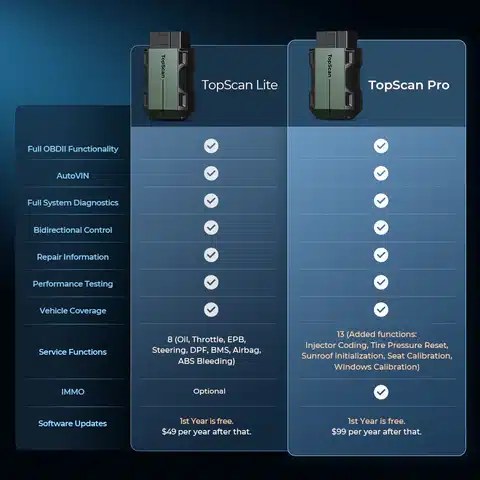
Choose your tool based on what you actually need to diagnose. A basic code reader, the TopScan, and the TopScan Pro serve three different types of owners.
| Option | Best for | Owner consideration | Driver consideration |
|---|---|---|---|
| $20 code reader | Reading and clearing check-engine codes | Low cost, no app or phone setup | Usually reads powertrain codes only |
| TopScan | Home DIYers who want full-system scanning | Moderate cost; phone becomes the display | Pairing takes minutes; use only while parked |
| TopScan Pro | Enthusiasts who want battery, TPMS, and reset functions | Higher cost; feature coverage varies by vehicle | Extra functions still depend on model-year support |
What TopScan Does That a Basic Reader Cannot
A basic code reader talks to the engine computer only. It reads powertrain codes and often cannot see ABS, airbag, or transmission codes. Many also struggle with live data and cannot run tests.
The TopScan reads multiple systems on compatible vehicles. It records freeze frame data, shows live sensor readings, and can clear codes from more than just the engine module. That wider view helps you tell the difference between a bad sensor and a wiring problem before you buy parts.
Where TopScan Pro Adds Value for Home Enthusiasts
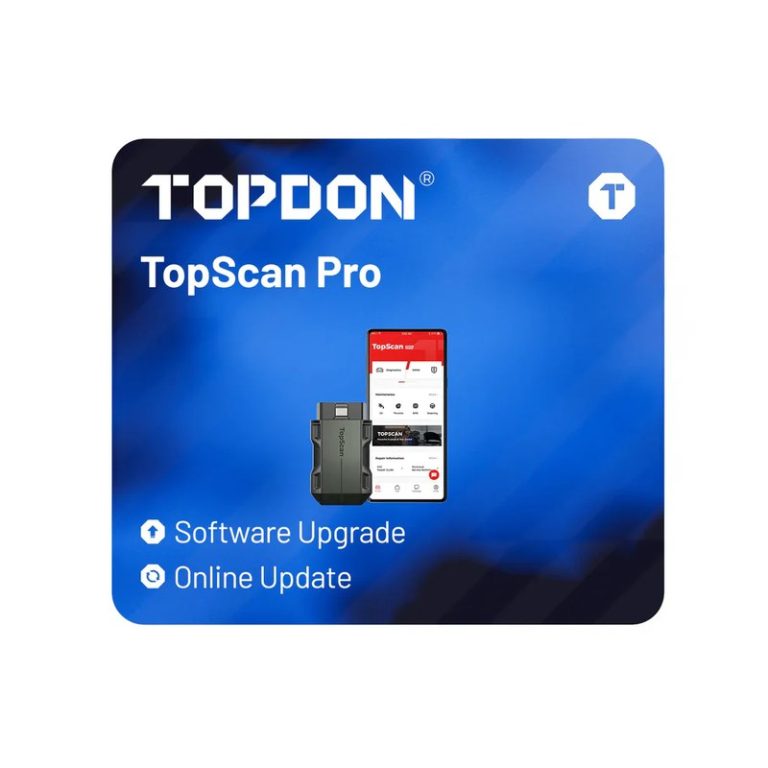
TopScan Pro is the higher-end version of the same adapter family. TOPDON adds features aimed at enthusiasts, including battery and charging system checks, TPMS service functions, and additional service reset menus on many makes.
The catch is that coverage varies by model. A function that works on one 2022 truck may not appear on a 2016 sedan. Check TOPDON’s official coverage information for your exact vehicle before paying extra for Pro features.
Before Using TopScan: Compatibility, Protocols, and Model-Year Coverage
Setup starts before you open the app. Confirm that your vehicle has a standard OBD2 port, which has been required on 1996 and newer gasoline cars and light trucks sold in the United States. Most vehicles from the 2008 model year onward use the CAN protocol that the TopScan is built around.
Check: Verify your vehicle’s make, model, year, and trim on TOPDON’s compatibility list. Confirm your phone runs a current version of the TopScan app and supports Bluetooth. Limitations: Full-system coverage, active tests, and service resets vary by model and app version. No consumer OBD2 adapter covers every function on every car.
Finding the OBD2 Port and Setting the Correct Ignition Mode
Most cars have the OBD2 port under the dashboard on the driver’s side, near the steering column or fuse panel. If you cannot find it, check the owner’s manual. Some models hide it behind a small cover.
Turn the ignition to the “on” position with the engine off for most scans. Some live-data and active tests need the engine running. Hybrids and EVs usually need the vehicle in “ready” mode. Never hold the key in the start position just to power a scan tool.
Phone Compatibility, App Permissions, and Firmware Updates
The TopScan app is available for iOS and Android phones. Before pairing, allow the app to access Bluetooth and, on some Android versions, location services. That location permission is often a system requirement for Bluetooth scanning, not a tracking feature.
Check for app updates in your phone’s app store and for dongle firmware updates inside the app before your first scan. An outdated dongle can fail to communicate with newer vehicles.
How to Use TopScan Step by Step: From Pairing to a Complete Vehicle Scan
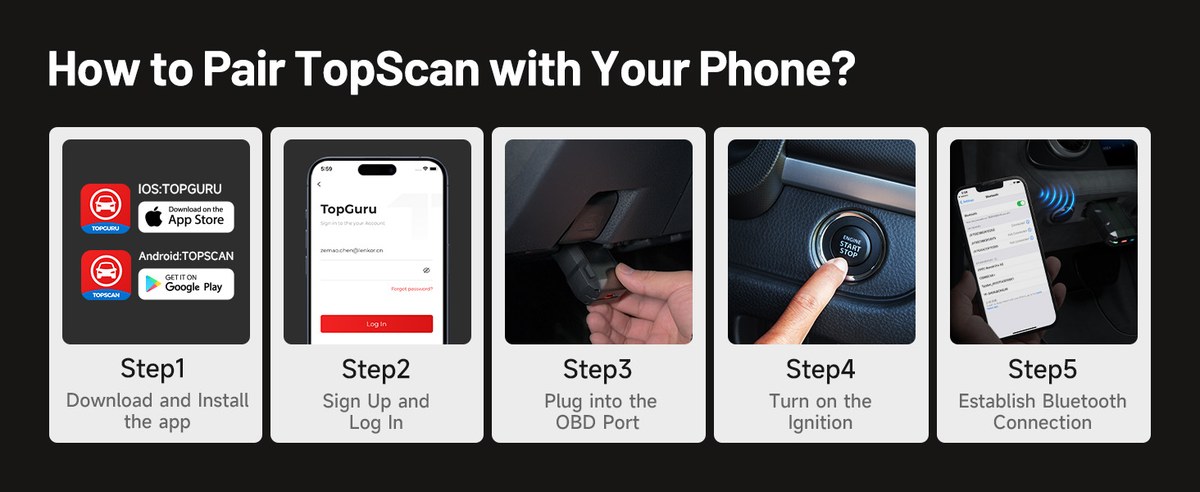
Download TopScan from the Apple App Store or Google Play. Create a TOPDON account so your saved vehicle reports stay linked across devices.
Insert the TopScan dongle fully into the OBD2 port. Then turn the ignition on with the engine off, or set a hybrid to ready mode.
Open the app, connect to the dongle over Bluetooth, and confirm the vehicle’s VIN, make, model, and year.
Choose the all-module scan option. The app checks each ECU it can reach and lists fault codes by system.
Pairing the TopScan Dongle with the TopScan App
Pairing is usually simple: the dongle appears in the app’s connection list when the ignition is on. TopScan normally expects you to manage the connection inside the app, so follow the app’s on-screen steps before checking your phone’s system Bluetooth menu.
Performing an All-System Scan and Reading Diagnostic Trouble Codes
Once paired, tap the full-system scan button. On a compatible vehicle, the app checks the engine, transmission, ABS, airbags, and other modules. Scan time depends on how many systems the vehicle has.
Each diagnostic trouble code, or DTC, appears with a code like P0300 and a plain-language description. Record the codes and freeze frame data before clearing anything. A code like P0300 with a misfire count can tell you whether one cylinder is misfiring or the whole engine is running rough.
Clearing Codes Safely: What Resets and What Does Not
Clearing codes turns off the check engine light and wipes stored codes in the modules the tool can reach. It also resets emissions monitors for the current drive cycle on many vehicles.
Clearing codes does not fix the underlying fault. The light will return if the problem is still there. Clearing also does not erase oil life reminders on every vehicle, and it cannot repair a dead sensor or a failing module.
Live Data and Active Tests: Going Beyond Basic Code Reading
Live Data Refresh Limits and PID Coverage on a Phone Screen
Live data shows real-time sensor values like coolant temperature, RPM, fuel trim, and oxygen sensor voltage. For a full walkthrough of reading these values, our guide on how to find live data on an OBD2 scanner covers the basics any owner should understand.
Two limits matter. First, the refresh rate on a phone display is slower than a professional tool, so fast-changing signals can look choppy. Second, PID coverage depends on the vehicle’s protocol and the app version. If a sensor is missing from the app, it usually means the vehicle is not sending that data through the OBD2 port, not that the sensor is necessarily broken.
Running Active Tests: When They Are Safe and When to Stop
Active tests, also called bidirectional tests, let you command a component to turn on or off. Examples include cycling the radiator fan, energizing a fuel pump relay, or testing an actuator. These tests help confirm that a part responds before you replace it.
Run active tests only in a safe, ventilated area. Set the parking brake, block the wheels, and keep hands clear of moving parts. Never run a test that could move the vehicle while anyone stands nearby.
- Record codes, freeze frame data, and relevant live data before running tests
- Confirm the ignition mode and safety conditions shown in the app for each test
- Stop immediately if you hear unusual noises, see smoke, or smell burning
- Run fuel-system or high-current tests in a garage without ventilation
- Command a component repeatedly when it is not responding as expected
- Attempt ABS bleeding or airbag-related tests without the vehicle and tool manufacturer’s specific instructions
Emissions Readiness, TPMS, Battery Health, and Electrical Checks
Emissions Readiness Monitors and Your Next State Inspection
Many states use OBD2 emissions monitors to decide whether your vehicle passes an inspection. The TopScan app shows the readiness status of monitors like catalyst, oxygen sensor, and EVAP.
If you cleared codes recently, the monitors reset. You may need to drive a specific cycle before they show complete. Our guide on how to pass emissions after clearing codes explains the drive-cycle steps that matter most before you visit the inspection station.
TPMS Sensor Relearn Limits, Cold Tire Pressure, and When a Tire Shop Is Required
Tire pressure monitoring system, or TPMS, work is model-specific. On many vehicles, TopScan Pro can read TPMS sensor IDs and trigger a relearn. On others, the relearn procedure requires a separate magnetic or radio-frequency tool.
Always set tire pressure when the tires are cold, using the pressure listed on the driver’s door placard. If a sensor battery is dead or the relearn fails, a tire shop with a dedicated TPMS tool can usually finish the job quickly. A scanner reading a tire pressure value is not a substitute for an accurate tire gauge.
Checking Battery Voltage, State of Charge vs. Battery Health, and Hybrid/EV Cautions
The TopScan reads the 12V battery’s voltage through the OBD2 port. With the engine off, voltage can show whether the battery is roughly charged. But voltage alone does not measure battery health. A battery with a dead cell can still show a normal-looking voltage until you put it under load.
For a reliable health check, use a conductance battery tester or a professional load test. If your vehicle is a hybrid or EV, remember that the OBD2 port operates on the 12V system while the high-voltage battery can be live in ready mode. Do not touch orange high-voltage wiring, and follow the vehicle manual before working beyond the OBD2 connector.
Troubleshooting Common TopScan Problems
Bluetooth Pairing, “Link Error,” and CAN Bus Communication Failures
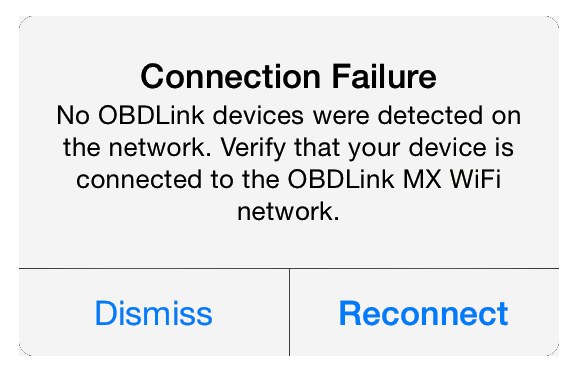
If the app cannot find the adapter, check three things in order: the dongle is fully seated in the OBD2 port, the ignition is on, and the app has Bluetooth permission on your phone. Reboot the phone, then start the app again.
“Link error” messages usually mean the connection dropped mid-scan. Move the phone closer, close other Bluetooth devices, and retry. CAN bus failures often point to a vehicle that needs the ignition fully on or a dongle that needs a firmware update. For a broader look at connection failures, see our article on why an OBD2 scanner won’t connect to your car.
When a Problem Still Requires a Professional Diagnostic Tool
Some jobs go beyond what a consumer adapter can do. Programming new modules, performing manufacturer-specific resets, and diagnosing intermittent wiring faults often need a professional-grade scan tool with deeper access to the vehicle’s network.
If the TopScan cannot communicate with a module that is setting a code, or if you are dealing with airbag faults and high-voltage systems, stop and consult a qualified technician. Guessing at parts based on a code can cost far more than a professional diagnosis when the wiring is the real problem.
Privacy, Data Storage, and Software Update Considerations
What Telematics Data TopScan Does and Does Not Access
The TopScan dongle connects to the OBD2 network of your vehicle, which contains diagnostic data, VIN information, and live sensor readings. That data powers the app’s features. The adapter does not access your infotainment system, navigation history, contacts, or personal files through a standard diagnostic connection.
Using the app requires an account and, for some features, an internet connection. Review TOPDON’s privacy policy and the app permission list before you connect a shared or leased vehicle.
Keeping Firmware Current and Managing the TopScan Account
Firmware updates fix communication bugs and add support for newer vehicles. Open the TopScan app, connect the dongle, and check for update prompts. Update with the ignition on and avoid unplugging the adapter during the update.
If you sell the adapter or the vehicle, sign out of the app and unlink the dongle from your account so the next user cannot access your saved vehicle data.
The Transparent TopScan Verdict: Who Should Buy It and Who Should Skip It
Ideal User, Vehicle Compatibility, and TopScan Drawbacks
The TopScan is best for a home DIYer who wants more than engine codes without spending handheld-scanner money. It earns its keep when a car is from the late 2000s or newer, since full-system coverage gives you ABS, airbag, and transmission codes in one app.
The drawbacks are real. Full features may require a subscription, coverage varies by model, and the tool depends on a phone. A phone app can also distract you in the driver’s seat, so only use the scanner while parked.
TopScan Alternatives Compared Per Dollar
Compare the TopScan against a basic code reader and a professional handheld scanner by looking at what you will actually use. A basic reader costs little but only reads powertrain codes. A professional handheld scanner offers shop-grade coverage at a much higher price. The TopScan sits between them, trading a physical screen for your phone.
BlueDriver is the closest mainstream competitor for phone-based scanning. Our detailed Topdon Topscan vs BlueDriver 2 comparison covers which one fits different budgets and vehicle types.
Warranty, Support, and the Final Call Without Overstating the Evidence
TOPDON includes a warranty with the TopScan, but the exact term depends on the seller and the regional packaging. Check the warranty card and return policy before you buy. Support contact options and response times also vary by region.
No consumer OBD2 adapter can fix every car, and the TopScan is no exception. What it does well is give a home mechanic a wide diagnostic view that a basic reader cannot match. For a complete picture of its strengths and limits, read our full Topdon Topscan review before deciding.
- Best for: Home DIYers with a 12V gasoline or diesel vehicle from the late 2000s or newer who want full-system scanning, live data, and code clearing from a phone.
- Think twice if: You need manufacturer-level programming, your vehicle is older and uses a non-CAN protocol, or you want every function on every model without checking compatibility first.
- Next step: Confirm your exact year, make, and model on TOPDON’s official compatibility pages, and compare the TopScan with the Pro version before you pay.
Frequently Asked Questions
No. The TopScan works with OBD2-equipped vehicles, generally 1996 and newer gasoline cars and trucks sold in the US, but full-system coverage varies by make, model, and model year. Check TOPDON’s official compatibility page for your exact vehicle before buying.
The TopScan app includes free basic scan functions, while full features such as all-system scans, live data, and service resets may require a subscription or a feature package. The exact split changes with app updates, so check the in-app purchase screen before paying.
On compatible vehicles, yes. The TopScan can read and clear codes from multiple systems including ABS and airbags. Vehicle coverage varies by make and model, so a function that works on one vehicle may not appear on another.
Clearing codes also resets emissions monitors, which can leave them in a “not ready” status and cause an automatic inspection failure in many states. Only clear codes after a repair, then drive the required drive cycle before testing.
The TopScan can read 12V battery voltage through the OBD2 port, and the Pro version adds battery and charging system checks on compatible vehicles. Voltage alone does not measure battery health, so use a dedicated conductance tester for a reliable verdict.
Check that the adapter is fully seated in the OBD2 port, the ignition is on, and the app has Bluetooth permission on your phone. Update the app and dongle firmware, then retry. If the error continues, the vehicle may use a protocol the adapter cannot reach.