TOPDON Topscan Full System Tool: What It Can and Cannot Fix
The Topdon Topscan reads and clears codes across multiple vehicle systems and runs live-data and active tests, but it cannot program or flash modules. Buy it for full-system diagnosis, not for dealer-level programming work.
The topdon topscan full system tool sits in a crowded middle ground between cheap code readers and dealer-level diagnostic stations, and the key to using it well is understanding exactly where those boundaries fall. This guide breaks down the Topscan’s real capabilities, its hard limits, and the ownership costs that often surprise first-time buyers.
- Full-system reads: Engine, ABS, SRS, transmission, and more on 1996 and newer OBD2 vehicles.
- Active tests: Command fans, solenoids, and pumps to confirm components respond before replacement.
- Programming limits: No ECU flashing, module coding, or key programming with the Topscan.
- Update costs: Firmware updates may require a subscription renewal after the initial window.
- Verify fit: Check your vehicle on Topdon’s current coverage list before buying.
The Topdon Topscan Full System Tool: The Bottom Line Up Front
If you want to read and clear codes across multiple vehicle systems, watch live sensor data, run active tests, and check emissions readiness, the Topscan is a strong mid-range choice. If you expect it to reprogram modules, flash ECUs, or handle immobilizer work, it will not get you there.
The Short Answer: What It Can and Cannot Fix (Diagnostics vs. Programming)
The Topscan is a diagnostic tool, not a programming tool. It can find problems across the engine, transmission, ABS, airbag, and other electronic systems. It can show you live data and command components like fuel pumps, cooling fans, and solenoids to turn on and off.
It cannot write new software to your car’s computers. Module coding, ECU flashing, key programming, and most immobilizer functions require dealer-level equipment or specialized programmers. Understanding that line before you buy saves you from a costly surprise.
How We Evaluated the Topscan for 2026: Specs, Market Consensus, and Realistic Expectations
CarValleyNJ has not independently lab-tested the Topscan. This evaluation draws from Topdon’s published specifications, owner-reported patterns across US forums and retailer reviews, and direct comparison with competing tools in the same price class.
We focused on four questions: What systems does it actually read? Where do its active-test abilities end? Which vehicles and protocols does it cover? And what does ownership cost over time, including firmware and subscription terms? You can read more in our broader Topdon Topscan review for the full background.
What Exactly is the Topdon Topscan? Scope and Positioning in 2026
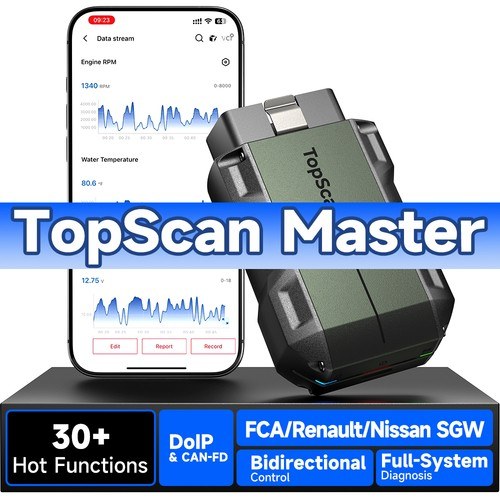
The Topscan is a tablet-style OBD2 scanner with a wireless vehicle communication interface. Topdon positions it as a full-system diagnostic tool for home mechanics and small shops who want more than a code reader but do not want to pay dealer-software prices.
Key Specifications: Display, Interface, and Vehicle Coverage (1996–2026)
Topdon lists the Topscan with a touchscreen tablet, an Android-based interface, and a Bluetooth-connected VCI dongle that plugs into the vehicle’s OBD2 port. The manufacturer states coverage for 1996 and newer OBD2 vehicles sold in the United States.
The tool reads diagnostic trouble codes from multiple systems, displays live data, and supports bi-directional controls. It also includes special functions such as oil reset, steering angle sensor calibration, and electronic parking brake release, though the exact list varies by vehicle make and model.
The 2026 Firmware Update: What Changed for US Drivers and DIY Mechanics
Topdon periodically releases firmware and software updates for the Topscan. Update notes for recent releases emphasize expanded coverage for newer model years, additional special functions, and interface refinements.
The practical effect for US owners is that a Topscan purchased a year or two ago may gain support for 2026 model-year vehicles after an update. The catch is that some updates require an active subscription or a paid renewal. Check the current update policy before you buy, because it directly affects long-term value.
What the Topscan CAN Do: Full-System Diagnostics Decoded
“Full system” means the Topscan can communicate with more than just the engine computer. That is the main reason it costs more than a basic code reader.
Beyond the Powertrain: Scanning ABS, SRS, Transmission, and Battery Management Systems
On most supported vehicles, the Topscan can read codes from the anti-lock brake system, airbag or supplemental restraint system, transmission control module, and body control modules. That means you can pull the ABS code that triggers the traction-control light without guessing.
Owner reports suggest coverage depth varies by brand. Some US vehicles offer deep module access, while others show only basic codes on certain systems. The tool is powerful, but it is not a substitute for factory diagnostic software on every car.
Live Data and Bi-Directional Controls: Turning Diagnosis into Action
Live data lets you watch sensor values in real time while the engine runs. You can compare coolant temperature, fuel trims, oxygen sensor voltage, and throttle position against expected ranges. That turns a stored code into a usable clue.
Bi-directional controls go one step further. You can command a cooling fan to turn on, cycle an ABS pump, or actuate a variable valve timing solenoid. This helps you confirm whether a component responds to commands before you replace it.
Emissions Readiness and O2 Monitor Tests: Passing Your State Inspection
Many US states require an OBD2 emissions check before you can renew registration. The Topscan can display emissions readiness status, which shows whether the vehicle’s monitors have completed their drive cycles.
It can also read oxygen sensor monitor results and pending codes. If your vehicle failed inspection because a monitor is not ready, the Topscan helps you confirm the drive-cycle requirements before you return to the station. Just remember that clearing codes before an inspection can set monitors to “not ready” and cause an automatic failure, so check your state’s rules first.
What the Topscan CANNOT Fix: The Hard Limits of DIY Diagnostics
Knowing the limits is just as important as knowing the features. Here is where the Topscan stops.
The Programming Wall: Why Module Coding, ECU Flashing, and Immobilizer Work Needs a Professional
The Topscan cannot flash or reprogram engine control modules, write new software, or perform most immobilizer and key-coding procedures. Those jobs require factory-level tools like J2534 pass-through devices, OEM software, or specialized programmers.
If you replace a used engine computer, a used ABS module, or a used airbag module, the replacement often needs to be programmed to match your vehicle. The Topscan will read the new module’s codes, but it will not make the module functional. A professional shop with the right equipment is the safer path. For a deeper look at this specific limit, see our guide on whether the Topdon Topscan can program keys.
The “Grey Area” Limits: Battery Registration, Injector Coding, and ADAS Calibrations
Some functions sit between simple resets and full programming. Battery registration on many European vehicles, injector coding on some diesel engines, and ADAS camera or radar calibrations often require factory-level tools.
The Topscan includes some special functions, and Topdon’s coverage list grows over time. But the availability of a specific function depends on the vehicle make, model, and current software version. Confirm the exact function for your vehicle before you assume it works.
When a Check Engine Light Requires a Dealer-Level Scan Tool
Some diagnostic trouble codes are manufacturer-specific and require enhanced data that generic tools cannot access. If your vehicle has a code related to module communication, gateway security, or proprietary systems, the Topscan may show the code but not the full context.
In those cases, a dealer or an independent shop with factory-level software is the right call. The Topscan still helps you understand the basics, but it cannot replace the deeper data stream.
Vehicle Compatibility and Protocol Coverage: Will It Work on Your Car?
Compatibility is the most common source of buyer frustration. Here is what to check before you commit.
Model Year and Protocol Coverage: From OBD1 to Modern CAN FD
The Topscan is designed for 1996 and newer OBD2 vehicles in the US market. It supports the standard OBD2 protocols, including CAN and the newer CAN FD used on many late-model vehicles.
It does not support true OBD1 vehicles from before 1996. If you own a classic car with an OBD1 system, you will need a different tool or an adapter with manufacturer-specific software.
Check: Confirm your vehicle’s make, model, year, and OBD2 protocol against Topdon’s current coverage list before purchase. Limitations: Coverage depth varies by manufacturer; some systems on some vehicles may show limited data.
Hybrid and EV Cautions: High-Voltage Safety and What the Topscan Actually Reads
The Topscan can read codes from the hybrid or EV control modules on many supported vehicles, including battery management system data. That is useful for monitoring battery health and diagnosing charging faults.
It does not give you permission to work on high-voltage components. Orange cables, battery packs, and inverters carry lethal voltage. Leave high-voltage repair to certified technicians. Use the Topscan for diagnosis, not for hands-on high-voltage service.
App Permissions, Bluetooth Connectivity, and Firmware Update Requirements
The Topscan runs through Topdon’s software, which handles the connection between the tablet and the VCI dongle. You will need to pair the devices, register the tool, and keep the software current.
Pay attention to the permissions the app requests and the account requirements. Diagnostic tools collect vehicle data, so review Topdon’s privacy terms before you connect your car. Firmware updates may require an internet connection and, in some cases, a paid subscription.
Beyond the Check Engine Light: TPMS, Battery, and Electrical System Realities
The Topscan is not just an engine-code reader. It also touches tire pressure and battery systems, though with limits.
TPMS Relearn and Sensor Data: Matching Cold Pressure to Your Door-Jamb Placard
Many vehicles require a TPMS relearn after tire rotation or sensor replacement. The Topscan includes TPMS service functions on many supported vehicles, which can help you complete the relearn procedure without a separate tool.
Remember that the tool does not set your tire pressure. The correct cold pressure is printed on the driver’s door-jamb placard, not on the tire sidewall. Use a reliable gauge and set pressures when the tires are cold. If a sensor is not found, the issue may be a dead sensor battery or a faulty sensor rather than a relearn problem.
Battery Health vs. State of Charge: What the Topscan Tells You (and What It Can’t)
Through the OBD2 port, the Topscan can read battery voltage and some battery management data on modern vehicles. That tells you about state of charge and charging system output.
It does not replace a conductance battery tester for measuring cranking amps and overall battery health. If you suspect a weak battery, a dedicated tester gives you a clearer picture. The Topscan is a diagnostic window, not a full battery laboratory.
Safe Diagnostic Practices: Connection Order, Ignition Modes, and Tool Storage
Always connect the VCI dongle to the OBD2 port with the ignition off, then follow the tool’s instructions to power up. Use the tool only while parked. Do not attempt to read live data or run active tests while driving.
When you finish, close the app, disconnect the dongle, and store the tablet and cables in a dry place away from extreme heat. Keep the dongle from dangling against the pedals or the driver’s feet, and secure it or remove it before you drive.
Topscan vs. The Competition: Side-by-Side Comparison for 2026
To know if the Topscan is right for you, compare it with the tools buyers actually cross-shop.
Topscan vs. Topdon ArtiDiag800/900: Is the “Full System” Label Worth the Premium?
The ArtiDiag800 and 900 are Topdon’s own mid-range alternatives. They focus on engine and a few other systems, with fewer special functions and less module coverage than the Topscan.
If you only work on your own car and mostly need engine codes plus a few resets, the ArtiDiag may save you money. If you want broader system coverage and bi-directional controls across more modules, the Topscan’s premium is easier to justify.
Topscan vs. Autel MX808/MX900: The Battle of the Mid-Range Heavyweights
Autel’s MX808 and MX900 are the Topscan’s main competitors. Both offer full-system diagnostics, bi-directional controls, and special functions. Autel has a strong reputation for coverage depth and update reliability.
Topdon typically prices the Topscan aggressively, and owner reports often praise its value. Autel tools sometimes cost more but may offer smoother software and broader model-year coverage. The right choice depends on which brand covers your specific vehicles better.
| Option | Best for | Owner consideration | Driver consideration |
|---|---|---|---|
| Topdon Topscan | DIY owners wanting full-system reads and active tests | Aggressive pricing; verify subscription terms | Wireless dongle must be secured away from pedals |
| Topdon ArtiDiag800/900 | Budget-focused owners needing engine codes and basic resets | Lower upfront cost, fewer systems covered | Simpler interface; fewer live-data channels |
| Autel MX808/MX900 | Owners wanting broad coverage and strong brand support | Often higher price; check update policy | Similar wireless setup and pedal-area caution |
Topscan vs. Cheap OBD2 Dongles: Why $50 Tools Fail Where This Succeeds
A $50 Bluetooth dongle with a phone app can read engine codes and clear them. That is where its usefulness ends. It cannot access ABS, SRS, or transmission modules on most vehicles, and it lacks bi-directional controls.
If you only need to read a check engine light, a cheap dongle is fine. If you want to diagnose a traction-control light, an airbag warning, or a transmission fault, the Topscan is a different class of tool. For more context on where the Topscan fits among home-mechanic options, see our guide to the best bidirectional scan tools for home mechanics.
Ownership Costs, Warranty, and The Final Verdict
Buying the tool is only the first expense. Understanding the full cost of ownership matters.
Firmware Updates, Subscriptions, and Long-Term Value (Total Cost of Ownership)
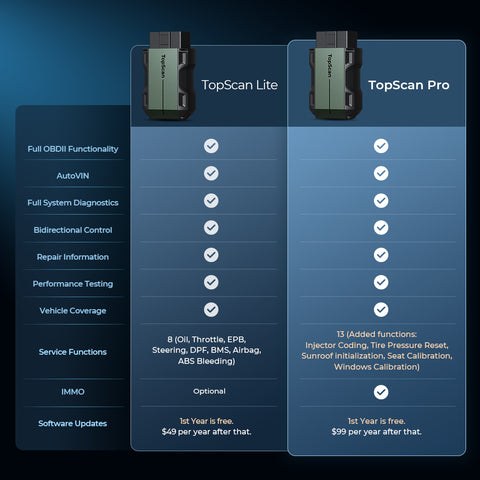
The Topscan’s upfront price is competitive for its feature set, but firmware updates are the real long-term cost. Topdon has offered free update windows with new tools, followed by subscription renewals for continued updates. The exact terms change over time, so read the current policy carefully.
Without updates, the tool still works for the vehicles and functions it already covers, but it will not gain support for newer model years or new special functions. Topdon provides a limited warranty with the Topscan; confirm the exact term and coverage with the retailer or Topdon’s US support before purchase. For a detailed breakdown of the update model, see our explanation of the Topdon Topscan subscription model.
The Transparent Verdict: Who Should Buy the Topdon Topscan in 2026?
The Topscan earns its place for DIY owners who work on multiple vehicles, want to diagnose beyond the engine, and understand that programming is out of reach. It is not the right tool for someone who only reads engine codes, nor for someone who needs module flashing or key programming.
Before you buy, confirm your vehicle’s coverage on Topdon’s current compatibility list, read the update terms, and compare the price against the Autel alternatives. If the coverage matches your cars and the subscription terms are acceptable, the Topscan is a capable mid-range investment.
- Best for: DIY owners and home mechanics who need full-system reads, live data, and bi-directional tests across multiple vehicles without dealer-level cost.
- Think twice if: You need module programming, ECU flashing, key coding, or guaranteed coverage for every system on a specific late-model vehicle.
- Next step: Verify your vehicle on Topdon’s current coverage list and read the firmware subscription terms before you order.
Frequently Asked Questions
No. The Topscan is a diagnostic tool, not a programming tool. It cannot write new software to engine control modules, program replacement keys, or perform most immobilizer procedures. Those jobs require dealer-level equipment or specialized programmers.
On supported vehicles, the Topscan reads codes from the engine, transmission, ABS, airbag or SRS, and body control modules. It also displays live data and supports bi-directional controls. Coverage depth varies by vehicle make and model.
The tool works out of the box for the coverage included at purchase. Continued firmware updates for newer model years and new functions may require a subscription or paid renewal. Confirm the current update terms with Topdon before buying.
Topdon lists coverage for 1996 and newer OBD2 vehicles, and firmware updates add support for newer model years over time. Whether a specific 2026 or 2026 vehicle is fully covered depends on the current software version and the vehicle’s protocols.
The Topscan can read battery voltage and some battery management data through the OBD2 port. It does not replace a dedicated conductance battery tester for measuring cranking amps and overall battery health.
Using an OBD2 scanner to check emissions readiness is legal, but clearing codes right before an inspection can set monitors to not ready and cause a failure. Check your state’s inspection rules before clearing any codes.