What’s the Difference Between a Cheap and Expensive OBD2 Scanner
A cheap OBD2 scanner is usually enough for basic code reading and emissions checks. An expensive one is worth it when you need deeper diagnostics, more vehicle coverage, or advanced reset functions.
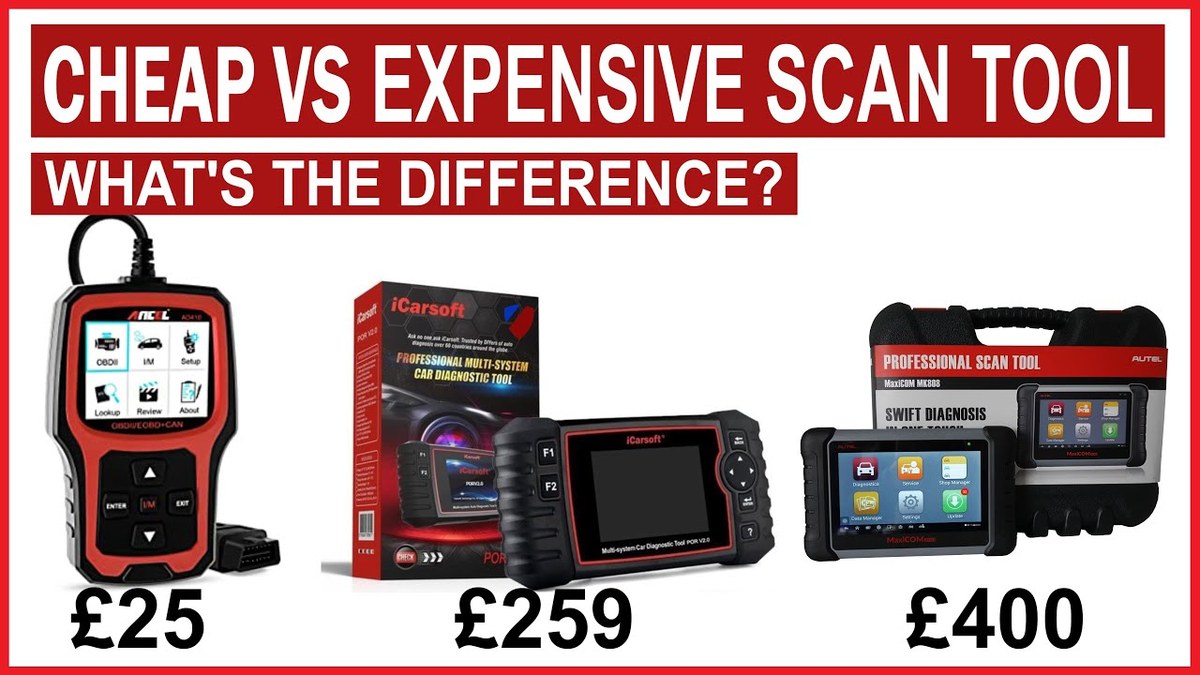
What’s the difference between a cheap and expensive OBD2 scanner is usually not just the screen or the brand name. It is how much vehicle data it can read, how fast it works, and whether it can do more than basic code reading and clearing.
For most US drivers, a cheap scanner is enough for check-engine light basics and emissions readiness. An expensive scanner starts to make sense when you need live data, bi-directional controls, special resets, better app support, or wider vehicle coverage.
- Basic vs. advanced: Cheap scanners handle simple codes; expensive ones usually add live data, special functions, and.
- Compatibility matters: Always verify your vehicle year, make, model, and supported protocols before buying.
- Safety first: Do not clear codes before saving useful data, and stop if the issue could.
- Cost is more than the sticker: Updates, subscriptions, cables, and support can change the real value.
- Privacy counts: App-based scanners may collect vehicle and account data, so review permissions and cloud storage.
What’s the Difference Between a Cheap and Expensive OBD2 Scanner? The Short Answer for Drivers
The short answer is that cheap OBD2 scanners usually handle the basics: read generic trouble codes, clear some codes, and show a few simple readiness checks. Expensive scanners usually go deeper, with faster menus, more live data, better vehicle coverage, and support for advanced functions.
If you only want to figure out why the check-engine light came on, a budget tool may be enough. If you want to diagnose sensors, monitor repairs, or work on more than one vehicle, the higher-priced option often saves time and frustration.
How OBD2 Scanners Work in 2026: Codes, Live Data, and What They Can’t Do
OBD2 scanners talk to a vehicle’s onboard computer through the diagnostic port. They can pull diagnostic trouble codes, show some sensor data, and sometimes reset warning lights or service reminders.
But they do not magically fix the car. They also cannot replace a proper diagnosis when the problem is mechanical, electrical, intermittent, or hidden behind a module a basic scanner cannot access.
Model-Year Coverage and Vehicle Protocol Support
Coverage matters more than many buyers expect. In the US, OBD2 became standard on most passenger vehicles starting with 1996 model-year gasoline vehicles, but support still varies by make, model, engine, and communication protocol.
Cheap scanners often focus on generic OBD2/emissions functions. More expensive scanners may support additional manufacturer-specific systems, newer communication methods, and broader vehicle lists. If you are comparing tools, check the exact supported model years and protocols before you buy.
Check: Verify make, model, year, trim, voltage, ports, mounting space, and OEM requirements. Limitations: State verified exclusions.
Port Location, Ignition Mode, and Basic Connection Requirements
Most vehicles place the OBD2 port under the dash, but the exact location varies. Some require ignition in accessory or run mode before the scanner will communicate, while others need the engine running for certain live-data functions.
If you are learning the setup steps, our how to connect an OBD2 scanner guide and OBD2 scanner beginner guide can help you avoid simple connection mistakes.
Code Reading vs. Live Data vs. Reset Functions
Code reading tells you what fault the vehicle detected. Live data shows what sensors and modules are reporting right now. Reset functions can clear codes or reset some service lights, but clearing a code does not repair the root cause.
That difference is where cheap and expensive tools separate fast. Low-cost scanners often stop at code reading and a few basic resets. Mid-range and premium scanners may show more live data, graph readings, and support more systems beyond the engine.
Cheap vs. Expensive OBD2 Scanners Side by Side: Features, Speed, and Accuracy
Price does not automatically mean better for every driver. But in general, more expensive scanners tend to offer better menus, wider coverage, more data, and stronger support for ongoing updates.
| Option | Best for | Owner consideration | Driver consideration |
|---|---|---|---|
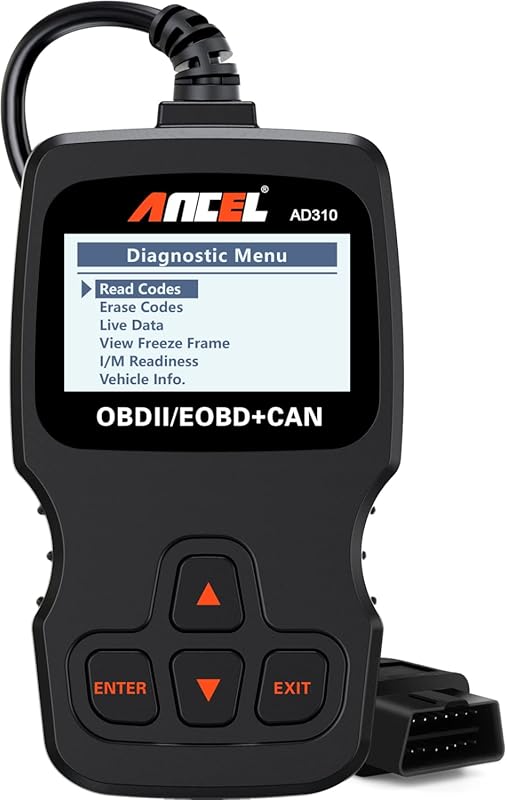
| Cheap OBD2 scanner | Basic code reading and emissions checks | Lower upfront cost, fewer features, may have weaker updates | Simple controls, but slower or less detailed information |
| Expensive OBD2 scanner | Deeper diagnostics and more vehicle systems | Higher upfront cost, possible subscriptions, better long-term use | More data, but can be more complex and distracting |
Fault Code Depth, Freeze-Frame Data, and Emissions Readiness
Many cheap scanners can read generic powertrain codes and clear them. Better tools often show freeze-frame data, which records conditions when the fault happened, plus more complete emissions readiness information.
That extra context can matter when a code comes back after clearing. It helps you see whether the issue is tied to engine temperature, speed, load, or another condition the basic tool might not display clearly.
Bi-Directional Controls, Special Functions, and Reset Limitations
Expensive scanners may offer bi-directional control, which means the tool can send commands to certain vehicle systems. That may include testing actuators, cycling components, or helping with service procedures.
Cheap scanners usually do not do that. They may also miss special functions like steering angle resets, brake service mode, throttle relearns, or battery registration, depending on the vehicle and tool level.
Screen Quality, App Experience, Firmware Updates, and Support
Cheap scanners often use smaller displays, slower processors, and simpler menus. That is fine for occasional use, but it can be harder to read in bright light or while standing beside a vehicle in a parking lot.
Expensive tools usually invest more in the user experience. That can mean a clearer screen, faster data refresh, better app design, and more frequent firmware updates. If you want a phone-based setup, see our guide on how to use a phone as an OBD2 scanner.
Who Should Buy a Cheap OBD2 Scanner vs. Who Needs an Expensive One?
The best choice depends on how often you diagnose problems and how many vehicles you support. A cheap scanner is often enough for one car and occasional warning-light checks. An expensive scanner is better when you need deeper information or use the tool often.
Best Fit for Daily Drivers, DIYers, and Emissions Testing
Daily drivers who mainly want to check a warning light, confirm emissions readiness, or clear a code after a simple repair can usually start with a budget scanner. It is also a smart choice for drivers who want a backup tool in the glove box.
For many people, that is enough. If your vehicle only needs occasional help and you are not chasing complex faults, spending more may not bring much extra value.
Best Fit for Repair Shops, Multi-Vehicle Households, and Advanced Diagnostics
Expensive scanners are better for repair shops, serious DIYers, and families with several different vehicles. The extra vehicle coverage and special functions can save time when one tool needs to work across different makes and model years.
Verified Product Name
Best for drivers who need broader diagnostics, stronger live-data support, and more advanced reset functions, but can accept a higher cost and more setup complexity.
Verified Product Name
Best for basic code reading, emissions checks, and simple home use, but it may lack special functions, fast data refresh, and deeper system access.
When a Scanner Is Not Enough and You Need a Professional Diagnosis
Some problems need more than any consumer scanner can provide. If the issue is intermittent, involves multiple modules, or returns after a repair, a professional technician may need factory-level tools, wiring checks, and service information.
That is especially true for security systems, airbag systems, charging faults, hybrid issues, and problems that could affect safe driving. A scanner is a tool, not a final answer.
Power, Battery, and Electrical Safety: What a Scanner User Should Know
OBD2 scanners draw power from the vehicle or from their own battery, depending on the type. That makes electrical basics important, especially when the vehicle battery is weak or the vehicle is in a low-voltage state.
System Voltage Basics, Battery Chemistry, and State of Charge vs. Battery Health
Many drivers confuse state of charge with battery health. State of charge is how full the battery is right now. Battery health is whether the battery can still hold and deliver power properly over time.
A scanner may show low voltage, but that does not always mean the battery is bad. It may simply need charging, or there may be a charging-system problem. If voltage is unstable, scanner readings can also become less reliable.
Correct Connection Order, Damaged-Battery Stop Conditions, and Hybrid/EV Cautions
Follow the vehicle and tool instructions in the correct order. In general, connect the scanner only as directed, and do not force a plug into a damaged port or use a tool with frayed cables.
How Low Voltage Can Affect Scanner Readings and Vehicle Modules
Low voltage can cause false trouble codes, failed communication, or incomplete scan results. Some modules may drop offline, and a scanner may show partial information even though the vehicle has more stored data.
That is one reason a scan should be only one step in diagnosis. If the battery or charging system is weak, fix that first before trusting the rest of the data.
Tire Pressure and TPMS Use Cases: Where OBD2 Tools Help and Where They Don’t
OBD2 scanners can sometimes read TPMS-related information on supported vehicles, but they are not tire-pressure gauges and they cannot replace proper tire maintenance. For tire safety, the placard pressure and cold-tire check still matter most.
Door-Jamb Placard Pressure, Cold Pressure, and Gauge Accuracy
The correct tire pressure is listed on the driver-side door-jamb placard or another manufacturer label. Check pressure when the tires are cold, because driving heats the air and raises the reading.
A scanner cannot tell you whether a tire is inflated to the right pressure in the same way a gauge can. If you are dealing with tire maintenance, use the vehicle placard, a reliable gauge, and the owner’s manual first.
Inflator Duty Cycle, TPMS Relearn Limits, and Temporary Repair Boundaries
Some people buy a scanner expecting it to solve every TPMS issue. It usually cannot. A scanner may help with a relearn or show sensor data, but it will not repair a failed sensor or a tire with damage that needs service.
If you are also thinking about inflators or emergency tire tools, remember that temporary fixes have limits. A scanner can help you understand the warning, but it does not make a tire safe to keep driving on indefinitely.
Puncture Location, Professional-Repair Thresholds, and Safety Limits
Where the tire is damaged matters. A puncture in the tread may sometimes be repairable, while sidewall damage is usually much more serious. If you are unsure, stop and have the tire inspected by a qualified shop.
Roadside and Emergency Use: Buying for Reliability, Storage, and Safety
Some drivers keep a scanner in the car for roadside checks. That can be useful, but only if the tool is easy to store, quick to access, and protected from heat, moisture, and damage.
Safe Location, Traffic Visibility, and Tool Completeness
If you are scanning at the roadside, stay out of traffic and keep the vehicle in a safe location first. A scanner is not worth using if you have to stand too close to moving cars or on a blind shoulder.
Cable or Pack Condition, Current Limits, and Storage Conditions
Inspect the cable, connector, and case before storing the tool in a vehicle. Heat and cold can shorten the life of plastic parts, batteries, and screens, especially if the scanner lives in a glove box or trunk year-round.
Keep the connector clean, update firmware when needed, and store the scanner in a dry place away from extreme heat. Replace damaged cables or worn adapters before they fail in the field.
Post-Use Inspection, Maintenance, and Replacement Timing
After use, check for bent pins, broken clips, or app connection issues. If the scanner starts losing communication, freezing, or failing to power up, it may need a battery replacement, firmware update, or full replacement depending on the design.
Compatibility, Privacy, Legal Considerations, and Final Buying Guidance
Before buying, think about compatibility, privacy, and support, not just features. A scanner that is cheap today can become expensive if it cannot be updated or does not work well with your vehicle.
App Permissions, Data Privacy, and Firmware Update Practices
App-based scanners can be convenient, but they may collect more data than a standalone tool. Review permissions, account terms, and update policies before pairing a phone or creating a profile.
Legal and Placement Variation by Vehicle Type, State, and Use Case
US rules can vary by state and by use case, especially for emissions-related code clearing, roadside work, and vehicle modifications. If you are using a scanner for inspection prep or repair documentation, verify current local rules before relying on a tool choice.
Ownership Cost, Warranty/Support, Alternatives, and Transparent Verdict
The real cost of a scanner includes updates, app subscriptions, adapters, cables, and support. If a tool is cheap but poorly supported, it may cost more over time than a mid-range scanner with better documentation.
If you are still deciding, our best OBD2 scanner guide can help you compare options by use case. If you want to see how mechanics think about coverage and depth, you may also find what OBD scanners mechanics use helpful.
- Best for: Cheap OBD2 scanners are best for basic code reading, emissions checks, and occasional DIY use. Expensive scanners are best for deeper diagnostics, more vehicle coverage, and advanced resets.
- Think twice if: You need bi-directional controls, broad system access, or frequent use across multiple vehicles, because the cheapest tools often stop short there.
- Next step: Match the scanner to your vehicle year, needed functions, update policy, and privacy comfort before you buy.
Frequently Asked Questions
Usually yes if your vehicle supports standard OBD2. Most US gasoline vehicles from 1996 onward do, but exact coverage still varies by make, model, year, and tool.
They do not clear codes more safely by default, but they often show more data before and after the clear. That can make diagnosis easier and reduce guesswork.
A normal scanner draws very little power, but a weak battery can still cause communication problems. Follow the manual and stop if the battery is damaged, swollen, hot, or leaking.
Sometimes. Some premium tools include updates, while others charge for app features, vehicle coverage, or special functions, so check the ownership cost before buying.
Rules can vary by state and by how the vehicle is used. Verify current local guidance before relying on code clearing for inspection or roadside use.
Check vehicle compatibility, supported functions, app permissions, update policy, warranty, and storage needs. Those factors matter as much as price for long-term ownership.