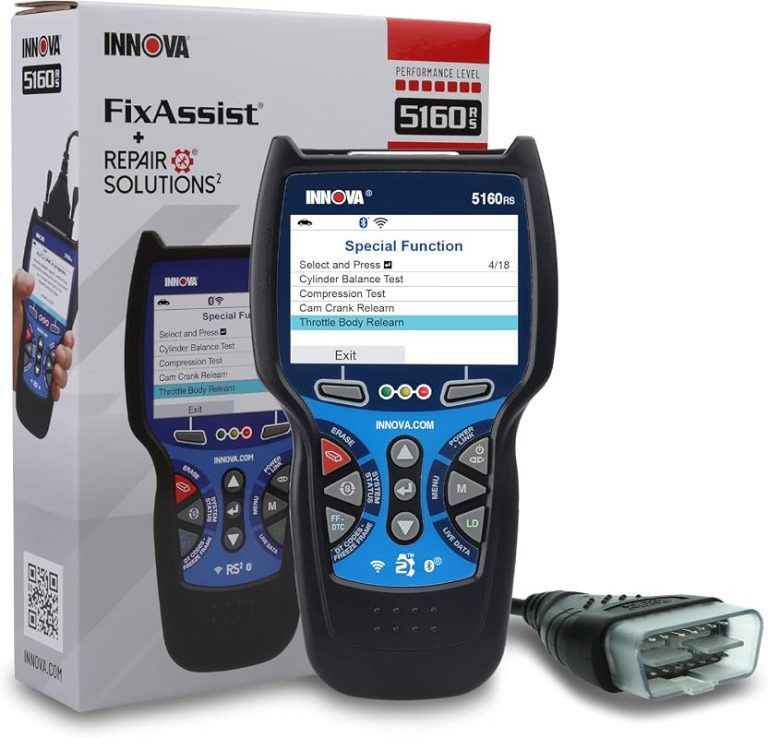
Innova 5610 Compatibility: What Vehicles It Supports and Why
Innova 5610 compatibility is strongest on many 1996-and-newer OBD2 gasoline vehicles in the U.S., where it can handle common code reading, live data, and readiness checks. It is less certain on diesels, hybrids, EVs, and specialty vehicles, so confirm your exact model before buying.
Innova 5610 compatibility is best understood as OBD2 coverage for many 1996-and-newer vehicles, not as a promise that every car function will be available on every model. For most U.S. drivers, that means it can help read engine-related trouble codes, view live data, and check emissions readiness on supported vehicles.
- Vehicle fit: Best on standard 1996-and-newer OBD2 gasoline vehicles.
- Feature limit: Generic diagnostics are not the same as full module access.
- Safety first: Use it parked, with a healthy 12V system, and avoid damaged batteries.
- Value: More useful than a basic reader if you want live data and readiness checks.
- Verify before buying: Check your model year, fuel type, and reset needs against the manual.
Innova 5610 Compatibility: Quick Answer for U.S. Drivers in 2026
If your vehicle has a standard OBD2 port and follows common U.S. emissions rules, the Innova 5610 is usually aimed at that kind of use. The bigger question is not just whether it plugs in, but which systems your specific vehicle exposes to the scanner.
Which vehicles it supports through the OBD2 standard
In broad terms, the scanner is meant for gasoline vehicles sold in the United States with OBD2 support, which is the common baseline for 1996 model year and newer passenger vehicles and light trucks. That baseline is why many drivers can use one scanner across several family cars, commuter vehicles, and older daily drivers.
For model-specific confirmation, it helps to compare the vehicle year, engine type, and connector standard against the scanner’s documentation. If you are also comparing other scanners, a published BlueDriver compatibility list can be useful as a cross-check for how vehicle coverage is often presented.
What “compatible” means for diagnostics, not every vehicle system
Compatible does not mean full access to every module. On many vehicles, a code reader can see engine and emissions data but cannot reach advanced body, comfort, security, or manufacturer-only systems without special software or a higher-level scan tool.
That distinction matters because a scanner may still be useful even if it cannot reset every light on the dash. It may read the check-engine light, show freeze frame data, and help you decide whether a repair is simple enough to handle or better left to a shop.
Who should consider it: daily drivers, DIYers, and light repair users
The 5610 makes the most sense for drivers who want a practical tool for warning lights, inspection prep, and basic troubleshooting. It is a good fit for commuters, rideshare drivers, parents who keep a family vehicle in service, and DIY owners who want more than a basic code reader.
How the Innova 5610 Connects: OBD2 Port Location, Power, and Ignition Requirements
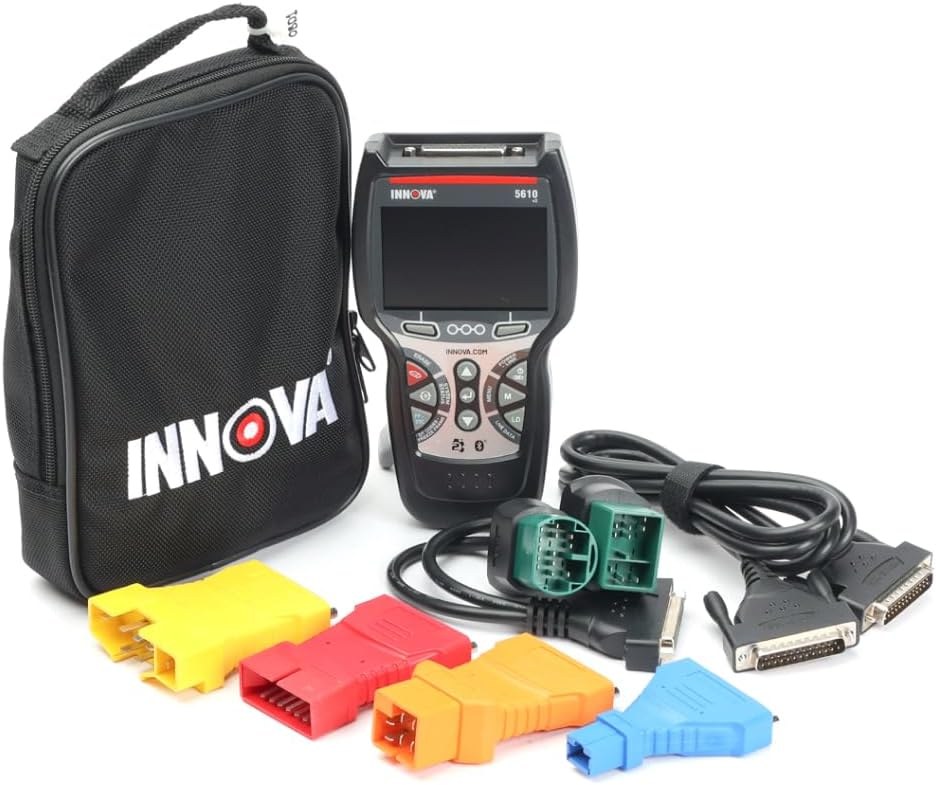
Most compatibility issues start with access, power, or the wrong scan conditions. The scanner may be fine for your vehicle, but if the port is hard to reach, the battery is weak, or the ignition state is wrong, the results can be incomplete or confusing.
Typical port locations by vehicle type
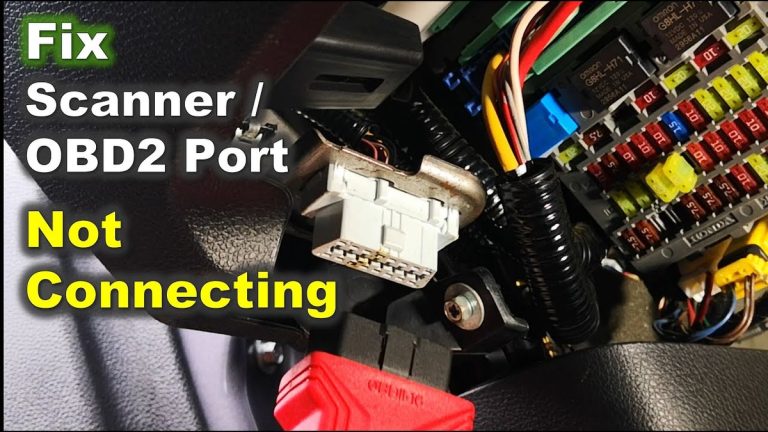
On most U.S. vehicles, the OBD2 port is under the dash on the driver’s side, often near the steering column, lower knee panel, or fuse area. Some trucks and vans place it a little farther inboard or lower, so a flashlight helps.
If you are unsure, check the owner’s manual before forcing the connector. A snug fit is normal, but you should not jam the plug or bend the pins.
Ignition-on vs engine-running behavior during scans
Many scan functions work with the key in the ON position and the engine off. That is often enough to read codes, check readiness, and access live data without the noise and movement of the engine running.
Some live data or charging-system checks may be more useful with the engine running, but that depends on the vehicle and the specific test. Always follow the scanner prompts and the vehicle manual, especially if the tool asks you to cycle the ignition or clear codes.
Power draw, voltage expectations, and when low battery can affect results
The scanner draws power from the vehicle through the OBD2 port, so it depends on a stable 12V system. A weak battery can cause communication errors, dropped sessions, or incomplete scans, especially if the vehicle has been sitting or the battery is near the end of its life.
Vehicle Coverage by Model Year, Protocol, and Drivetrain Type
Vehicle compatibility depends on more than model year. Protocol support, emissions equipment, and whether the vehicle is gas, diesel, hybrid, or electric all affect how much data the scanner can actually see.
Gasoline vehicles and the standard 1996-and-newer OBD2 baseline
For most gasoline vehicles sold for U.S. road use, 1996-and-newer OBD2 support is the main compatibility rule. That is the easiest group for a scanner like this because the connector, emissions data, and basic code structure are widely standardized.
That said, even within that group, some manufacturers expose more data than others. A code reader may work perfectly on one car and feel limited on another because the vehicle itself is the bottleneck.
Diesel, hybrid, and EV cautions: where compatibility can narrow
Diesel vehicles can be more complicated because emissions systems vary by weight class, model year, and manufacturer. Some light-duty diesels will communicate normally, while others may have narrower data access or different fault-code behavior.
Hybrids may support standard OBD2 functions, but some battery, inverter, and high-voltage details are outside the scope of a consumer scanner. EVs can be even more limited for a basic OBD2 tool because much of the interesting data sits behind manufacturer-specific systems.
Protocol support and why some older or specialty vehicles may not communicate
Older pre-OBD2 vehicles, specialty imports, and some off-road or converted vehicles may not communicate at all. Even if a connector is present, the scanner still needs the right protocol and a vehicle that actually speaks standard OBD2.
That is why the safest pre-buy step is to verify year, fuel type, and connector standard before assuming the tool will work. If you are comparing options, a BD310 compatibility guide can help you understand how coverage lists are often organized by model year and protocol.
What the scanner can and cannot do on newer CAN-based platforms
Most newer cars use CAN-based communication, which usually improves speed and reliability for standard diagnostics. In practice, that helps the scanner connect faster and read common emissions data more cleanly.
But CAN support does not automatically mean full access to every module. On newer platforms, the same scanner may still be limited to generic OBD2 functions unless the vehicle and tool support deeper manufacturer data.
Check: Verify make, model, year, trim, voltage, ports, mounting space, and OEM requirements. Limitations: Some diesels, hybrids, EVs, and specialty vehicles may only support partial generic OBD2 communication.
What the Innova 5610 Can Read and Reset: Codes, Live Data, and Emissions Limits
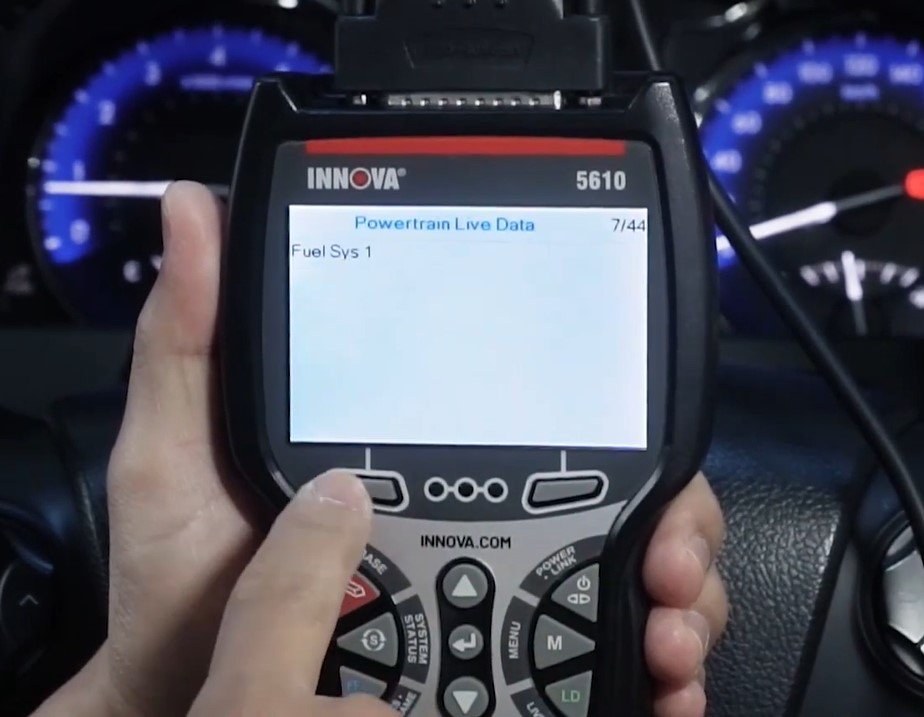
For most owners, this is the section that matters most. The scanner’s real value comes from what it can show you before you buy parts, clear a light, or head to an inspection station.
Check-engine codes, freeze frame data, and live sensor readings
On supported vehicles, a scanner in this class commonly reads diagnostic trouble codes and freeze frame information tied to the fault. Freeze frame data can be especially useful because it shows the conditions present when the code was stored.
Live data is also valuable because it lets you watch sensors and system behavior in real time. That can help you spot a loose gas cap issue, a misfire pattern, or a sensor that is reporting outside normal range.
Emissions readiness monitors and inspection prep
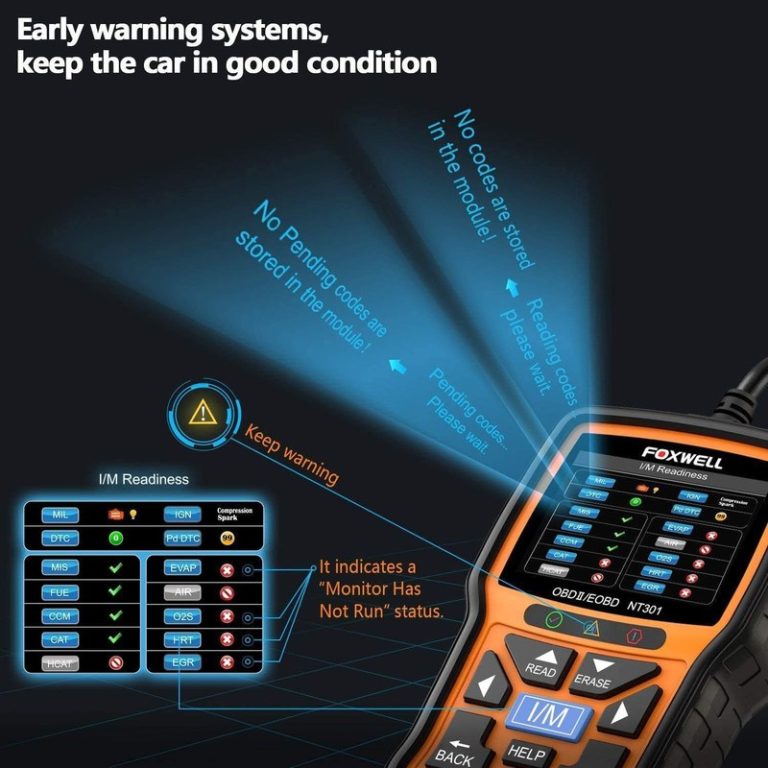
One of the most practical compatibility checks is whether the scanner can show readiness monitors. These monitors matter because many states use them during emissions inspection or inspection prep, even when the check-engine light is off.
After repairs or code clearing, readiness status may reset and take a normal drive cycle to complete. That means a cleared code is not the same thing as a repaired vehicle.
Reset limitations: what it can clear and what it usually cannot
Basic reset ability usually covers generic fault codes and some emissions-related indicators. It does not guarantee access to service reminders, steering-angle calibration, advanced ABS work, airbag resets, or manufacturer-specific adaptations.
If a light returns quickly after clearing, that usually means the underlying fault is still present. In that case, the scanner helped identify the symptom, but not the full cause.
When a professional diagnosis is still the safer next step
If the vehicle has multiple warning lights, drivability problems, transmission faults, or intermittent electrical issues, a consumer scanner may only provide part of the picture. That is when a shop-level scan, wiring diagnosis, or smoke testing may be safer and cheaper than guessing.
Battery and Electrical Compatibility: Safe Use on 12V Systems
Because the 5610 powers through the vehicle, electrical compatibility matters as much as software compatibility. A healthy 12V system helps the scanner work the way it should.
System voltage checks and why 12V matters
Most passenger vehicles in the U.S. use a 12V electrical system. If the system is unstable or very low, communication can become unreliable and the scanner may fail to finish a reading.
That does not mean the scanner is the problem. It often means the vehicle battery, charging system, or connection point needs attention first.
Battery chemistry, state of charge, and battery health are not the same thing
A battery can show some voltage and still be weak under load. State of charge tells you how full it is, while battery health tells you how well it can deliver power when the vehicle and scanner need it.
For that reason, a scanner session is not a battery test by itself. It may reveal a low-voltage symptom, but not the full condition of the battery.
Correct connection order and safe disconnection habits
Connect the scanner only as directed by the vehicle and tool instructions. In most cases, that means the connector should seat firmly before you start the diagnostic session, and removal should happen only after the scan is finished and the ignition state is appropriate.
Keep the cable clear of pedals, steering movement, and any sharp trim edges. If the connector feels loose or the tool repeatedly loses power, stop and inspect the port and cable instead of forcing a connection.
Damaged-battery stop conditions and warning signs to avoid testing
Stop immediately if you see swelling, leaking, corrosion, heat, or unusual odor from the battery area. Those are signs that the electrical system may be unsafe for casual diagnosis.
Hybrid and EV high-voltage cautions for owners and DIYers
Hybrid and EV owners should be extra careful around orange high-voltage components and service procedures. Standard OBD2 scanning is usually separate from high-voltage service work, but that does not make the vehicle safe to open up casually.
If your concern involves traction batteries, inverter faults, or charging-system isolation, the scanner may help with basic fault codes but not with the full repair. That is a good point to stop and consult the service manual or a trained technician.
Tire and TPMS Use Cases: What Works, What Doesn’t, and When to Stop
Some owners look at the 5610 as part of a broader maintenance kit, especially if they also want to stay ahead of tire warnings and low-pressure issues. That can be useful, but tire safety still starts with the vehicle placard and a proper gauge.
Using the door-jamb placard and cold pressure as the baseline
Always start with the tire pressure listed on the driver-door placard, not the number on the tire sidewall. Measure pressure when the tires are cold whenever possible, because driving raises pressure and can skew the reading.
An OBD2 scanner does not replace a tire gauge. It may help with TPMS-related diagnostics on some vehicles, but it does not tell you the correct inflation target.
Gauge accuracy, inflator duty cycle, and safe inflation limits
If you are using the scanner alongside a tire inflator or portable kit, accuracy matters more than speed. A good gauge and a cautious inflation habit are safer than trying to “eyeball” pressure.
Do not overinflate in search of a temporary fix. If a tire is rapidly losing air, inspect for puncture location, bead damage, sidewall damage, or rim issues before deciding whether the tire can be safely repaired.
TPMS relearn limits and vehicle-specific reset expectations
Some vehicles need a TPMS relearn after tire service, but the exact process varies by make and model. A basic OBD2 scanner may not handle every relearn or sensor registration step.
That is another reason compatibility matters. The tool may be helpful for diagnosis, yet still not be the right tool for every tire-related reset task.
Puncture location, temporary-repair limits, and professional-repair thresholds
Small tread-area punctures are sometimes repairable, but sidewall damage, shoulder damage, and large cuts usually are not. Temporary sealants and plug kits have limits and should not be treated as permanent solutions unless the tire maker or repair standard specifically allows it.
Roadside and Emergency Readiness: Compatibility with Real-World Use
Many drivers keep a scanner in the glove box or emergency kit because warning lights do not always appear in a driveway. That makes storage, visibility, and tool condition part of compatibility too.
Safe location, traffic visibility, and when not to work roadside
If you need to scan a vehicle on the shoulder, choose the safest available location and avoid standing in traffic lanes. Turn on hazard lights only when appropriate and legal for the situation, and never assume the shoulder is a safe workspace.
Storage conditions, cable or pack condition, and tool completeness
Keep the scanner and its cable stored where heat, moisture, and crushing pressure are less likely to damage them. If the tool uses an app or account, keep login details current so you are not locked out when you need it.
Current limits, post-use inspection, and when to retire damaged accessories
Any accessory that shows heat damage, broken insulation, or a loose connector should be removed from service. A damaged cable can create unreliable readings and may become a safety issue if it interferes with pedals or wiring.
After use, a quick visual check is worth the time. That is especially true if the scanner travels between multiple vehicles or lives in a crowded glove box.
How the 5610 fits into a compact emergency toolkit
For many drivers, the scanner fits best alongside a tire gauge, flashlight, gloves, and a basic roadside kit. It is not a substitute for those items, but it can help you decide whether the warning light is urgent or manageable until you reach a safer place.
Innova 5610 vs. Similar OBD2 Scanners: Which Driver Gets the Best Value?
Value depends on what you want from a scanner. Some drivers only need to read a code once in a while, while others want better live data, more reset help, and a tool they will keep using for years.
Side-by-side comparison by vehicle coverage, live data, reset functions, and ease of use
| Option | Best for | Owner consideration | Driver consideration |
|---|---|---|---|
| Innova 5610 | Owners who want a stronger consumer-grade scanner for common OBD2 tasks | May cost more than a basic code reader, but can offer more diagnostic usefulness | Good for parked diagnostics; less distracting than guessing at warning lights |
| Basic code reader | Occasional check-engine light reads | Lower upfront cost, fewer features, limited live data | Simple to use, but may not help much with deeper troubleshooting |
| Advanced app-based scanner | Drivers who want broader feature sets and phone-based reporting | May involve app setup, account permissions, or subscriptions | Convenient, but phone use can add distraction if not handled parked |
Best fit for commuters, DIY troubleshooters, and budget-minded owners
Commuters and family-car owners often benefit from a scanner that is easy to grab, easy to read, and useful more than once. DIY troubleshooters usually want live data and readiness checks, while budget-minded owners may still prefer a tool that outgrows the cheapest category.
When a cheaper code reader is enough and when a more advanced scanner makes sense
If your only goal is to read a check-engine light once or twice a year, a basic reader may be enough. If you want more confidence before buying parts, checking emissions readiness, or comparing sensor behavior, a more capable scanner can make better sense.
That is where product support and compatibility lists matter. For example, readers comparing feature depth may also review the BlueDriver compatibility list to see how app-based coverage is typically presented.
Warranty, support, ownership cost, and long-term usefulness
Before buying, check the warranty term, support channels, and whether firmware updates are included. A scanner that stays useful after software updates and vehicle changes often delivers better long-term value than a cheaper tool that becomes outdated quickly.
Limitations, Privacy, Firmware, and Final Buying Verdict
Before you buy any connected scanner, it is smart to look beyond feature lists. Privacy settings, update support, and the limits of generic OBD2 coverage can matter just as much as the scan screen itself.
App permissions, data handling, and privacy considerations
If the scanner uses an app or account, review what data may be stored or shared. VINs, trouble codes, and live data can be useful for records, but they may also be tied to an account or cloud service depending on the product setup.
Firmware updates and why compatibility can improve over time
Firmware updates can improve vehicle communication, fix app issues, or expand support for certain models. That means compatibility is not always frozen on day one, but updates should still be treated as a support benefit, not a guarantee.
Key drawbacks by vehicle type and by user experience level
The main drawback is that a consumer scanner cannot turn every vehicle into a shop-level diagnostic platform. Owners of diesels, hybrids, EVs, and specialty vehicles may also run into narrower coverage than gasoline-car drivers expect.
New users may also need time to learn what a code means and what it does not mean. A scanner can point you in the right direction, but it cannot replace judgment or a proper repair plan.
Transparent verdict: ideal user, ideal vehicle, and next steps before buying
- Best for: U.S. drivers with 1996-and-newer OBD2 vehicles who want practical check-engine, readiness, and live-data help.
- Think twice if: You need deep module access, frequent TPMS relearns, or full support for specialty, hybrid, EV, or diesel systems.
- Next step: Confirm your vehicle year, fuel type, and desired reset functions against the scanner manual before buying.
Common Questions
If your car is a 1996-and-newer OBD2 vehicle, there is a good chance it will handle basic diagnostics. Exact support still depends on the vehicle and the functions you want.
Yes, on supported vehicles it can show live sensor and system data. That helps with troubleshooting beyond a simple code read.
Sometimes, but coverage can be narrower than on gasoline vehicles. Check your exact model and emissions setup first.
Usually yes, as long as the ignition is on and the vehicle powers the port. Some checks may work better with the engine running.
No. It is a consumer diagnostic tool with useful OBD2 coverage, but not every advanced module or reset function.
Frequently Asked Questions
It is aimed at many 1996-and-newer OBD2 vehicles sold in the United States, especially gasoline models. Exact coverage still depends on the vehicle’s protocol, trim, and which systems the manufacturer exposes.
Some may communicate for basic OBD2 functions, but coverage can be narrower than on gasoline vehicles. Hybrids and EVs often have more manufacturer-specific systems that a consumer scanner may not access.
It can usually clear generic emissions-related codes on supported vehicles, but clearing a code does not fix the cause. Always record the code and freeze frame data first, then repair the fault before clearing if possible.
Many scans work with the ignition on and the engine off. Some live-data checks may be more useful with the engine running, but you should follow the scanner prompts and vehicle manual.
If the tool uses an app or account, it may store VINs, codes, and diagnostic history. Review permissions, account settings, and any cloud features before pairing the scanner.
Check your vehicle year, fuel type, OBD2 support, and the specific reset functions you need. Also review firmware support, warranty terms, and whether the scanner covers your exact diagnostic goals.