Innova 5610 Update: Fix Setup Issues and Improve Scans
Last Updated: September 15, 2026
Innova 5610 Update: Quick Answer
An Innova 5610 update is mainly about keeping the scanner software, coverage database, and repair information current. If the update fails, start with the basics: use a stable USB connection, keep the tool powered as instructed, install the official Innova updater, and do not disconnect the scanner while the update is running.
For most owners, the update is worth doing before a major diagnostic session because new coverage and fixes can make the scanner more reliable on newer vehicles.
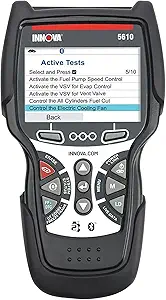
Best fit: keep the Innova 5610 updated if you use advanced functions
If you rely on bidirectional controls, ABS/SRS checks, or special reset functions, keeping the 5610 updated reduces the chance of missing newer vehicle coverage.
Before You Run an Innova 5610 Update
| Check | Why It Matters |
|---|---|
| Use official Innova software | Avoids bad files or unsupported update tools. |
| Use a stable USB cable and computer | Prevents update interruptions and connection errors. |
| Confirm account/registration steps | Some update tools need the scanner registered first. |
| Do not disconnect mid-update | Disconnecting early can corrupt the update process. |

If you only need basic updates and engine-code work
A simpler Innova scanner can be enough if you mostly need check-engine diagnostics and do not use the 5610’s advanced bidirectional functions.

If update trouble makes you rethink the tool
If your old scanner is frustrating to update, compare newer Innova models before replacing it. A simpler current model may be easier for basic DIY diagnostics.
Innova 5610 Update FAQ
How do I update an Innova 5610 scanner?
Use Innova’s official update software or app instructions, connect the 5610 with the recommended cable, follow the registration prompts, and wait for the update to finish before disconnecting the scanner.
Why does my Innova 5610 update fail?
Common causes include a weak USB connection, outdated updater software, account/registration issues, blocked downloads, or disconnecting the scanner before the update completes.
Update the Innova 5610 first if setup is failing, coverage is missing, or scan results seem incomplete. If the car’s port, ignition mode, or wiring is the real problem, the update will not fix it.
Innova 5610 scanner update questions usually come up when setup fails, the vehicle is not detected, or scan results feel incomplete. If that sounds familiar, the update is often the first fix to try, but it is not a cure-all for every communication or coverage problem.
- Update first: It can fix pairing, coverage, and stability issues before you replace the tool.
- Check the vehicle: A dead OBD2 port, wrong ignition mode, or low voltage can look like scanner.
- Use it for the right job: It helps with codes, live data, and readiness, but not every advanced repair task.
- Watch privacy settings: App permissions and cloud accounts can affect both performance and data sharing.
- Know the limit: Complex electrical faults, EV high-voltage work, and module-level diagnosis may need a pro scanner.
Innova 5610 Scanner Update: What It Fixes, What It Doesn’t, and When You Need It
For many owners, the value of an update is simple: better compatibility, fewer connection hiccups, and more reliable access to supported functions. For a deeper look at scanner tradeoffs, see our guide on the best OBD2 scanner choices and how different tools fit different drivers.
Quick answer: update first if setup is failing, vehicle coverage is missing, or live data looks incomplete
If the Innova 5610 is acting odd, update it before you assume the tool is bad. That is especially true when the scanner will not finish setup, does not recognize a vehicle profile, or only shows partial live data.
An update can also help after a firmware change, app change, or vehicle database refresh. But if the OBD2 port has no power, the ignition mode is wrong, or the car itself has a wiring issue, the update will not solve that.
What changed in 2026 for U.S. owners: firmware, vehicle coverage, and app/connection stability
In 2026, the main reasons owners look for an update are still the same: more stable firmware, broader model-year coverage, and fewer app or connection problems. The exact improvements depend on the current Innova release notes and the tool’s software version, so verify the latest notes in the official support area before updating.
For U.S. drivers, this matters most on older cars, newer model-year vehicles, and vehicles with mixed protocol behavior. A scanner can be “compatible” on paper and still need refreshed software to read codes or live data cleanly on a specific car.
How to Update the Innova 5610 Scanner Safely and Correctly
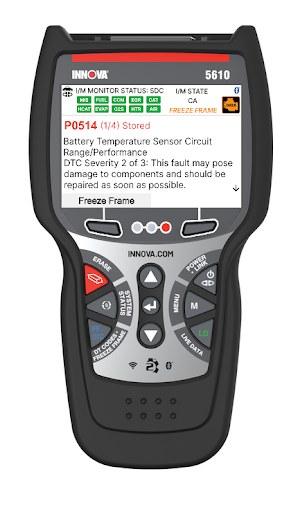
The update process should be done with steady power, a reliable cable, and the correct software from Innova. If you rush it, you can create the same setup problems you were trying to fix.
Required setup: PC, USB cable, account access, and stable power
Most update workflows need a Windows PC or the platform supported by Innova, plus the correct USB cable and account access. Use a stable power source for the scanner so it does not shut off mid-update.
Before you start, confirm whether the tool needs a desktop updater, a web account, or a companion app. If the software asks for permissions, allow only what is needed for device communication and account verification.
Update order: charge device, connect cleanly, install software, then verify version
A safe order is simple: charge the scanner, connect it cleanly, install the updater or app, and then confirm the version after the process finishes. Do not unplug early just because the screen looks done.
After updating, check the version number in the device menu or software screen. If the version did not change, the update may not have completed correctly.
Verify the scanner model, supported software path, cable type, and account access before starting.
Keep the device and cable away from heat, sharp edges, and places where they can be pulled loose.
Finish the update while parked, then confirm the scanner powers on and reads a supported vehicle.
Common update failures: driver conflicts, interrupted downloads, and outdated app permissions
Driver conflicts are common on PCs that already have old scan-tool software installed. Interrupted downloads can also leave the scanner in a partial state, which looks like a bad device even when the fix is just a clean re-run.
App permissions matter too. If the phone or PC blocks Bluetooth, USB access, notifications, or background permissions, the scanner may not pair correctly or may fail to finish syncing.
Setup Issues the Update Can Fix: Pairing, Port Detection, and Ignition Problems
Some setup complaints are really software problems, while others are vehicle-power problems. The update helps with the first group, but not the second.
OBD2 port location and connection checks before blaming the scanner
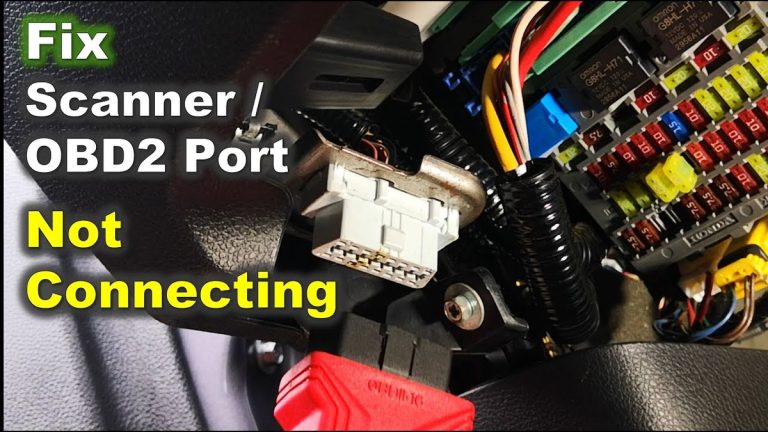
Start with the basics: confirm the OBD2 port is in the correct location, the connector is fully seated, and the port has power. A loose plug or a dead port can look like a scanner failure.
If the scanner turns on but cannot talk to the car, inspect the port for damage, dirt, or bent terminals. For broader setup help on scanner behavior, our scanner setup guide explains the same kind of checks in plain language.
Ignition mode requirements: key-on, engine-off, accessory mode, and vehicle-specific differences
Many OBD2 scanners need key-on, engine-off power to communicate correctly. Some vehicles also behave differently in accessory mode, so the exact ignition position matters.
If the instructions say key-on and the vehicle is only in accessory mode, data may not appear. That is a vehicle-specific behavior, not necessarily a bad scanner.
When a setup issue points to the vehicle, not the tool
If the scanner works on one car but not another, the vehicle is often the better place to look. Fuse problems, aftermarket wiring, low battery voltage, and damaged DLC circuits can all break communication.
Compatibility Guide: Model Years, Protocol Coverage, and Vehicle Types
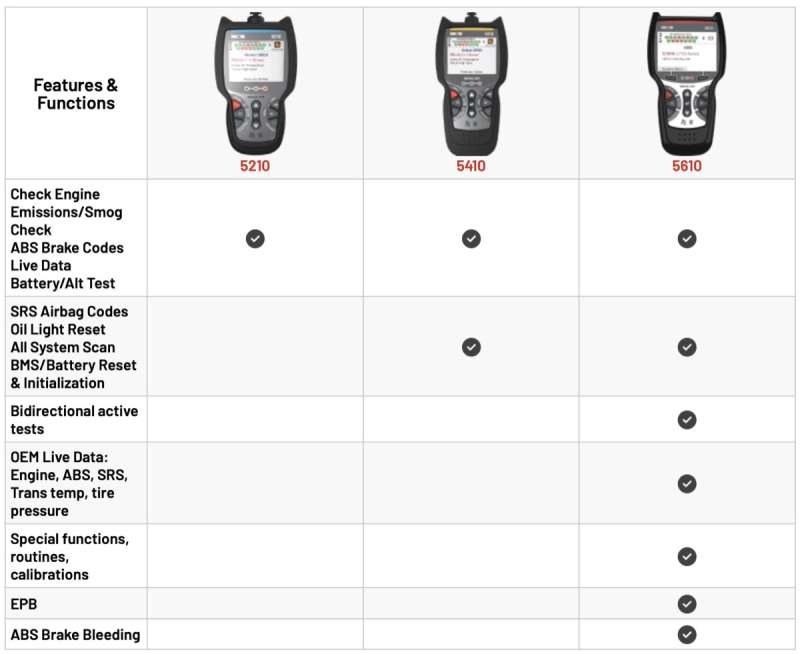
The Innova 5610 is an OBD2 scanner, so compatibility depends on the vehicle’s year, emissions system, and protocol support. Always verify the exact model-year coverage in the current manual or product page before buying or updating.
Supported OBD2 model-year range in the United States and protocol basics
In the United States, OBD2 generally applies to most gasoline vehicles starting with 1996 model year, but there are exceptions and edge cases by vehicle type and market. Diesel, hybrid, and specialty vehicles can follow different rules or support different functions.
Protocol coverage matters because the scanner must speak the same communication language as the car. If that match is incomplete, you may see missing modules, slow reads, or limited live data.
Check: Verify make, model, year, trim, voltage, ports, and OEM requirements. Limitations: Coverage varies by vehicle, firmware, and function set.
Gas, diesel, hybrid, and EV cautions: what the 5610 can and cannot diagnose
Gas vehicles are usually the easiest fit for an OBD2 scanner like this. Diesel and hybrid vehicles may still support emissions data and codes, but some advanced systems can be limited.
EVs are different. An OBD2 scanner may still access some vehicle data, but it will not replace a tool designed for high-voltage diagnostics or brand-specific EV systems.
Emissions readiness, code reading, live data, and reset limitations by vehicle
The 5610 can be useful for reading codes, checking readiness monitors, and viewing live data, but the depth of those features varies by vehicle. Some cars expose more information than others.
Reset functions can also be limited. A code clear or service reset that works on one model may not work on another, especially if the vehicle wants a brand-specific procedure.
When a professional scan tool is still the better choice
If you need module-level diagnostics, bidirectional controls, or detailed manufacturer data, a higher-end professional scanner may be the better choice. That is especially true for complex electrical faults or repeated warning lights.
For readers comparing tool classes, our cheap vs expensive OBD2 scanner guide helps explain where entry tools stop and advanced tools start.
Scan Quality and Diagnostic Value: What Better Scans Actually Mean
“Better scans” does not always mean more numbers on the screen. The real value is whether the tool gives you the right data in a form you can use.
Code retrieval versus live data depth: why more data is not always better
Reading a trouble code is only the first step. Live data can help narrow down the cause, but too much data can also overwhelm a DIY owner who only needs a few key readings.
What matters most is whether the scanner shows the data you need clearly and consistently. A simple, stable display is often more useful than a crowded one.
Freeze frame, readiness monitors, and pending codes for emissions troubleshooting
Freeze frame data can show what the engine was doing when the fault happened. Readiness monitors help you see whether the car is ready for an emissions test, while pending codes can warn you before a light fully turns on.
That combination is useful for commuters and second-car households trying to avoid a surprise inspection failure. It also helps you decide whether a problem is new, old, or intermittent.
App permissions, firmware stability, and why privacy settings can affect scan performance
Some scan issues come from the app layer, not the scanner itself. If the phone blocks Bluetooth, local network access, or device permissions, the scan may stall or fail to sync.
Firmware stability matters for the same reason. A fresh update can improve connection behavior, but a bad app setting can still make the tool seem unreliable.
Evidence limits: what an OBD2 scanner can suggest versus prove
An OBD2 scanner can point you toward likely causes, but it cannot prove every repair. A code for a sensor circuit, for example, does not always mean the sensor itself is bad.
Battery and Electrical Checks After the Update: Safer Testing, Better Decisions
Once the scanner is working, many owners use it to look at charging and battery-related data. That can help, but it should be done carefully because weak electrical systems can cause misleading readings.
System voltage basics: 12V lead-acid, AGM, EFB, and 12V lithium considerations
Most passenger vehicles still use a 12V system, but battery chemistry can vary. Lead-acid, AGM, EFB, and some 12V lithium setups can behave differently under load and during charging.
That means the scanner may show useful voltage information, but it does not replace a proper battery tester or the vehicle’s service procedure.
State of charge versus battery health: what the scanner can indicate and what it cannot
State of charge tells you how full the battery is right now. Battery health is a broader question about how well it can hold and deliver power over time.
The scanner may help you spot low voltage or charging problems, but it cannot always tell you whether the battery is simply discharged or nearing replacement.
Correct connection order, damaged-battery stop conditions, and jump-start cautions
When checking battery-related data, connect the tool in the correct order and avoid probing damaged battery terminals. If the battery case is swollen, leaking, cracked, or hot, stop and follow the vehicle manual.
Hybrid and EV warning points: high-voltage systems and when to stop
Hybrid and EV owners should be extra careful. An OBD2 scanner may help with low-voltage or emissions-related checks, but it is not a substitute for high-voltage training or brand-specific service tools.
If the issue involves orange cables, traction battery warnings, or high-voltage service areas, stop and use the correct service manual or a qualified technician.
Tire Pressure, TPMS, and Roadside Use: What the Scanner Helps With and What It Doesn’t
The 5610 is not a tire gauge or inflator, but readers often use diagnostic tools alongside roadside checks. It can help with vehicle status, yet tire pressure still needs direct measurement.
Door-jamb placard pressure, cold inflation checks, and gauge accuracy
For tire work, start with the door-jamb placard, not the sidewall. Check pressure when the tires are cold, and use a known-accurate gauge if the reading matters.
The scanner cannot replace a tire pressure gauge, and TPMS warnings do not always tell you the exact pressure in each tire.
Inflator duty cycle, temporary repair limits, and puncture location red flags
If you are using a portable inflator or sealant kit, follow its duty cycle and time limits. A slow leak, sidewall damage, or a puncture near the shoulder often needs a shop, not a roadside patch.
Temporary repairs are for short-term movement to safety or service, not permanent driving.
TPMS relearn limits and when a tire shop is required
Some vehicles need a TPMS relearn after tire service, wheel rotation, or sensor replacement. A scanner may help on some models, but many relearn steps still depend on the car and sensor type.
If the tool cannot complete the relearn, a tire shop or dealer-level process may be required.
Roadside safety: safe location, traffic visibility, storage conditions, cable or pack condition, current limits, tool completeness, and post-use inspection
Keep roadside work away from traffic, and make sure you are visible before opening the hood or connecting tools. Store the scanner, cable, and any accessory pack so they do not get crushed, wet, or overheated.
Innova 5610 vs. Alternatives: Which Tool Fits Which Driver in 2026
The right scanner depends on how often you diagnose, how much detail you need, and whether you want updates to be simple or hands-off. The 5610 sits in the practical DIY middle for many owners, but not everyone needs that level.
Side-by-side comparison criteria: price, compatibility, ease of use, live data, reset support, and update reliability
When comparing tools, focus on the same criteria every time: compatibility, live data depth, reset support, update process, and support quality. Price matters, but so does how much time the tool saves you later.
| Option | Best for | Owner consideration | Driver consideration |
|---|---|---|---|
| Innova 5610 | DIY owners who want code reading and useful live data | Update support and vehicle coverage should be verified | Simple interface can reduce confusion during quick checks |
| Basic code reader | Occasional check-engine light reads | Lower cost, but fewer live-data and reset features | Fast for simple use, but limited for deeper diagnosis |
| Advanced scan tool | Frequent diagnosis or multiple vehicle systems | Higher cost and more learning time | More data, but more menus and potential distraction |
Best fit for DIY owners, commuter drivers, and second-car households
DIY owners usually get the most value if they want more than a basic code reader but do not need dealer-level controls. Commuter drivers and second-car households may like the quick health check and emissions-readiness value.
If you only want to know why a light is on once in a while, a cheaper reader may be enough.
When a budget code reader is enough and when a higher-end scan tool makes more sense
A budget reader is fine if your needs are simple: read the code, clear it after a repair, and check readiness. A higher-end tool makes more sense if you work on multiple vehicles or need deeper system access.
For a broader scanner comparison, our Bluetooth vs wired OBD2 scanner guide can help you decide which connection style fits your routine.
Warranty, support, ownership cost, and long-term update value
Long-term value depends on support and update access as much as the first purchase. If updates are easy and the company keeps coverage current, the scanner stays useful longer.
That is why ownership cost should include time, support quality, and any required app or account setup, not just the sticker price.
Final Verdict for CarValleyNJ Readers: Is the Innova 5610 Update Worth Doing?
For most owners, yes: the update is worth doing when setup is failing, vehicle coverage looks incomplete, or scan performance seems unstable. It is a sensible first step before you replace the tool or blame the car.
Who should update now, who can wait, and who should skip the tool entirely
Update now if the scanner is new to you, has not been refreshed in a while, or is missing a vehicle you need to diagnose. You can wait if the tool is already working well and your vehicle coverage is stable.
Skip the tool entirely if you need advanced module access, high-voltage EV diagnostics, or frequent professional-level work.
Best next steps after updating: verify vehicle coverage, test readiness monitors, and confirm safe storage
After the update, test the scanner on a supported vehicle, confirm readiness monitor access, and save the version information for future reference. Then store the tool cleanly so the next use starts from a known-good state.
Transparent limitations and the point where professional diagnosis is the smarter move
The Innova 5610 can help you narrow down a problem, but it cannot replace every diagnostic method. If the issue involves wiring faults, repeated communication loss, airbag warnings, or high-voltage systems, a professional diagnosis is the smarter move.
- Best for: DIY drivers who want a practical OBD2 scanner update to improve setup, coverage, and everyday scan reliability.
- Think twice if: You need advanced brand-specific diagnostics, EV high-voltage service, or dealer-level control.
- Next step: Verify the current firmware, confirm your vehicle is supported, and retest the scanner on a known-good OBD2 port.
Common Questions
If setup is failing, the scanner misses vehicles, or live data looks incomplete, an update is a smart first step.
Check the OBD2 port, ignition position, cable, app permissions, and vehicle battery voltage. The issue may be on the vehicle side.
That depends on the current Innova software method for your unit. Always follow the official update instructions for your exact scanner version.
No. Coverage and function support still vary by make, model, year, and vehicle system.
It is useful for many DIY checks, but advanced module and brand-specific work may need a higher-end scan tool.
Frequently Asked Questions
It usually works best on OBD2-compliant vehicles, which includes most 1996-and-newer gasoline cars in the U.S. Coverage can still vary by make, model, year, and function.
Confirm the correct cable, software path, account access, and stable power. Also make sure your PC or phone allows the needed permissions.
No. If the port has no power or is damaged, the problem is with the vehicle, not the update.
It is better to use stable battery voltage so the scan does not drop out. If the battery is damaged, swollen, or leaking, stop immediately.
If you use an app or account, some data may be stored or synced depending on the platform settings. Review permissions and privacy options before pairing.
Possible extras include a replacement cable, app setup time, or support-related updates if required by the platform. Check the current warranty and update policy before you buy.