Is the ANCEL BD310 Worth Buying? Key Features and Value Analysis
If you want a simple way to check engine faults, monitor live data, and track battery health, the ANCEL BD310 deserves a close look. It combines a handheld scanner with Bluetooth app support, giving you useful diagnostic tools without a subscription.
The ANCEL BD310 is worth buying if you want affordable DIY engine diagnostics, a built-in display, and app-based features in one compact device. It may not replace a professional scan tool, but it can help you understand common warning lights and check inspection readiness.
I will cover its features, vehicle compatibility, setup, limits, alternatives, and overall value so you can decide whether it fits your car and your needs.
Key Takeaways
- The BD310 reads engine codes and shows live vehicle data.
- Its handheld display and Bluetooth app offer flexible use.
- It suits DIY owners more than professional repair shops.
What the ANCEL BD310 Does
I can use the ANCEL BD310 to read common engine fault codes, view live vehicle data, and check emissions-related readiness. Its built-in screen handles basic checks, while Bluetooth adds app-based monitoring and display options.
OBD2 Diagnostic Functions
I can plug the BD310 into a vehicle’s OBD2 port to scan for check-engine codes. It can display stored and pending codes, show basic code descriptions, and clear codes after I address the underlying problem. Clearing a code does not repair the fault, and the warning may return if the issue remains.
The scanner can also show live data, such as:
- Engine speed
- Coolant temperature
- Vehicle speed
- Throttle position
- Fuel-system readings
- Oxygen-sensor data
I can use these readings to spot unusual values before replacing parts. The BD310 also checks emissions readiness monitors, which helps me see whether a vehicle may pass an emissions test. Its coverage mainly focuses on standard OBD2 engine and emissions systems, not every module or advanced manufacturer function.
Bluetooth Monitoring Capabilities
The BD310 connects to a smartphone through Bluetooth and works with the ANCEL app. I can view live sensor data on a larger screen, review readings while diagnosing a problem, and use dashboard-style displays. This makes it useful for monitoring engine information during normal driving, when a handheld screen may be harder to read.
The app also gives me another way to read and clear codes. Bluetooth does not make the scanner a full professional diagnostic system, however. Access to air-bag, ABS, transmission, or other manufacturer-specific systems can depend on the vehicle and app support. I should check compatibility before buying, especially if I need functions beyond standard engine diagnostics.
Vehicle Compatibility and Setup
The ANCEL BD310 supports most vehicles that use the OBD-II standard, but the connector alone does not guarantee access to every system. Setup usually takes only a few minutes, though the app and vehicle must work together correctly.
Supported Vehicle Types
I would use the BD310 mainly with 1996 and newer cars and light trucks sold in the United States, since these vehicles generally include a standard OBD-II port. Many newer vehicles in other regions also use compatible EOBD systems, but buyers should check the vehicle manual or ANCEL’s compatibility list first.
The scanner connects through the diagnostic port, usually located under the dashboard near the steering wheel. It can read standard engine fault codes and provide live data, depending on the vehicle. It may not access manufacturer-specific systems such as airbags, anti-lock brakes, body controls, or transmission modules.
I would not assume that the BD310 can perform advanced repairs or coding. Before buying, I would confirm:
- The vehicle has a 16-pin OBD-II port.
- The model year meets the required standard.
- The needed diagnostic functions match the scanner’s capabilities.
- The vehicle does not require a special adapter.
App Connection and Installation
I connect the BD310 to the OBD-II port, turn on the ignition, and pair the scanner with a phone through Bluetooth. The companion app handles vehicle identification, code reading, live data, and report access. Some reviews found that the scanner connected to both vehicle computers in less than 15 seconds, although finding the VIN may require extra steps in the app.
I would install the app before starting a diagnosis and allow Bluetooth and any requested phone permissions. The scanner includes a USB-C cable for charging, but the car powers it through the diagnostic port during use. A magnetic vent mount can keep the unit visible while I monitor readings.
The app experience matters because the scanner depends on the phone for many functions. I would check that my phone supports the app and keep the app updated before relying on it for troubleshooting.
Key Features and Performance
I find the ANCEL BD310 most useful for basic engine diagnostics, live vehicle data, and battery checks. Its compact scanner works with a phone app, while its built-in display lets me check key information without relying on a constant Bluetooth connection.
Live Data and Gauge Displays
The BD310 displays live readings from the vehicle’s onboard computer. I can monitor values such as engine speed, coolant temperature, vehicle speed, and system voltage while the engine runs. These readings help me spot conditions that may not trigger a warning light.
The companion app adds graphs and gauge-style displays. I can watch data change during a drive, compare trip information, and review measures such as acceleration and braking patterns. This makes the scanner more useful for tracking a problem under real driving conditions.
The display and app provide different benefits. I use the scanner’s screen for quick checks, while the app gives me a clearer view of changing readings. The exact data available depends on the vehicle and its supported sensors.
Fault Code Reading and Clearing
I can use the BD310 to read diagnostic trouble codes from most OBD-II vehicles sold in the United States since 1996. It supports the main OBD-II communication protocols, which gives it broad compatibility with cars and light trucks.
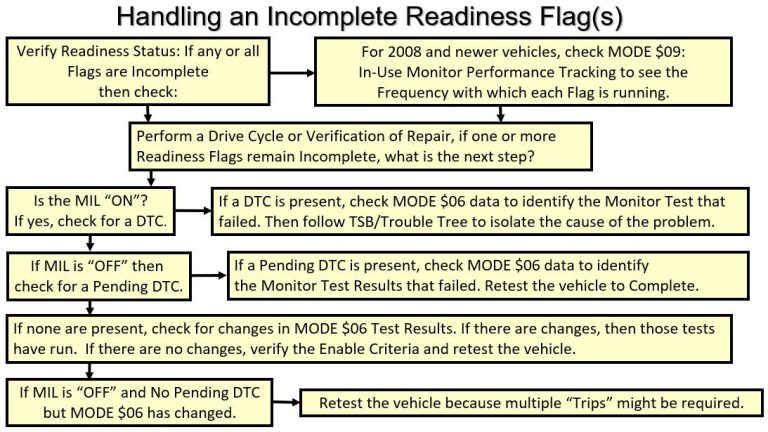
The scanner can show stored fault codes and help me understand why the check-engine light turned on. Its I/M readiness feature also checks whether the vehicle’s emissions monitors have completed their tests, which helps before an emissions inspection.
I can clear codes after I repair the cause, but clearing them does not fix the underlying problem. It also resets some emissions monitors. I should diagnose the code first and avoid erasing it when I still need the information for repair.
Battery Voltage Monitoring
The BD310 measures battery voltage through the vehicle’s diagnostic port. The app can show voltage readings and display changes over time, which helps me check the electrical system before starting deeper diagnostics.
A healthy charging system usually shows higher voltage with the engine running than with the ignition switched off. A low reading may point to a weak battery, charging problem, poor connection, or another electrical fault. I treat the scanner’s reading as a useful screening tool, not a replacement for a dedicated battery load tester.
The app’s trip and voltage records can also reveal patterns, such as voltage dropping during startup or changing while accessories operate. Results can vary by vehicle, so I compare the readings with the manufacturer’s specifications when available.
Strengths and Limitations
I find the ANCEL BD310 useful for drivers who want quick access to engine fault codes, basic live data, and battery information. Its small screen, Bluetooth connection, and low price make it practical, but its functions remain limited compared with professional scan tools.
Advantages for Everyday Drivers
I like the BD310 because it combines a handheld display with a phone app. I can read and clear standard OBD-II engine codes without depending on a separate computer. The plain-language code descriptions can also make an unfamiliar warning easier to understand, although I still need to confirm the cause before replacing parts.
The scanner shows live data such as engine speed, coolant temperature, and sensor readings. Its battery monitoring feature can help me check charging voltage and spot possible battery or alternator problems. The app also provides a heads-up display, which can show selected driving data on my phone.
Its compact size makes storage easy, and the device generally sells for less than many advanced scanners. I consider it a good fit for basic maintenance, checking a check-engine light, and deciding whether a repair needs immediate attention.
Potential Drawbacks
The BD310 mainly targets standard OBD-II engine diagnostics. I should not expect it to provide the same coverage as a professional tool for airbag, ABS, transmission, or other manufacturer-specific systems. Coverage can also vary by vehicle, so I need to check compatibility before buying.
The device cannot identify every mechanical cause behind a fault code. A code points to a system or condition, not always to a failed part. Clearing the code without fixing the problem can also cause the warning light to return.
Bluetooth features depend on a compatible phone and the app. I may prefer a larger screen or a cable-connected scanner if I work in a noisy garage or want fewer setup steps. The BD310 also lacks the deeper testing and service functions found on more expensive equipment.
Who Should Consider It
I see the ANCEL BD310 as a practical choice for drivers who want basic engine diagnostics, live data, and code clearing without buying a full professional scan tool. Its wired connection supports quick checks, while Bluetooth adds convenience for monitoring vehicle data through a phone.
Best Use Cases
I would consider the BD310 for DIY drivers who mainly need to read and clear check-engine codes. It can help identify a problem before visiting a repair shop and lets me view live engine information, such as vehicle speed, engine speed, and sensor readings.
Its small design also suits drivers who want a simple tool for occasional use. I can keep it in the vehicle, connect it through the OBD-II port, and use either the built-in display or a compatible phone app. The wired mode works well when I want a direct, self-contained scan.
The BD310 may also suit someone who wants a basic gauge display during a drive. I would not treat its readings as a replacement for professional testing, but they can help me watch selected engine data and understand changes over time.
Drivers Who May Need More Advanced Tools
I would look beyond the BD310 if I needed access to ABS, airbag, transmission, or other body-system codes. Basic OBD-II scanners often focus on engine and emissions faults, while advanced tools can scan more control modules and run system-specific tests.
I would also choose a stronger tool for repair work that requires bidirectional controls, coding, service resets, or detailed manufacturer data. The BD310 may tell me that a fault exists, but it may not provide enough information to find the exact failed part.
Professional technicians and experienced DIY users may prefer a larger scanner with broader vehicle coverage, deeper reports, and a more advanced display. The BD310 makes more sense when I need straightforward engine diagnostics rather than full vehicle analysis.
Price, Alternatives, and Overall Value
At about $60, the ANCEL BD310 targets drivers who want more than a basic code reader without paying professional-tool prices. Its value depends on whether I need Bluetooth features, a built-in screen, or advanced service functions.
How It Compares With Similar Scanners
I would compare the BD310 with tools such as the BlueDriver, Launch CRP123X, and basic wired OBD2 readers.
| Scanner type | Main advantage | Best fit |
|---|---|---|
| ANCEL BD310 | Screen, Bluetooth app, live data, HUD mode | DIY drivers |
| BlueDriver | Detailed repair reports and app-based guidance | Users who prefer guided diagnostics |
| Launch CRP123X | Wider system coverage on supported vehicles | Owners needing more than engine codes |
| Basic code reader | Low price and simple operation | Occasional check-engine scans |
The BD310 can read and clear engine fault codes, show live data, monitor battery information, and record trip or performance data. Its handheld screen also lets me scan without using a phone. However, I should not expect the same depth as a professional scanner or assume it can reset every vehicle system.
BlueDriver may provide stronger repair information, but it usually costs more and depends more heavily on its app. The BD310 offers more flexibility without a subscription, which makes it a practical choice for routine checks.
Final Buying Considerations
I would buy the BD310 if I want a compact tool for check-engine diagnostics, live data, battery checks, and basic driving information. Its support for standard OBD2 vehicles generally covers gasoline vehicles sold in the United States from 1996 onward, but I would verify compatibility before ordering.
The BD310 makes less sense if I need ABS, airbag, transmission, coding, or advanced service resets. Those functions require a scanner with broader system coverage, often at a much higher price.
The built-in display adds convenience, while Bluetooth adds features through the mobile app. I should also remember that clearing a code does not repair the cause of the fault. At roughly $60, the BD310 offers useful features for DIY maintenance, provided I understand its limits.
FAQs
Is the ANCEL BD310 worth buying?
I think it is a good choice for DIY drivers who want basic engine diagnostics without paying for a professional scan tool. Its price often falls near $60–$70, and it combines a handheld scanner with Bluetooth app features.
What can the BD310 diagnose?
I can use it to read and clear engine fault codes, check emissions readiness, view live data, and monitor vehicle information. It may also support battery testing and dashboard-style displays through the app, depending on the vehicle and phone.
Does it work with every car?
The BD310 uses the OBD-II standard, so it works with many vehicles sold in the United States from 1996 onward. I would still check ANCEL’s compatibility list because supported features can vary by make, model, year, and region.
Does it need a subscription?
The listed features do not require a recurring subscription. I would confirm the current app terms before buying, since software features and pricing can change.
Is it better than a basic code reader?
I would choose the BD310 if I wanted both a built-in screen and Bluetooth access. A simple code reader may cost less, while a more advanced scanner can access systems such as airbags, transmissions, or body controls.
Can it fix car problems?
No. It reports diagnostic information, but I must identify the cause and complete the repair separately. I should treat any code as a starting point rather than proof that one part needs replacement.
Conclusion
I would buy the ANCEL BD310 if I wanted an affordable tool for basic vehicle checks. Its handheld and Bluetooth modes make it flexible, while features such as trouble-code reading, I/M readiness checks, live data, and battery testing add practical value.
The BD310 suits DIY owners who want more information before visiting a repair shop. Its compact design and typical price near $60–$70 also make it easier to justify than a larger professional scanner.
I would not treat it as a replacement for advanced shop equipment. OBD-II features vary by vehicle, and the scanner may not access every manufacturer-specific system, such as airbag or ABS modules. I would confirm compatibility with my vehicle before buying.
| Best for | Less suitable for |
|---|---|
| Basic engine diagnostics | Advanced module programming |
| Checking emissions readiness | Full professional repair work |
| Viewing live data | Brand-specific system testing |
For routine engine-code checks and basic monitoring, I consider the ANCEL BD310 a sensible purchase. Its value depends on whether I need simple OBD-II information or deeper diagnostics.


One Comment