BlueDriver Pro vs Next Gen: Which OBD2 Scanner Should You Buy?
Last Updated: September 15, 2026
Blue Driver Pro vs Pro Next Gen: Short Answer
If you are searching for Blue Driver Pro vs Pro Next Gen, choose Pro Next Gen when your vehicle is newer and you want the safest long-term compatibility. Choose the original BlueDriver Pro when it already supports your car and the lower price matters more than having the latest hardware revision.
If you are choosing between BlueDriver Pro and Pro Next-Gen, the vehicle you own should guide your decision. Both tools connect to your phone, read and clear diagnostic codes, show live data, and provide repair reports, but their vehicle coverage and features may differ.
For most newer North American vehicles, I recommend BlueDriver Pro Next-Gen because it offers broader compatibility and enhanced diagnostics without a subscription. I will compare its hardware, app experience, diagnostic coverage, performance, and long-term value with the standard Pro model.
Choose BlueDriver Pro Next-Gen if you want the safer long-term buy for newer vehicles, faster pairing, and broader enhanced diagnostics. Choose the original BlueDriver Pro only if your exact vehicle is supported and the lower price is the main reason to buy.
| Buyer priority | Better pick | Why it matters |
|---|---|---|
| Newer North American vehicle | BlueDriver Pro Next-Gen | Better fit when current compatibility and enhanced-system coverage matter most. |
| Lowest upfront cost | Original BlueDriver Pro | Still useful if your vehicle is supported and you do not need the latest hardware revision. |
| No monthly fee | Either model | Both are positioned around one-time app access instead of recurring diagnostic subscriptions. |
| ABS, SRS, TPMS, transmission checks | Verify Pro Next-Gen first | Enhanced diagnostics depend on year, make, model, engine, and installed modules. |
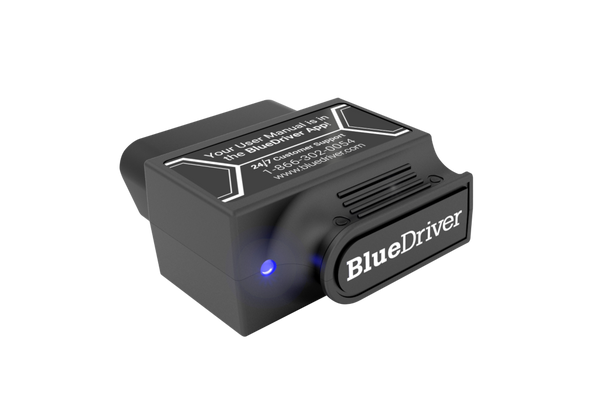
Best fit if you want simple phone-based diagnostics, repair reports, and compatibility checks before buying.
Key Takeaways
- Vehicle compatibility matters more than the model name alone.
- Both scanners support live data and repair reports.
- Pro Next-Gen may offer better value for newer vehicles.
| Buyer Question | Best Answer |
|---|---|
| BlueDriver Pro vs Next Gen | Pick the version with confirmed vehicle compatibility, current app support, and the diagnostic functions you actually need. |
| Blue Driver Pro vs Pro Next Gen | Do not upgrade just for the name. Check enhanced diagnostics coverage for your make/model first. |
| Best buyer move | Use BlueDriver for app-based OBD2 diagnostics; consider a stronger scan tool if you need bidirectional controls or advanced service resets. |
Quick Verdict: BlueDriver Pro vs Next Gen
BlueDriver Pro vs Next Gen is mostly a buying-intent comparison around app experience, enhanced diagnostics, compatibility, and long-term value. If you are comparing Blue Driver Pro vs Pro Next Gen, choose the newer/updated option only if it gives the vehicle coverage and app support you need; otherwise, the smarter buy is the one with confirmed compatibility for your car.
Core Diagnostic Capabilities
I find that both BlueDriver versions handle more than basic check-engine codes. Their main value comes from enhanced module access, live data, freeze-frame details, readiness checks, Mode 6 results, and VIN-based repair information, though vehicle coverage can vary.
Supported Vehicle Systems
Both models support standard OBD2 diagnostics for engine and emissions systems. On compatible vehicles, they also read enhanced codes from systems such as ABS, airbag, transmission, and TPMS. I would confirm coverage for my exact year, make, model, and engine before buying because enhanced access is not identical across all vehicles.
The Pro Next-Gen model targets newer vehicles with updated protocol support. Search results also report faster Bluetooth pairing and a brighter status LED, but those changes do not necessarily add new diagnostic functions to every older vehicle.
Both scanners use the same BlueDriver app and provide VIN-specific repair reports when the vehicle supports the required data. I should treat these reports as repair guidance, not a replacement for testing with a multimeter, wiring diagram, or professional scan tool.
Live Data And Fault Code Functions
I can use either scanner to read and clear diagnostic trouble codes, view freeze-frame data, and check whether the vehicle has completed its emissions monitors. The app also displays live sensor data, which helps me compare values such as engine temperature, oxygen sensor readings, fuel trims, and engine speed while the vehicle runs.
Mode 6 results can show test data from monitored systems before a fault becomes a confirmed code. This can help me find intermittent emissions problems, but the meaning of each value depends on the vehicle.
Both versions provide enhanced diagnostic codes and technician-verified repair information without a recurring subscription, according to the supplied results. The Next-Gen version may connect faster and support newer protocols, while the core app workflow and main diagnostic features remain similar.
Hardware Design And Connectivity
I see the main hardware differences in phone pairing, vehicle support, and everyday handling. Both models use a compact Bluetooth adapter, but the Next-Gen version targets newer vehicle platforms and may offer a better fit for current vehicles.
Bluetooth Compatibility
The original BlueDriver Pro connects to the BlueDriver app on supported iPhone and Android devices through Bluetooth. I would check phone requirements before buying, since the adapter depends on the app and does not function as a standalone scanner with its own screen.
The Pro Next-Gen keeps the same basic wireless workflow. I plug the adapter into the vehicle’s OBD-II port, pair it with my phone, and use the app to read codes, view live data, and access supported enhanced diagnostics. It supports vehicles sold in North America from 1996 onward, but available functions still vary by make, model, year, and control module.
BlueDriver’s vehicle coverage matters more than Bluetooth speed claims. The Next-Gen model addresses compatibility with newer vehicle platforms, while the original model may remain suitable for older cars. I would use BlueDriver’s official compatibility checker for a specific vehicle before replacing a working adapter.
Adapter Durability And Portability
Both adapters use a small plug-in design that fits directly into the diagnostic port. I can leave the unit connected during a short test drive, but I would remove it when I park the vehicle for long periods or when the port sits near my knee.
The compact shape makes either model easy to store in a glove box or tool bag. The adapter has no display, buttons, or built-in controls, so I operate every scan through the phone app. That keeps the hardware simple but makes a charged phone and an active Bluetooth connection necessary.
The Next-Gen revision is the safer choice for buyers who want updated hardware for newer vehicles. I would choose the original Pro when its vehicle coverage is confirmed and the lower purchase price matters more than having the latest revision.
Software Experience And Updates
I use the same core mobile app with both BlueDriver models. The main differences come from hardware speed, vehicle coverage, and the diagnostic features available for supported vehicles.
App Features And Interface
I pair the adapter with my phone through the BlueDriver app, which presents scan results in a simple, guided layout. I can read and clear trouble codes, view live data, check freeze-frame records, review emissions readiness, and access Mode 6 test results when the vehicle supports them.
The app also provides Repair Reports based on the vehicle identification number. These reports connect stored codes with likely causes, reported fixes, and repair details from other vehicles. I treat them as guidance rather than a final diagnosis.
The Pro Next-Gen model targets newer North American vehicles and may provide enhanced diagnostics on more supported systems. The exact coverage still depends on the vehicle’s make, model, year, and installed modules. I would check BlueDriver’s compatibility information before buying if I need features beyond engine and emissions data.
Subscription And Update Policies
I pay once for the BlueDriver adapter and app access, without a required monthly subscription for the main diagnostic features. That makes the cost easier to predict than tools that lock functions behind recurring fees.
BlueDriver updates its app and vehicle databases through software releases. I need a compatible phone, an internet connection for downloads and reports, and a current app version to receive those changes. Updates do not guarantee that every vehicle will gain new enhanced functions.
The Pro Next-Gen costs more than the original Pro in many listings, so I compare the price with my vehicle’s supported features supported features. If I own an older vehicle and only need standard code reading, the original Pro may provide enough software capability.
Performance For Professional Use
I judge these tools by diagnostic coverage, response time, report quality, and how well they fit a repair process. The Pro Next-Gen may suit newer North American vehicles, while the original Pro can remain practical when its vehicle coverage meets the shop’s needs.
Diagnostic Speed And Accuracy
I use both models mainly for code reading, clearing codes, live data, freeze-frame records, readiness checks, and Mode 6 results. Both connect through a phone app, so performance depends on the vehicle network, Bluetooth connection, phone, and app response. Neither device should replace a dedicated bidirectional scan tool when a repair requires active tests, coding, programming, or module setup.
The Pro Next-Gen focuses on newer North American vehicles and can provide enhanced diagnostics for systems such as ABS, airbag, and TPMS on supported models. Its VIN-linked, technician-verified Repair Reports can help me connect a stored code with likely causes and repair checks. I still verify each result with service information and test equipment.
The original Pro offers similar core functions and can deliver strong value when I mainly need engine diagnostics or supported enhanced system access. Before buying, I check the exact year, make, model, engine, and module coverage because feature support varies by vehicle.
Workshop Workflow Considerations
For professional work, I value a fast scan, clear code descriptions, saved reports, and simple sharing with customers. BlueDriver’s app-based workflow lets me connect a phone, scan the vehicle, review live data, and create a Repair Report without a recurring subscription. That can reduce software costs for a small shop or mobile technician.
The Pro Next-Gen makes more sense when I regularly service newer North American cars and need broader supported module coverage. I would confirm compatibility before replacing an original Pro, since an upgrade may not add useful functions for older vehicles or brands outside its strongest coverage.
Neither model provides the full workflow of a shop-level scan platform. I still need a reliable battery charger, a multimeter, wiring diagrams, and manufacturer repair data for complex faults. I also keep a separate tool available for bidirectional controls, special functions, and programming.
Pricing And Long-Term Value
I weigh the higher purchase price against diagnostic coverage, app support, and the lack of subscription fees. The best choice depends on your vehicles, not just the device price.
Upfront Cost
Search results place the BlueDriver Pro near $85 and the Pro Next-Gen near $120, though prices may change by seller and promotion. I would treat those figures as typical examples rather than fixed prices.
The Pro costs less and can suit owners who need basic OBD2 functions, such as reading and clearing engine codes and viewing live data. The Next-Gen model costs more, but it targets newer North American vehicles and may offer broader or improved vehicle support.
| Model | Typical listed price | Best fit |
|---|---|---|
| BlueDriver Pro | About $85 | Basic DIY diagnosis and lower cost |
| Pro Next-Gen | About $120 | Newer vehicles and broader coverage |
I would check compatibility for each vehicle before buying. A cheaper scanner provides less value if it cannot access the systems I need.
Ongoing Ownership Expenses
BlueDriver’s no-subscription model keeps long-term costs predictable. After I buy the scanner, I can use the app and access its supported diagnostic features without paying a recurring service fee. That can make the higher Next-Gen price easier to justify over several years.
Both models still require a compatible smartphone or tablet. I also need to consider possible costs outside the scanner, such as vehicle repairs, replacement hardware, or a new device if the original becomes damaged or lost.
The Next-Gen model offers stronger value when I own newer vehicles or plan to keep the scanner for several years. The standard Pro may provide better immediate value when I only need common engine diagnostics and want to minimize the purchase price.
- Best choice for most shoppers: BlueDriver Pro Next-Gen, if the official compatibility checker confirms your vehicle.
- Best budget move: Original BlueDriver Pro, if it is discounted and covers the systems you need.
- Do not buy on model name alone: confirm ABS, SRS, transmission, TPMS, and live-data support for your exact vehicle first.
Frequently asked questions
Is Blue Driver Pro vs Pro Next Gen the same comparison as BlueDriver Pro vs Next Gen?
Yes. Searchers often write the brand as Blue Driver with a space, but the buying decision is the same: compare original BlueDriver Pro against the newer Pro Next Gen option by vehicle compatibility, supported systems, app support, and price.
Is BlueDriver Pro Next-Gen better than BlueDriver Pro?
I would choose the Next-Gen model for newer North American vehicles if its compatibility checker lists your car. It offers deeper diagnostics on supported makes, including access to systems such as ABS and TPMS. The original Pro may suit owners of older vehicles who only need basic and enhanced code reading.
Do both models require a subscription?
No. I found no recurring subscription requirement for either model. The purchase includes access to the BlueDriver app and its repair-report features, though supported functions depend on the vehicle and brand.
Will either scanner work with my vehicle?
Both models target 1996 and newer vehicles sold in North America, but coverage varies by year, make, model, and system. I recommend checking BlueDriver’s official compatibility tool before buying, especially for enhanced diagnostics.
Can BlueDriver read ABS or airbag codes?
It can read some manufacturer-specific systems, but coverage differs by vehicle. I would not assume that every car supports ABS, airbag, TPMS, or other enhanced modules.
Does BlueDriver work with iPhone and Android?
Yes. I can use the Bluetooth adapter with the BlueDriver app on compatible iOS and Android devices. The app provides live data, freeze-frame details, readiness checks, and VIN-based repair information when available.
Should I upgrade from the original Pro?
I would upgrade only if my vehicle benefits from the Next-Gen model’s added coverage or performance claims. If my current Pro meets my diagnostic needs, replacing it may offer limited value.
Conclusion
I would choose the BlueDriver Pro Next-Gen for most buyers who want broader diagnostics and support for newer North American vehicles. It can read more than basic engine codes, including selected ABS, SRS, and TPMS systems, and it provides VIN-based repair information without a subscription.
The original BlueDriver Pro may still make sense if I find it at a much lower price or need compatibility with a specific older vehicle. Before buying, I would check the supported makes, model years, and available enhanced systems for my car.
| My priority | Better choice |
|---|---|
| Newer North American vehicle | Pro Next-Gen |
| Lowest purchase price | Whichever model is discounted |
| Repair reports and deeper code access | Pro Next-Gen, if supported |
| Known compatibility with an older vehicle | Verify either model first |
I would not treat either scanner as a replacement for a professional scan tool. BlueDriver depends on phone connectivity, app support, and vehicle-specific coverage. Still, the Next-Gen model offers the safer choice for buyers who want one-time-cost diagnostics beyond a basic check-engine-light reader.
Is BlueDriver Pro vs Next Gen worth comparing before buying?
Yes. The BlueDriver Pro vs Next Gen comparison matters because app support, enhanced diagnostics, vehicle compatibility, and update experience can affect how useful the scanner is after purchase.
What is the difference between Blue Driver Pro and Pro Next Gen?
For most buyers, the practical difference is not the name alone. Compare supported vehicles, enhanced diagnostics, app features, and current product availability before choosing.