Is the ANCEL BD310 Safe to Use? Safety Features and Considerations
The ANCEL BD310 is generally safe to use when you connect it correctly and follow basic vehicle safety steps. I use it as a diagnostic tool, not a repair device, because it reads engine fault codes, displays live data, and may connect to a phone through Bluetooth.
You can use the ANCEL BD310 safely if your vehicle supports its functions, you avoid changing settings you do not understand, and you protect your phone and vehicle during wireless setup. I will cover its limits, electrical safety, app permissions, and signs that you need professional help.
Key Takeaways
- Use the scanner only with a compatible vehicle.
- Follow safe connection and handling practices.
- Seek professional help for serious or unclear faults.
Device Overview And Intended Use
I use the ANCEL BD310 as a basic OBD-II diagnostic reader and trip computer. It can display engine fault codes, live vehicle data, and selected driving information through its built-in screen or a Bluetooth connection.
What The ANCEL BD310 Does
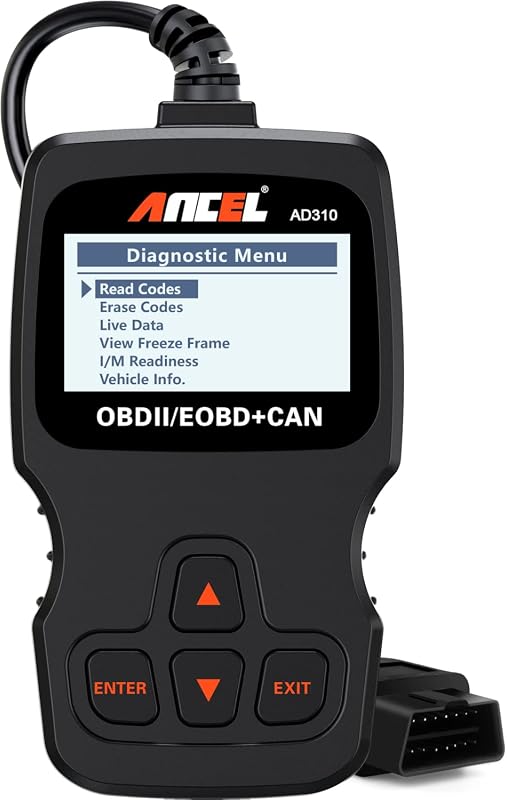
The BD310 plugs into the vehicle’s OBD-II port, usually located under the dashboard near the steering column. I can use its handheld screen to read and clear engine diagnostic trouble codes, view emissions-related data, and check whether the vehicle has completed its readiness monitors.
The device can also stream live data, such as engine speed, coolant temperature, vehicle speed, and sensor readings. Through the companion app, I can view graphs, record data, and use the device as an extra dashboard display.
Clearing a code does not repair the problem. It can also reset emissions monitors, so I should identify the cause first and confirm that the vehicle operates normally before removing stored codes.
Compatible Vehicle Systems
The BD310 is designed for vehicles that support OBD-II or EOBD, the diagnostic standards used on most cars and light trucks sold in North America and many other regions. Compatibility usually covers gasoline vehicles from about 1996 onward and diesel vehicles from about 2004 onward, but the exact model year and market can vary.
The device mainly accesses the engine and emissions system. It may show information from systems such as the oxygen sensors, fuel system, coolant system, and catalytic converter. It generally should not be treated as a full-service scanner for air bags, anti-lock brakes, body modules, or transmission systems unless the vehicle and app specifically support those functions.
Before buying or using it, I check the vehicle’s manual and ANCEL’s compatibility information. A matching OBD-II port does not guarantee access to every control module.
Connection And Electrical Safety
I treat the BD310 as a low-power diagnostic device, but I still connect it carefully. The main risks involve incorrect connection, a damaged vehicle socket, battery drain, or unsafe phone use while driving.
OBD-II Port Power Considerations
I turn the ignition off before connecting the BD310. I then push its 16-pin plug fully into the vehicle’s OBD-II port before turning the ignition on. This sequence helps reduce the chance of electrical arcing or communication errors.
The OBD-II port supplies power to the scanner, so the BD310 does not normally need a separate power source. I check the plug and socket for bent pins, dirt, moisture, or loose parts. I do not force the connector or use the scanner if its cable or housing shows damage.
The scanner can draw power while plugged in, even when the engine is off. To limit battery drain, I remove it when I finish testing, especially if the vehicle will sit unused. I keep the device away from pedals, steering parts, hot surfaces, and moving components.
Bluetooth And App Pairing Precautions
I pair the BD310 with the official companion app and allow Bluetooth access when the app requires it. On iPhones running iOS 13 or later, I check the phone’s Bluetooth privacy settings if the app cannot find the scanner.
I pair the device while the vehicle is parked, with the ignition in the required position. I do not handle the phone or change app settings while driving. Bluetooth pairing does not make vehicle repairs safe by itself; I follow the vehicle maker’s service instructions before changing settings or clearing codes.
I also avoid pairing in a crowded area if the app displays several nearby devices. After use, I close the diagnostic session, remove the BD310 from the OBD-II port, and disable Bluetooth if I do not need it.
Safe Diagnostic Practices
I keep the vehicle stationary while I connect or use the ANCEL BD310. I also check compatibility, secure the adapter, and keep the phone away from tasks that could distract me while driving.
Using The Scanner While Parked
I turn off the ignition before inserting or removing the BD310 from the OBD-II port. I push the adapter in firmly and avoid forcing it if the port feels loose, damaged, or blocked.
I use the scanner in a well-ventilated area and keep the cable or adapter away from pedals, steering parts, and hot surfaces. I follow the BD310 manual and use a compatible vehicle with a standard OBD-II system. A loose connection can interrupt communication or produce incomplete results.
Before clearing a trouble code, I record the code and its related data. Clearing it can erase useful information for diagnosis, but it does not repair the underlying fault. I also avoid changing settings or testing electrical circuits unless I understand the procedure.
Avoiding Distraction While Driving
I complete code scans, data reviews, and settings changes while parked. I do not handle my phone, read live data, or operate the BD310 app while the vehicle moves.
If I need live readings during a road test, I set up the app before leaving and mount the phone where it does not block my view. A passenger should operate the app when possible. I keep my attention on traffic, signs, and vehicle control rather than watching sensor values.
I stop in a safe location before reviewing codes or responding to an alert. I also avoid letting the adapter or its connection interfere with my legs, pedals, or steering. These steps reduce distraction and help prevent accidental damage to the scanner or vehicle.
Vehicle Compatibility And Limitations
I can use the ANCEL BD310 with most OBD-II vehicles from 1996 onward, but compatibility does not guarantee access to every diagnostic system. The vehicle’s connector, protocol, model year, and manufacturer features affect what the scanner can read.
Supported OBD-II Vehicles
The BD310 supports standard OBD-II, EOBD, and CAN communication used by many cars, light trucks, and SUVs. In the United States, this usually includes vehicles from 1996 and newer. I should confirm the vehicle’s manual or the manufacturer’s data before buying, especially for imported or unusual models.
The scanner connects through the vehicle’s 16-pin OBD-II port. I turn off the ignition before connecting it, then switch the ignition on as directed by the manual. A loose connection, damaged port, or low vehicle battery can prevent communication.
The BD310 can read and clear many engine-related trouble codes and display live data. It may also provide tests such as battery monitoring, trip information, and performance measurements through its app. These functions depend on the vehicle and its available data.
Features That May Vary By Model
Standard OBD-II access mainly covers emissions-related systems and engine data. The BD310 may not communicate with every airbag, ABS, transmission, body, or manufacturer-specific module. It also should not replace a professional scan tool when a repair requires advanced system access.
Supported data can differ by make, model, year, engine, and trim. One vehicle may provide more live readings or test functions than another. Bluetooth operation also requires a compatible Android or iOS device and the correct app connection.
I should treat displayed codes as starting points, not final diagnoses. The scanner identifies stored information, but I still need to inspect wiring, sensors, power supply, and related parts before replacing anything.
Data Privacy And App Permissions
I treat the ANCEL BD310 app like any other connected vehicle app: I check its privacy policy, limit unnecessary access, and use Bluetooth only when needed. The scanner can send diagnostic data to a phone, but the available information does not show that it needs broad access to personal files or contacts.
Information Collected By The Companion App
The ANCEL app may collect information linked to app use, device details, and diagnostic activity. This can include vehicle fault codes, sensor readings, connection records, and technical data about the phone or app. The exact data depends on the app version, operating system, and its current privacy policy.
I avoid entering personal details unless the app requires them. I also remember that diagnostic information can reveal details about my vehicle and driving problems. I review the app’s privacy disclosure before creating an account or sending reports. Google Play and Apple’s App Store may show separate data-safety or privacy information, which I check before installation.
Managing Phone Permissions
On iPhone, iOS 13 and later may require Bluetooth access through both the app settings and the system’s privacy settings. I open the phone’s Bluetooth permission list and allow access only for the ANCEL app.
On Android, I review Bluetooth or nearby-device permissions and deny access that the app does not need. I do not grant contact, microphone, camera, location, or storage access unless the app clearly explains why it requires that permission.
I keep Bluetooth off when I am not using the scanner, update the app through the official store, and remove its permissions if I uninstall or stop using it.
Installation And Handling Guidance
I reduce risk by connecting the BD310 with the ignition off, checking the OBD-II socket first, and securing the adapter without force. I also keep the tool and cable away from heat, moisture, moving parts, and areas where they could interfere with driving.
Proper Plug-In Procedure
I first park the vehicle safely, engage the parking brake, and turn off the ignition. I locate the vehicle’s OBD-II port, usually beneath the dashboard near the steering column, and check that the socket has no dirt, bent pins, or visible damage.
I align the BD310 with the port and press it in gently. I do not twist, rock, or force the connector. After it fits securely, I turn on the ignition without starting the engine unless the app or test requires the engine to run. I then connect the scanner through the ANCEL app and follow its on-screen instructions.
I keep the adapter clear of my feet and avoid using the device while driving. Before removing it, I turn off the ignition and wait briefly for communication to stop. I then pull the BD310 straight out by its housing, not by the cable or connector.
Preventing Port Damage
I inspect the plug and vehicle socket before every connection. A damaged connector, loose socket, bent terminal, or foreign object can prevent a proper connection. I never insert tools, metal objects, or another plug into the OBD-II port to clean or adjust it.
I support the BD310 while it remains connected instead of allowing its weight to hang from the socket. I also keep the cable away from pedals, hinges, hot surfaces, and sharp edges. These steps help prevent strain on both the adapter and the vehicle’s wiring.
The BD310 should stay dry and should not remain connected during service work that could move the dashboard wiring or create a short circuit. If I notice heat, a burning smell, sparks, or unusual electrical behavior, I switch off the ignition, unplug the scanner, and have the vehicle inspected.
When To Seek Professional Help
I use the ANCEL BD310 for basic OBD-II code reading, but I do not treat its results as a complete diagnosis. Warning signs, safety risks, or faults outside the tool’s coverage require a trained technician and proper test equipment.
Warning Signs That Require Immediate Attention
I seek professional help when the check-engine light flashes, especially if the engine shakes, loses power, or smells of unburned fuel. A flashing light can indicate a severe misfire that may damage the catalytic converter.
I also stop driving and arrange help when I see an oil-pressure warning, engine-temperature warning, or brake warning. The BD310 cannot make these conditions safe, and clearing a code will not repair the cause. I follow the vehicle owner’s manual and stop the engine when it directs me to do so.
I avoid driving when the vehicle has smoke, fuel leaks, exposed wiring, a burning smell, severe braking problems, or steering trouble. For airbag, ABS, and transmission warnings, I use a qualified shop because the BD310 mainly supports standard engine and emissions data. I do not work under a vehicle supported only by a jack.
Limits Of DIY Code Reading
I use the BD310 to read and clear supported engine and emissions trouble codes, view live data, and check emissions readiness. A code identifies a system or condition; it does not prove that a specific part has failed. For example, an oxygen-sensor code may result from wiring, an exhaust leak, fuel problems, or the sensor itself.
I do not use the BD310 to diagnose airbag, ABS, or transmission faults unless the vehicle and tool documentation specifically confirms support. It also does not replace wiring tests, pressure tests, manufacturer procedures, or bidirectional controls.
I record the codes and freeze-frame data before clearing them. If the code returns, the vehicle runs poorly, or several systems report faults, I stop replacing parts based on guesses and have a technician perform a full diagnosis.
Overall Assessment
I consider the ANCEL BD310 safe for routine OBD-II checks when I use it as directed. It connects through the vehicle’s diagnostic port and can read engine fault codes, display live data, and clear codes. It supports most vehicles built since 1996, but compatibility can vary by model and feature.
The device uses the car’s OBD-II power and can work as a handheld scanner or through Bluetooth. I would check the cable and connector before use, keep the vehicle parked during testing, and avoid using live data features while driving unless another person operates the scanner.
| Safety point | My assessment |
|---|---|
| Electrical risk | Low during normal use |
| Vehicle damage risk | Low when connected correctly |
| Data accuracy | Useful for diagnosis, not a final repair decision |
| Code clearing | Safe, but it can erase helpful fault information |
I would not treat the BD310 as a replacement for professional testing. A fault code identifies a system or condition, not always the failed part. Clearing a code without fixing the cause can hide a problem and may reset emissions monitors.
I would also avoid altering settings, updating software, or disconnecting the scanner during an active operation. If the vehicle shows warning signs such as smoke, overheating, loss of power, or a flashing check engine light, I would stop driving and seek qualified service.
FAQs
Is the ANCEL BD310 safe to use?
I consider the BD310 safe when I use it as directed. It connects to the vehicle’s OBD-II port and reads diagnostic data, but it does not repair faults or replace a trained technician.
Can it damage my car?
The scanner should not damage a compatible vehicle during normal use. I switch off the ignition before connecting or removing it, keep the plug and port clean, and avoid forcing the connector.
Can I use it while driving?
I avoid using handheld controls while driving. A passenger can monitor data, but I keep my attention on the road and follow local safety rules.
Could it erase important fault codes?
The BD310 can clear stored trouble codes. I record the codes and check the cause before clearing them because erasing them may remove useful diagnostic information.
Does it work with every vehicle?
I check compatibility before buying or connecting it. The BD310 targets OBD-II/EOBD vehicles, but supported functions can vary by vehicle make, model, year, and system.
Is the Bluetooth connection safe?
I use the official app or trusted software, enable Bluetooth only when needed, and avoid pairing in unsafe locations. Bluetooth access does not make the scanner a substitute for secure phone settings.
What should I do if the scanner or port becomes hot?
I stop using it, turn off the ignition, and remove the scanner if it feels unusually hot, smells burnt, or behaves unexpectedly. I then inspect the vehicle and device before using them again.
Conclusion
I consider the ANCEL BD310 safe for normal OBD2 use when I follow the manual and basic vehicle safety practices. I connect it with the ignition off, place the vehicle in Park or Neutral, set the parking brake, and keep the scanner and phone away from moving parts.
The device reads diagnostic data through the vehicle’s OBD2 port and connects to a phone or tablet through Bluetooth. I treat its results as information for troubleshooting, not as a final diagnosis. A stored fault code does not identify every failed part, so I check the related systems before replacing components.
| Safe practice | Why it matters |
|---|---|
| Use the correct OBD2 port | Prevents damage from improper connections |
| Keep the engine area clear | Reduces injury risk |
| Do not drive while using the app | Prevents distraction |
| Follow the vehicle manual | Helps avoid unsafe testing |
| Disconnect the scanner when needed | Prevents possible battery drain |
I also follow the manual’s safety warnings and check Bluetooth permissions when using an iPhone. If the vehicle behaves dangerously, shows warning signs beyond a routine fault code, or requires live electrical testing, I stop using the BD310 and seek qualified help.