Is OBDLink MX discontinued? Best replacement and risks explained
Yes, the original OBDLink MX is effectively a legacy model, so most buyers should compare current replacements instead of hunting for old stock. If your MX still works, you can keep using it for basic scans, but newer models are usually the safer long-term choice.
Is OBDLink MX discontinued? For most shoppers, the practical answer is that the original MX is no longer the model to buy, and the safer move is to compare current replacements before you spend money. The biggest risks are compatibility gaps, stale firmware support, and buying old stock that may not match today’s app or vehicle needs.
- Compatibility first: Check your vehicle, phone, and scan app before choosing a replacement.
- MX+ is the closest upgrade: It is usually the first model to compare for former MX owners.
- Battery risk is real: Any always-powered adapter can matter on weak or infrequently driven cars.
- Basic scans are not full diagnostics: Some resets and advanced functions still need a better tool.
- Support matters: Firmware, app updates, and return policy can be more important than the lowest price.
Is OBDLink MX discontinued? The short answer for 2026 buyers
In plain terms, the original OBDLink MX is widely treated as a legacy product, while newer OBDLink adapters carry the current support and feature focus. That matters because Bluetooth OBD2 tools depend on firmware, app support, and phone compatibility as much as hardware.
If you are shopping in the United States, the smart question is not only whether MX is discontinued, but whether it still fits your car, phone, and scan app. For many drivers, a current model is the better long-term buy because it reduces the chance of pairing trouble or missing features.
What happened to OBDLink MX: model status, naming changes, and what’s still available
The OBDLink brand has moved through several Bluetooth adapter generations, and that can make the naming confusing. Shoppers often see MX, MX+, CX, and EX in search results, but they are not interchangeable in every vehicle or app.
The original MX is the older generation most buyers mean when they ask this question. Newer products usually offer better support for current phones, operating systems, and app ecosystems, which is why many sellers and reviewers steer buyers toward newer models instead.
Buying the current generation can reduce return hassles, firmware uncertainty, and the chance that a scanner becomes the weak link in an otherwise good diagnostic setup.
For readers comparing options, our guide to OBDLink MX+ vs. BlueDriver covers the kind of tradeoffs many shoppers face when they move away from older adapters. If you are comparing brands more broadly, see what can be better than BlueDriver for your use case.
Best OBDLink MX replacements in 2026: side-by-side comparison for different drivers
The best replacement depends on what you want the adapter to do. Some drivers only need check-engine codes and basic live data, while others want stronger app compatibility, faster communication, or better support for specific platforms.
| Option | Best for | Owner consideration | Driver consideration |
|---|---|---|---|
| OBDLink MX+ | Drivers who want a modern OBDLink Bluetooth adapter with broad app support | Usually the closest current replacement path, but confirm app and vehicle support | Good fit when you want a compact adapter that stays out of the way |
| OBDLink CX | iPhone users who want a Bluetooth Low Energy-focused adapter | Best when you use compatible iOS apps and do not need every advanced feature | Can be simpler for phone-based scanning, but app choice matters |
| OBDLink EX | Windows users and laptop diagnostics | Better for PC-based scan workflows than general phone use | Useful if you prefer a larger screen and detailed desktop software |
OBDLink MX+ vs OBDLink CX vs OBDLink EX: Bluetooth, speed, and app compatibility
MX+ is the most natural upgrade path for many former MX buyers because it is built for broad everyday scanner use. CX is more focused on iPhone and Bluetooth Low Energy compatibility, while EX is aimed more at Windows-based diagnostics than casual phone scanning.
Speed only matters if the adapter and app can actually use it well. In real ownership, app support, firmware support, and vehicle protocol coverage often matter more than a simple spec sheet claim.
OBDLink MX+
Best fit for most former MX shoppers who want a current OBDLink Bluetooth adapter with broad app support and a safer long-term support path. Confirm your phone, app, and vehicle compatibility before buying.
OBDLink CX
A strong lower-friction choice for compatible iPhone users who mainly want phone-based scan app access. It may not be the best fit if you need Windows workflows or broader legacy support.
Which replacement fits daily drivers, DIY mechanics, and advanced users
Daily drivers usually want the simplest option that clears basic confusion fast and pairs reliably with a popular app. DIY mechanics often care more about live data access, graphing, and repeatability, while advanced users may want a laptop-friendly adapter and software stack.
If you are a commuter or parent who only wants occasional check-engine help, a current OBDLink model is often enough. If you are deep into diagnostics, compare app support first, then choose hardware second.
Compatibility guide: vehicles, model years, protocols, and app support
OBD2 adapters are only useful if they match the vehicle protocol and the app environment. That is why a scanner can work well on one car and feel useless on another, even when both are “OBD2.”
Check: Verify make, model, year, trim, voltage, ports, mounting space, and OEM requirements. Limitations: State verified exclusions.
OBD2 protocol coverage, ignition mode, and port location basics
Most gasoline vehicles sold in the U.S. use OBD2, but protocol support still varies by vehicle family and model year. Some vehicles also require the ignition in a specific mode before the adapter and app can communicate properly.
The OBD2 port is usually under the dash near the driver, but not always in the same place. Before buying any adapter, make sure you can reach the port safely without forcing the connector or blocking pedals.
iPhone, Android, Windows, and popular scan app permissions
Phone compatibility is a major reason older adapters get replaced. iPhone users need to pay close attention to Bluetooth type and app support, while Android users usually have more flexibility but still need the right permissions enabled.
Windows users should confirm driver support, software compatibility, and whether the adapter is intended for desktop diagnostics. A good adapter can still feel broken if the app, permissions, or operating system settings are wrong.
What OBDLink MX can and cannot do: codes, live data, emissions, and reset limits
OBDLink MX-class adapters are useful, but they are not magic. They can help you read common fault information, yet they cannot turn a phone into a full dealer-level diagnostic system.
Check-engine diagnosis, freeze-frame data, and live-data limitations
For a check-engine light, the adapter can usually help you read diagnostic trouble codes and view freeze-frame or live data through a compatible app. That can point you toward a loose gas cap, sensor issue, or a more serious problem.
Still, live data is only as useful as the app and the vehicle’s available sensor information. Some problems need manufacturer-specific data, bidirectional controls, or deeper module access that a basic Bluetooth adapter may not provide.
Emissions readiness, service resets, and when a professional scan tool is still needed
Many drivers buy these adapters to check emissions readiness before inspection or to clear a code after a repair. That is helpful, but clearing codes too early can erase useful diagnostic clues.
Service resets vary widely by vehicle. Oil reset, brake service, steering angle, or battery registration functions may require a different tool, a specific app, or a professional scan tool with manufacturer coverage.
If a fault affects braking, steering, charging, or engine performance, do not rely on a code reset alone. Diagnose the cause first and stop driving if the vehicle shows unsafe behavior.
Power, battery, and electrical risks every buyer should understand
Most OBD2 Bluetooth adapters draw power from the vehicle port, so they should be treated like always-on electronics. That makes battery drain, connector wear, and improper use real ownership concerns.
System voltage, battery chemistry, and state of charge versus battery health
Vehicle battery state of charge is not the same as battery health. A battery can read charged and still be weak, old, or unable to support reliable starting after the adapter has been left connected for long periods.
That matters most for cars that sit outside, drive short trips, or already have battery issues. If your battery is marginal, any always-powered device deserves extra caution.
Correct connection order, damaged-battery stop conditions, and hybrid/EV cautions
Follow the vehicle and adapter instructions in the right order. If the adapter or app behaves strangely, disconnect it and inspect the port rather than forcing a connection or leaving it plugged in indefinitely.
Hybrids and EVs deserve special care because high-voltage systems, accessory batteries, and wake-up behavior can differ from standard gasoline vehicles. Use the owner manual and avoid assumptions.
Installation, firmware, and privacy: how to use an OBD2 Bluetooth adapter safely
Most of the risk with a Bluetooth OBD2 adapter comes from setup mistakes, not from the scanner concept itself. Good habits make the adapter easier to live with and less likely to cause annoyance or confusion.
Pairing steps, firmware updates, app permissions, and data privacy tradeoffs
Pair the adapter while parked and keep the app open only when needed. If the manufacturer offers firmware updates, install them from the official app or support path so the adapter stays compatible with current phones and vehicles.
Review Bluetooth, location, and notification permissions carefully. Some apps need more access than you expect, so it is worth checking what is required before you sign in or sync vehicle data.
Legal and placement considerations in the United States
US rules can vary by state, especially for emissions-related code clearing, roadside work, and anything that changes vehicle equipment or behavior. If you are using the adapter around inspection timing or repair verification, check current state guidance before relying on it.
Maintenance, storage, and ownership cost: keeping the adapter reliable long term
OBD2 adapters are small, but ownership cost is more than the sticker price. Support, app compatibility, replacement risk, and storage habits all affect how good the deal really is.
Firmware upkeep, connector wear, warranty/support, and replacement cost factors
Check whether the manufacturer still supports the model with firmware and documentation. An older adapter with no meaningful update path can become a dead end even if it still powers on.
Connector wear also matters because OBD2 ports are used in awkward positions and can get bumped. A loose fit, broken latch, or damaged shell can turn a cheap scanner into a recurring annoyance.
When the cheaper option becomes the more expensive one
A low-cost adapter can cost more if it fails to pair, lacks support, or forces you to buy a second scanner later. That is why many buyers are better off paying for a current model once instead of chasing a bargain that does not fit their phone or car.
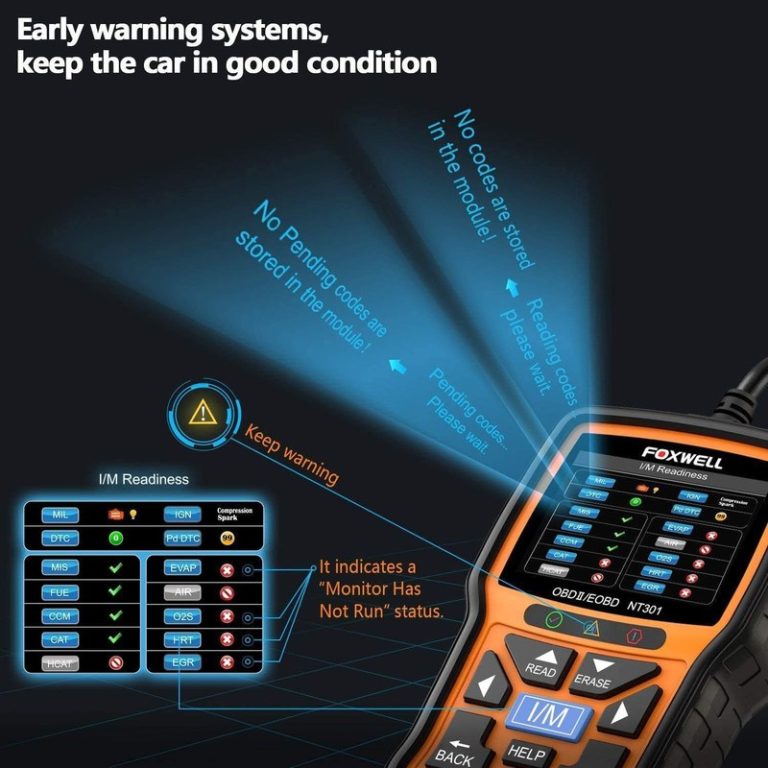
If you want a budget baseline for comparison, our review of whether the Foxwell NT301 is good can help you compare a simpler scan-tool approach with Bluetooth app-based options.
Related driver tools: tire pressure, TPMS, and roadside emergency gear limits
Many OBD2 buyers also want a small kit for tire, battery, and roadside basics. That can be smart, but each tool has limits and should be matched to the job.
Door-jamb placard pressure, cold tire checks, gauge accuracy, and inflator duty cycle
Tire pressure should be checked against the vehicle door-jamb placard, not a generic number on the tire sidewall. Cold tire checks are more reliable because driving heats the air and changes the reading.
If you carry a portable inflator, check gauge accuracy and duty cycle before relying on it for repeated fills. A compact inflator is convenient, but it is not a substitute for a damaged tire repair or a full-service air compressor.
TPMS relearn limits, puncture location, temporary-repair limits, and repair thresholds
TPMS tools may help with relearn steps on some vehicles, but they cannot fix a puncture or override a failed sensor. If the tire damage is in the sidewall, shoulder, or too close to the edge, replacement is often safer than a temporary patch.
Temporary sealants and plug kits also have limits. Use them as short-term roadside tools when appropriate, then follow up with a proper inspection and repair decision.
Roadside tool safety: storage conditions, cable or pack condition, current limits, and post-use inspection
Whether you carry an inflator, jump pack, or scan tool, inspect cables, packs, and connectors after use. Heat, moisture, and rough storage can shorten life fast.
For battery-powered roadside gear, respect current limits and follow the manufacturer’s sequence. If a battery is damaged or a cable looks compromised, do not improvise.
If you also need a battery-focused comparison, our guide to which Topdon battery tester is best may help you decide whether your next purchase should be diagnostic or emergency-focused.
Final verdict for CarValleyNJ readers: who should replace OBDLink MX now and who can keep using it
Old MX owners who need dependable app support, modern phone compatibility, or a clearer upgrade path should strongly consider a current replacement, especially MX+ or CX depending on platform. If your MX still pairs cleanly, your apps still support it, and your vehicle needs are simple, you may be able to keep using it for basic code reading.
- Best for: Drivers who want a current Bluetooth OBD2 adapter with better support and fewer compatibility headaches.
- Think twice if: You only need occasional basic code reading and your current MX still works with your phone and app.
- Next step: Verify your vehicle, phone, and scan app before buying any replacement.
Frequently Asked Questions
It can still be useful if it pairs reliably with your phone and app and your vehicle needs are basic. If support or compatibility is shaky, a current replacement is usually the safer buy.
OBDLink CX is often the first model to compare for iPhone-focused use because it is designed around Bluetooth Low Energy compatibility. Always confirm the app you want to use before buying.
It can, because many adapters draw power from the OBD2 port. The risk is higher if the car sits for long periods or already has a weak battery.
That depends on the vehicle, adapter, and how the car is used. If you notice battery drain, heat, or connection issues, unplug it and follow the manufacturer instructions.
Usually yes, because the adapter needs compatible software to read codes and live data. Check app permissions, platform support, and any subscription requirements before you buy.
Check your vehicle model year, phone type, app compatibility, and whether you need basic codes, live data, or deeper diagnostics. Also review firmware support and return policy.