How to Use TOPDON BT200 Battery Tester to Test Cca and Voltage
Connect the clamps, pick the battery type, enter the CCA rating from the battery label, and read the health percentage in about 10 seconds. The TOPDON BT200 tests 12V lead-acid batteries only — skip lithium and 6V systems.
Knowing how to use topdon bt200 battery tester correctly will save you time and help you catch a weak battery before it leaves you stranded. With two clamps and a battery label, you can measure voltage and cold cranking amps (CCA) in about 30 seconds. The TOPDON BT200 is a popular budget-friendly 12V battery tester in US garages, and this guide covers the full process from safe hookup to reading your results.
- Safety: Confirm the battery is 12V lead-acid before connecting; the BT200 can’t test lithium or.
- Hookup: Attach the red clamp to positive and the black clamp to negative with the.
- CCA entry: Enter the exact CCA number printed on the battery label or the result will.
- Results: Voltage shows state of charge; the health percentage shows real cranking condition.
- Limits: The BT200 won’t read OBD2 codes or replace a shop-grade charging-system diagnosis.
What the TOPDON BT200 Battery Tester Does — and the 30-Second Answer
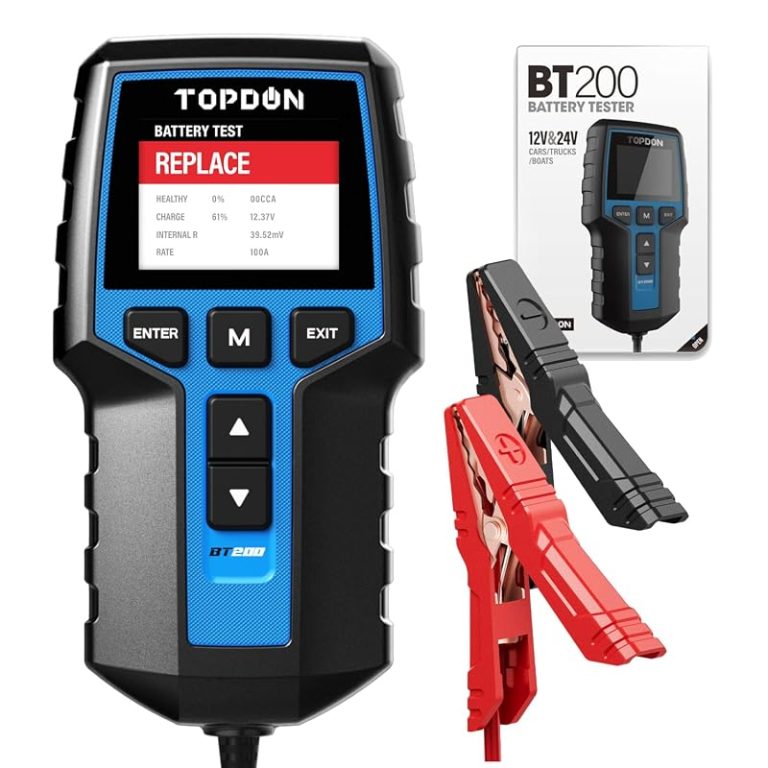
The BT200 is a handheld digital tester that checks a 12V lead-acid battery’s voltage and its ability to deliver cranking power. It reports state of charge, measured CCA, and an overall health percentage. The tester runs on the battery’s own power, so there’s no separate power source to plug in.
What This Guide Covers and How We Evaluated the BT200
This guide follows the operating sequence in TOPDON’s official documentation and the standard test methods used for automotive starting batteries. CarValleyNJ has not performed hands-on lab testing of the BT200. Everything below is based on the manufacturer’s manual, product documentation, and consistent owner-reported patterns.
For the full menu walkthrough and error-code meanings, our TOPDON BT200 manual guide is a useful companion to this article.
The Quick-Start Steps: Connect, Select, Test
- Turn the vehicle off and close all doors.
- Connect the red clamp to positive (+) and the black clamp to negative (–).
- Select the battery type: flooded, AGM, or GEL.
- Enter the CCA rating printed on the battery label.
- Run the test and read the health percentage and measured CCA.
That’s the whole routine. The sections below explain each step in enough detail to avoid common mistakes.
Safety First: Battery Voltage, Chemistry, and Stop Conditions
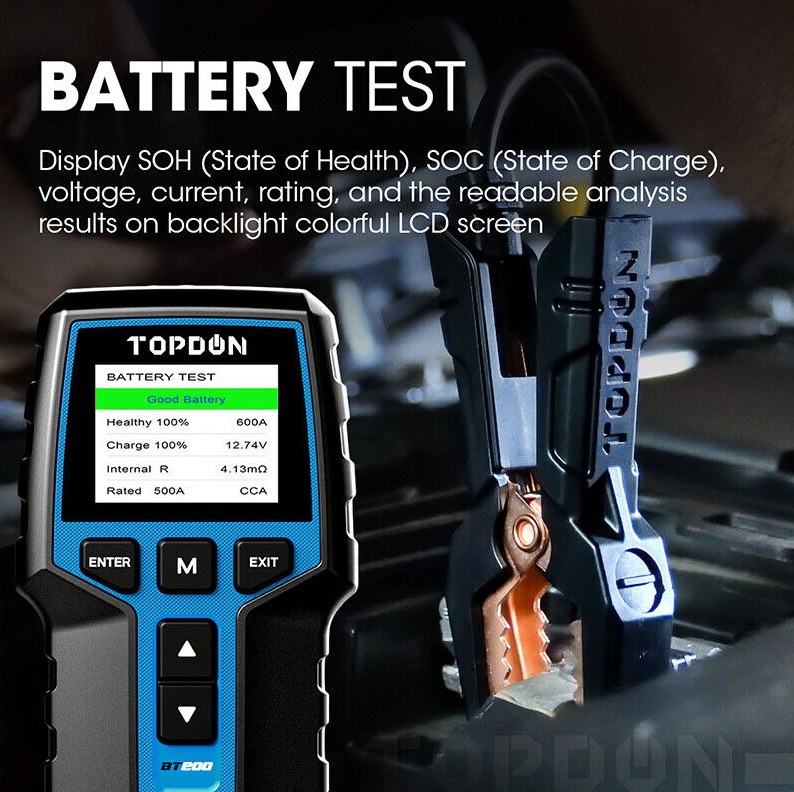
Car batteries store serious energy and can release explosive hydrogen gas. Testing takes seconds, but a careless setup can be dangerous.
Supported Chemistries and System Voltage (6V vs. 12V, and Why Lithium Is a No-Go)
The BT200 is designed for 12V lead-acid starting batteries: standard flooded, AGM flat plate, AGM spiral, and GEL. It is not made for 6V systems, and it is not reliable on lithium starter batteries. Lithium batteries follow a different discharge curve, so a lead-acid tester can produce a false pass or a false failure.
Correct Connection Order and When to Stop Immediately
Connect the red clamp first, then the black. When you disconnect, remove the black clamp first. That order keeps the risk of a short low if a clamp slips. If the tester shows an error, flashes a connection warning, or displays a voltage that seems wrong, stop and re-check both clamps.
Do not test a battery that is cracked, swollen, leaking, hot, or fuming. Do not test a battery with heavy corrosion that prevents clean clamp contact. If any of these conditions appear, skip the test and speak with a professional.
Hybrid and EV Caution: Test Only the 12V Auxiliary Battery
Hybrids and EVs use a high-voltage traction battery, but the BT200 is only for the 12V auxiliary battery. That battery can sit in the engine bay, under a rear seat, or in the trunk depending on the model. Never approach the orange high-voltage cables, and check the owner’s manual if you can’t find the 12V battery.
Step-by-Step: How to Test CCA and Voltage on Your Car
Follow these three steps in order. Skipping the prep work is the main reason owners get a confusing result.
Step 1: Prep the Vehicle and Locate the Battery
Park on level ground, set the parking brake, and turn the ignition off. Close doors and switch off accessories so nothing drains power during the test. If the car just ran, wait a few minutes for the surface charge to settle. A battery with a fresh surface charge can read higher than its true resting voltage.
Check the terminals for dirt and corrosion. Clean them with a wire brush if needed so the clamps get solid metal contact. A loose or dirty connection is the most common source of bad battery tester readings.
Step 2: Connect the Clamps and Select Battery Type
Attach the red clamp to the positive terminal and the black clamp to the negative terminal. The tester should power on and display a live voltage reading. From the menu, choose the battery type that matches the label on the battery. Most newer vehicles use AGM. If the label says flooded, maintenance-free, or GEL, pick the matching option.
Step 3: Enter the CCA Rating and Run the Test
Look for the CCA number on the battery label. It’s usually a three-digit number such as 550, 650, or 720. Use the buttons to enter that exact value and confirm. The tester then runs its measurement and compares your battery’s output with the rating you entered.
In about 10 seconds you’ll see the state of health percentage, measured CCA, and a pass-or-fail result. Don’t confuse CA with CCA — they are measured at different temperatures. Our guide to CCA vs CA on a car battery tester explains the difference clearly.
Reading the Results: State of Charge vs. Battery Health
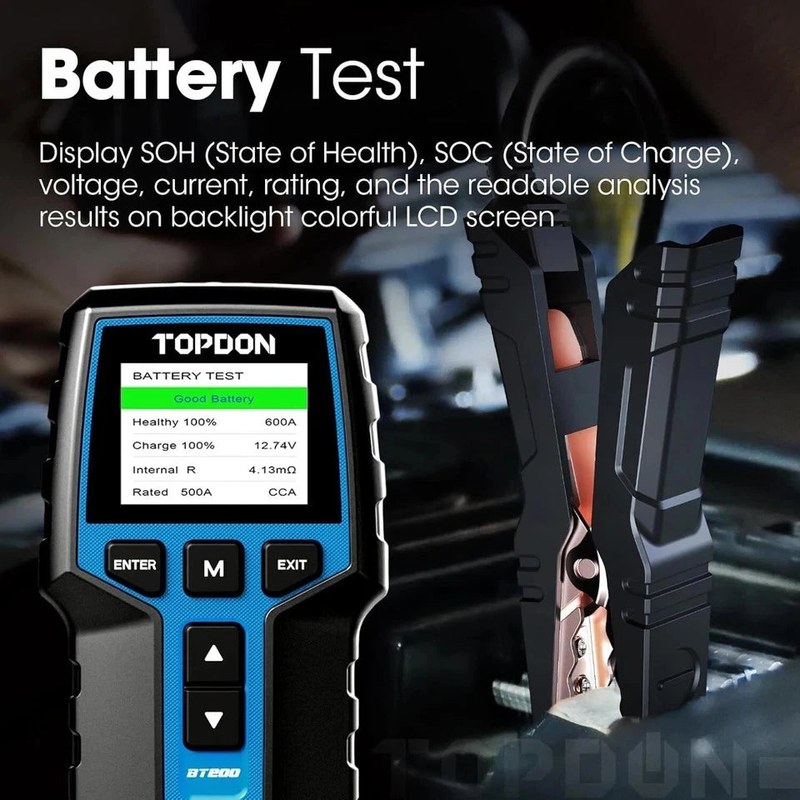
The BT200 screen shows two numbers that answer different questions. Learning which is which prevents a lot of confusion.
What the Voltage Reading Actually Tells You (State of Charge)
Voltage is a snapshot of the battery’s charge level, not its lifespan. A rested 12V battery sits near 12.6V fully charged, around 12.4V at 75%, and near 12.2V at about 50%. Below 12.0V, starting the car becomes a gamble. But a fully charged battery can still be dying inside. Voltage alone never shows that.
What the CCA and Health Percentage Tell You (True Cranking Condition)
The health percentage (sometimes labeled SOH) is the tester’s estimate of how much cranking stamina the battery still has compared with its rated CCA. As a general rule, above 75% is usable, and below 50% is a strong sign the battery is near the end of its service life.
The measured CCA tells you what the battery can actually deliver in cold conditions. If measured CCA sits far below the rated number, the battery is losing capacity even if the car still starts fine on a warm afternoon. That gap is exactly what winter mornings expose.
BT200 Limitations Every Owner Should Know
The BT200 is excellent at one job and quiet about the rest. Knowing its limits keeps you from asking the wrong questions of the wrong tool.
- Measures voltage, CCA, and overall health in about 10 seconds
- Compact, button-driven design needs no subscription or app account
- Covers flooded, AGM, and GEL 12V batteries for typical cars and light trucks
- Not an OBD2 scanner; no trouble codes, live data, or emissions functions
- No deep charging-system or parasitic-drain diagnosis
- Not for 6V or lithium starter batteries
What the BT200 Won’t Do: Charging-System and OBD2 Gaps
The BT200 is not an OBD2 scanner. It won’t read diagnostic trouble codes, show live sensor data, or prepare a vehicle for an emissions test. It also won’t pinpoint a charging-system fault, a parasitic drain, or a failing alternator under real driving conditions. It tells you whether the battery is healthy; the rest of the electrical system needs different tools or a professional diagnosis.
Privacy, Firmware, and App Notes
Most BT200 units sold in the US are standalone testers with no connected features. That means no account, no cloud sync, and very little to manage — but also no digital test history. Some units in TOPDON’s lineup support a phone app, so check your box before assuming your version has connectivity.
TOPDON BT200 vs. Multimeter vs. Load Tester: Side-by-Side Comparison
A dedicated battery tester isn’t the only way to check a battery. Some owners use a digital multimeter; professional garages use carbon-pile load testers. Here’s how they compare on the same five criteria.
| Option | Best for | Owner consideration | Driver consideration |
|---|---|---|---|
| TOPDON BT200 | Fast battery health and CCA checks at home or on the road | Low upfront cost; no subscription; 12V lead-acid only | 10-second result catches weak batteries before winter failures |
| Digital multimeter | Voltage checks and basic electrical testing | Least expensive; requires interpreting numbers manually | Shows charge level but misses overall battery condition |
| Carbon-pile load tester | Shop-level testing under real current draw | Higher cost and bulk; needs technical know-how | Most accurate cranking test; more than most owners need |
For a deeper look at where a basic tester beats a multimeter — and where it doesn’t — our battery tester vs multimeter comparison is worth a read.
Same Criteria for Each: Price, Accuracy, Safety, Ease, and Best Fit
The comparison above uses the same five criteria. The BT200 wins on ease of use and convenience. A multimeter wins on price and flexibility. A carbon-pile load tester wins on raw testing accuracy but costs more and demands more skill. No single tool wins every category, which is exactly why the right choice depends on what you’re trying to learn.
Also remember that no handheld tester is perfect. Connection quality, temperature, and corroded terminals all affect accuracy. Treat any single reading as strong evidence, not a final verdict, and retest after cleaning if the result surprises you.
Who Should Buy the BT200 — and Our Verdict
Ideal Owner and Vehicle Match
The BT200 suits drivers who want one fast answer: is my battery good? It’s a great fit for families with more than one vehicle, for owners heading into a cold winter, and for anyone who helps friends or family with roadside trouble. A 10-second test can catch a weak battery before it fails at a supermarket parking lot.
It’s a weaker fit if you own a 6V classic car, a lithium starter battery, or want OBD2 diagnostics in the same tool.
Drawbacks, Alternatives, Warranty, and Support
The main drawbacks are the narrow chemistry support and the lack of deeper electrical diagnostics. If you need battery records, app features, or a wider test standard list, TOPDON’s lineup includes higher-end testers that add those functions at a higher price. A simple multimeter is the cheapest alternative, and a carbon-pile tester is the most thorough.
Warranty terms vary by model, retailer, and purchase date, so check the documentation in your box or contact TOPDON’s US support before relying on a specific period. Our TOPDON BT200 warranty guide explains the details to verify.
Maintenance, Storage, and Next Steps After Testing
Keeping the Tester Accurate and the Battery Terminals Clean
A battery tester is only as good as its connection. Dirty terminals, loose clamps, and corroded posts all produce false readings. Wipe the terminals before each test, tighten the clamps, and hold them steady during the test. After use, store the BT200 in a dry spot away from direct sun and freezing temperatures.
When a Failed Test Means Replacement — and When to Call a Professional
If the battery is over three years old and the BT200 reports low health with a measured CCA well below the rating, replacement is usually the smart move. Cold weather is brutal on weak batteries. If the tester flags a nearly new battery, clean the terminals, re-enter the CCA rating, and retest after a full charge before deciding.
If the battery leaks, bulges, or keeps failing after a fresh charge, or if a new battery still dies overnight, stop guessing. A professional electrical diagnosis can find a parasitic drain or alternator problem before you waste money on another battery.
- Best for: Owners who want a fast, low-cost 12V lead-acid battery health and CCA check before winter or a long road trip.
- Think twice if: You need OBD2 code reading, lithium battery support, or a full charging-system and parasitic-drain diagnosis.
- Next step: Read the battery label, confirm the battery type and CCA rating, and run a baseline test now so you have a number to compare next season.
Frequently Asked Questions
The BT200 is designed for 12V lead-acid batteries: flooded, AGM flat plate, AGM spiral, and GEL. It does not support 6V systems or lithium starter batteries, which need different test profiles.
No. Turn the vehicle off, close the doors, and make sure accessories are off before connecting the clamps. Testing with the engine running can produce a false voltage reading.
A healthy 12V battery usually shows a resting voltage near 12.6V, a health percentage above 75%, and a measured CCA close to the rating printed on the label. Treat readings below that as a sign to retest or replace.
The tester measures cranking reserve, not just the ability to turn over a warm engine. A battery can start a car on a mild day while failing under the extra load of cold weather. A replace battery reading on an older battery is usually worth acting on.
It can test the small 12V auxiliary battery, which powers starting circuits and computers. It must never be used on the high-voltage traction battery or orange cables. Check your owner’s manual for the 12V battery location.
The standard BT200 is a standalone tester with no subscription and no app requirement. Some related TOPDON models add Bluetooth connectivity; if your unit includes an app, review its permissions before connecting.