Can an OBD2 Scanner Reset the Oil Change Light? Yes, with Caveats
An OBD2 scanner can reset the oil change light on many vehicles, but only if the scanner supports service resets for your make and model. Basic code readers usually cannot do it — you need a mid-range or dealer-level tool with service menus.
The direct answer: can an obd2 scanner reset the oil change light? Yes, on many modern vehicles — but only if the scanner supports service reset commands and the vehicle’s protocol allows it. A basic code reader that only pulls engine codes usually will not do the job. A bidirectional or manufacturer-specific scanner often will. This guide explains which tools work, which vehicles cooperate, and where the limits are.
- Check compatibility first: Verify the scanner’s vehicle coverage list includes your exact make, model, and year before.
- Know your tool tier: Basic code readers rarely reset oil lights; mid-range scanners with service menus usually can.
- Change the oil first: Resetting the light without changing the oil just hides the reminder and risks engine.
- Follow the procedure: Most vehicles need the ignition on, engine off, and a confirmed service reset command.
- Watch for subscriptions: Some scanners gate service resets behind paid software or annual fees.
Can an OBD2 Scanner Reset the Oil Change Light? Yes — With Important Caveats
An OBD2 scanner can reset the oil change light on vehicles that support service reset commands through the diagnostic port. That includes many cars from the mid-2000s onward, especially models with electronic oil life monitors.
The caveats matter. The scanner must have the right software for your make and model. The vehicle must be in the correct ignition state. And the oil must actually be changed — resetting the light without doing the service just hides the reminder.
Some vehicles still use a simple mileage counter. On those, the light may reset with a button sequence on the dashboard, and a scanner may not be needed at all. On others, the reset command sits in a proprietary menu that generic tools cannot reach.
How Oil Change Light Resets Work: Mileage Counters, Oil Life Monitors, and OBD-II Protocols
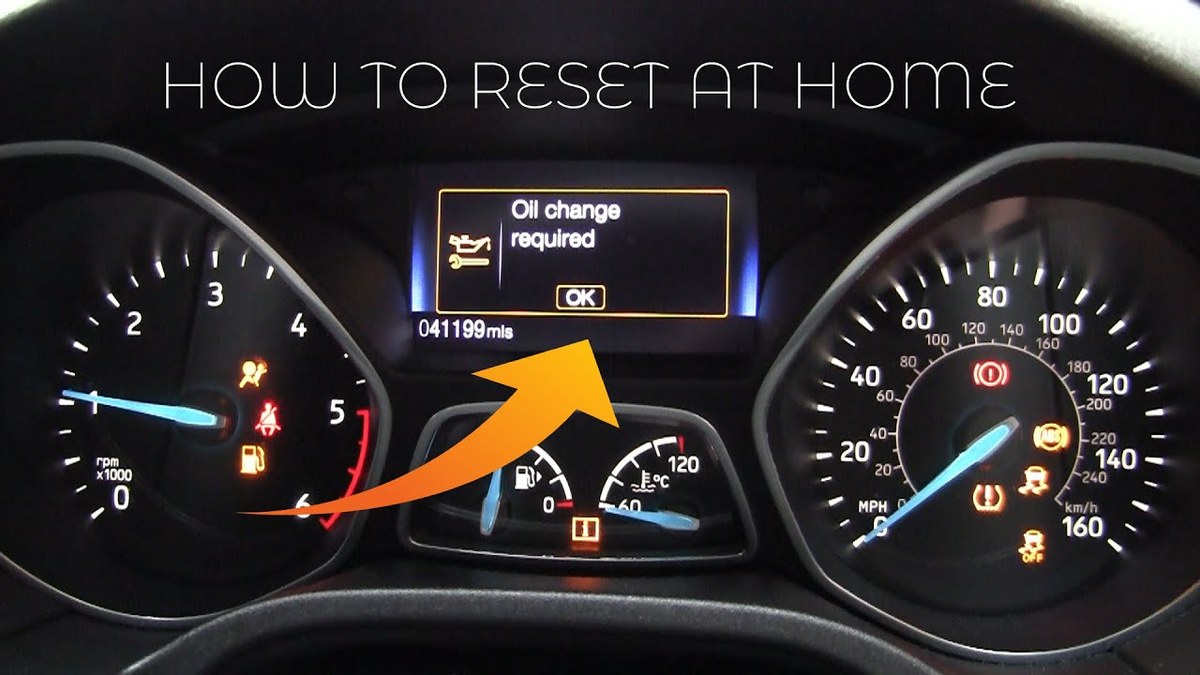
Oil change lights fall into two broad categories. The first is a fixed mileage counter. The light turns on at a preset interval, like every 5,000 or 7,500 miles, and the reset simply zeroes the counter. The second is an oil life monitor. These systems estimate oil condition based on engine temperature, RPM, driving time, and load. GM’s Oil Life System, Ford’s Intelligent Oil Life Monitor, and Honda’s Maintenance Minder all work this way.
When you connect a scanner and send a reset command, you are not clearing a diagnostic trouble code. You are telling the vehicle’s computer to restart its oil life calculation. That is why the command lives in a service menu, not in the generic OBD-II emissions menu.
Model-Year and Protocol Coverage: From OBD-II to CAN Bus and Beyond
OBD-II became mandatory for gasoline vehicles sold in the United States starting with model year 1996. That standardized emissions-related diagnostics, but not service resets. Each manufacturer kept its own reset logic.
In model year 2008, CAN bus became the required onboard network protocol. CAN allows faster data transfer and more modules to communicate, but it still does not standardize oil life reset commands. A scanner that works on a Ford may not work on a Toyota, even if both are CAN-based.
Some manufacturers also use proprietary layers on top of CAN. That is why a scanner’s vehicle coverage list matters more than its protocol list. If you see a “vehicle not supported” message, the scanner’s software does not include the reset routine for your car. Learn more about what “vehicle not supported” means on an OBD2 scanner and how to work around it.
Which OBD2 Scanners Can Reset the Oil Change Light? A Compatibility Guide
Scanner capability falls into three rough tiers. Knowing where your tool sits helps you predict whether it can handle an oil light reset.
Entry-Level Code Readers vs. Mid-Range Scanners vs. Dealer-Level Tools
Entry-level code readers read and clear powertrain diagnostic trouble codes. Most cost well under $100 and focus on emissions-related faults. They rarely include service reset menus. If you own one, check the manual before assuming it can reset an oil light. Many cannot. The same limits that apply to cheap OBD2 scanners and check engine lights often apply to service resets too.
Mid-range scanners add live data, ABS and SRS coverage, and some service functions. Oil light reset is common on this tier, but coverage varies by brand and vehicle. Some mid-range tools only reset oil lights on a handful of makes. Others cover dozens.
Dealer-level tools, such as factory diagnostic systems or professional aftermarket platforms, include full service reset routines. They can also perform brake service resets, battery registration, and steering angle calibration. These tools cost more and often require subscriptions or software licenses.
Manufacturer-Specific Resets: When Generic Tools Fall Short
Honda, Toyota, Ford, GM, BMW, Mercedes-Benz, Hyundai, and Subaru all use different reset routines. Some require a simple service command. Others need a multi-step procedure that involves the brake pedal, ignition cycling, or a specific sequence of buttons.
Generic OBD-II tools that only speak standard emissions protocols cannot send these manufacturer-specific commands. That is why a $30 code reader can clear a check engine light but cannot reset an oil change reminder on most vehicles.
Check: Verify the scanner’s vehicle coverage list includes your exact make, model, and model year. Limitations: Even when a scanner lists your make, the oil reset function may only work on certain trims or software versions.
How to Reset an Oil Change Light With an OBD2 Scanner: Step-by-Step Guide
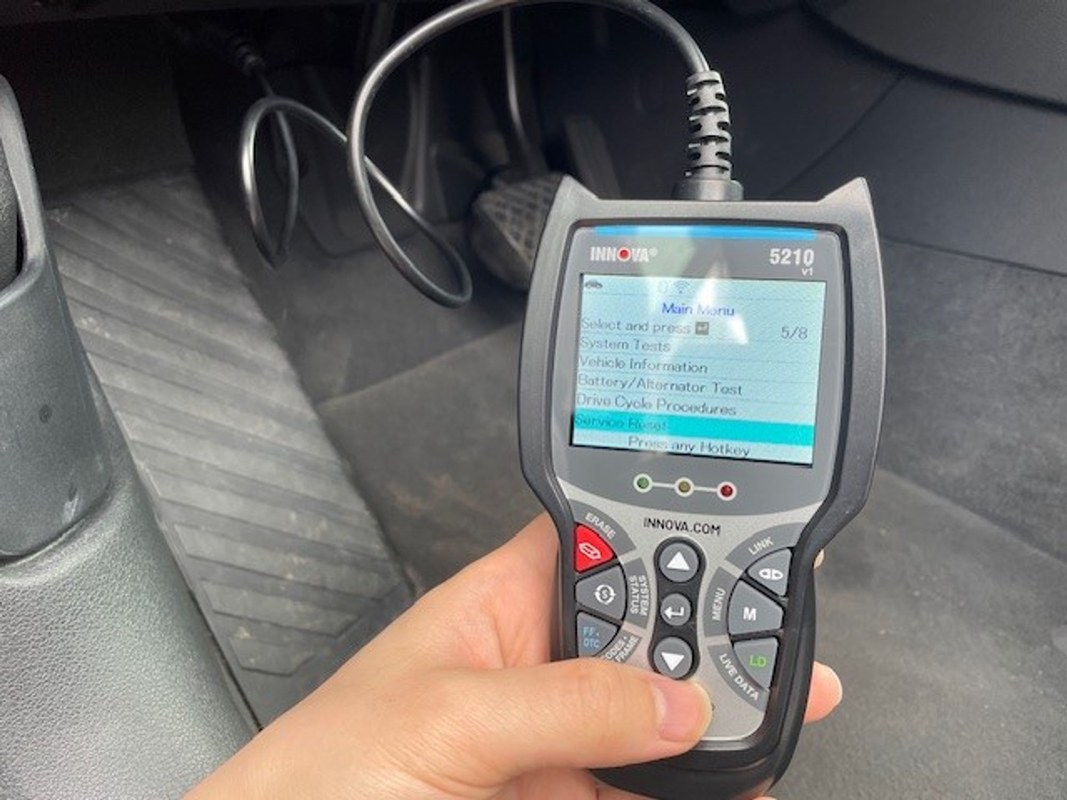
The exact steps vary by scanner and vehicle, but the general flow is consistent. Follow the scanner’s manual first. The steps below describe the typical process.
Locate the OBD2 Port, Set the Ignition Mode, and Connect the Scanner
The OBD2 port is usually under the driver’s side dashboard, near the hood release or steering column. Plug the scanner into the port. Most vehicles need the ignition in the “on” position with the engine off. Some scanners require the engine running, but that is less common for service resets. If you are unsure, check whether you need the engine running to use an OBD2 scanner.
Navigate to the Service Reset Menu and Confirm the Reset
Once connected, look for a menu labeled “Service,” “Oil Reset,” “Maintenance,” or “Service Reset.” Select the oil change or oil life option. The scanner will ask you to confirm. After confirmation, the vehicle’s computer should reset the oil life percentage to 100 percent or the mileage counter to zero.
Turn the ignition off, wait a few seconds, then restart the car. The oil change light should be gone. If the vehicle has a multi-function display, the oil life percentage should show 100 percent.
If the Light Stays On: Common Reset Failures and Fixes
If the light stays on, check the obvious things first. Was the ignition in the correct mode? Did the scanner actually complete the command? Is the scanner’s software up to date?
Some vehicles require the hood to be closed or the brake pedal to be pressed during the reset. Others need the key out and back in. If the scanner reports success but the light remains, try the vehicle’s manual reset procedure instead. Many manufacturers include a button-based reset method that works without any scanner.
- Confirm the scanner lists your exact make, model, and year for oil reset
- Follow the scanner manual and vehicle owner’s manual in the correct order
- Record the oil life percentage and any warning messages before resetting
- Reset the light before actually changing the oil
- Clear diagnostic codes just to make a warning light disappear
- Assume a code reader can perform service resets without checking its manual
What an OBD2 Scanner Can’t Do: Code Limits, Emissions Readiness, and Firmware Risks
An OBD2 scanner is a powerful tool, but it has limits. Knowing them prevents wasted time and costly mistakes.
Clearing Codes vs. Fixing the Underlying Problem: Code and Live-Data Limits
Clearing a diagnostic trouble code does not fix the fault. The code will return if the underlying problem remains. The same logic applies to an oil light. If the oil is old or low, resetting the light does not restore oil condition. It only hides the reminder.
Live data can help you diagnose, but it cannot tell you everything. A scanner can show oil pressure sensor values, but it cannot measure actual oil viscosity or contamination. Those require a laboratory oil analysis or a physical inspection.
Emissions Readiness, State Inspections, and Reset Limitations
Clearing codes also resets emissions readiness monitors. In many states, a vehicle with incomplete readiness monitors will fail an emissions inspection. If you clear codes right before a test, you may need to drive through a specific drive cycle to set the monitors again.
Oil light resets usually do not affect readiness monitors because they do not clear emissions-related codes. But if your scanner clears all codes as part of the reset, readiness can be affected. Check the scanner’s behavior before using it.
App Permissions, Bluetooth Pairing, and Firmware Update Risks
Bluetooth scanners rely on smartphone apps. Those apps often request location, account, and storage permissions. Some upload diagnostic data to cloud servers. Before installing an app, review its privacy policy and permission requests.
Firmware updates can also introduce risks. An update might add new features, but it can also change menu layouts or remove functions. If a scanner works for your vehicle, read update notes before installing new firmware. Some users report that updates break previously working service resets.
When Resetting the Light Isn’t Enough: Battery, Electrical, and Professional Diagnosis
Sometimes the oil light stays on for reasons unrelated to the reset procedure. Electrical problems, low battery voltage, or a faulty oil pressure sensor can all cause warning lights to behave oddly.
Battery Voltage, Chemistry, and Connection Order: Protect Your Scanner and Your Car
Low battery voltage can interrupt a reset command. If the scanner loses power mid-command, the vehicle’s computer may not complete the reset. Make sure the battery is in good condition before starting.
When connecting a scanner, plug it into the OBD2 port before turning the ignition on. Avoid unplugging the scanner while the vehicle is in the “on” or “running” state. This protects both the scanner and the vehicle’s modules from voltage spikes.
Hybrid and EV Cautions: High-Voltage Systems and Service Warnings
Hybrid and electric vehicles have high-voltage battery systems. The OBD2 port is isolated from those high-voltage circuits, but the vehicle may still have special service warnings. Some hybrids display oil life reminders that require a specific reset procedure through the infotainment system.
Warning Lights That Demand a Professional’s Attention
An oil pressure warning light is different from an oil change reminder. The oil pressure light indicates low oil pressure, which can cause engine damage. If that light comes on, stop driving and check the oil level immediately.
Other warning lights — such as check engine, battery, or temperature lights — may require professional diagnosis. A scanner can read the codes, but interpreting them correctly often requires experience and additional testing.
Choosing the Right OBD2 Scanner: Comparison, Compatibility, and Ownership Cost
If you want oil reset capability, choose a scanner that matches your vehicle and your budget. The comparison below shows the main trade-offs.
Side-by-Side Comparison: Basic Code Reader vs. Bidirectional Scanner vs. Dealer-Level Tool
| Option | Best for | Owner consideration | Driver consideration |
|---|---|---|---|
| Basic code reader | Reading and clearing engine codes | Lowest cost, but rarely resets oil lights | No service menus, limited diagnostic depth |
| Mid-range scanner | DIY owners who want oil reset and live data | Moderate cost, coverage varies by make | Service menus reduce trips to the dealer |
| Dealer-level tool | Professional shops and serious DIYers | High cost, often requires subscriptions | Full service functions, including oil reset |
Compatibility Checklist: Make, Model, Model Year, and Protocol
Before buying, confirm the scanner supports your vehicle. Check the manufacturer’s coverage list, not just the box. Some scanners list “OBD-II compliant” but only support generic emissions functions. That does not guarantee oil reset capability.
Also check whether the scanner requires a paid subscription for service functions. Some tools include oil reset in the base price. Others gate it behind an annual fee.
Warranty, Support, and Long-Term Value
Look for a warranty that covers the scanner itself. Firmware updates matter too. A scanner with regular updates is more likely to support newer vehicles. Check the manufacturer’s update policy before buying. Some brands offer free updates for the life of the tool; others charge per update.
If you own multiple vehicles, a scanner with broad make coverage offers better long-term value. If you only own one car, a model-specific tool may be enough. For guidance, see our roundup of the best OBD2 scanners for the money.
The Bottom Line: What an OBD2 Scanner Can and Cannot Do for You
An OBD2 scanner can reset the oil change light on many vehicles, but not all scanners can do it on all cars. The tool must support service resets for your specific make and model. The vehicle must be in the correct state, and the oil must actually be changed.
For most DIY owners, a mid-range scanner with oil reset coverage is the sweet spot. It saves dealer visits, handles routine maintenance reminders, and still reads diagnostic codes. A basic code reader may be enough if you only need engine codes, but do not expect it to reset service lights.
When in doubt, check the scanner’s manual, the vehicle owner’s manual, and the manufacturer’s coverage list. Those three documents answer most compatibility questions before you spend money.
- Best for: DIY owners who change their own oil and want to clear the reminder light without a dealer visit.
- Think twice if: You only need engine code reading, or your vehicle requires a manufacturer-specific reset that your scanner does not support.
- Next step: Check the scanner’s vehicle coverage list for your exact make, model, and year before purchasing.
Frequently Asked Questions
No. Basic code readers only read and clear engine diagnostic codes. You need a scanner with service reset functions that covers your specific make and model.
Most vehicles only require the ignition in the on position with the engine off. Some scanners or vehicles may need the engine running, so check the scanner manual and vehicle owner’s manual first.
The reset may not have completed, the scanner may not support your vehicle, or the oil life monitor may have detected severe driving conditions. Try the manual reset procedure in the owner’s manual if the scanner method fails.
An oil light reset usually does not affect emissions readiness monitors. However, if the scanner clears all diagnostic codes as part of the reset, readiness monitors can reset and may require a drive cycle to complete.
Resetting the light does not restore oil condition. It only hides the reminder. Driving on old or degraded oil can lead to engine wear, so change the oil before resetting the light.
Clearing codes removes diagnostic trouble codes from the engine computer. Resetting an oil light restarts the oil life monitor or mileage counter. They are separate functions that may require different scanner capabilities.