How Accurate Is a Battery Tester? What Drivers Can Trust
A battery tester is usually accurate enough to tell you whether a battery is healthy, weak, or failing, but it is not perfect. The best results come from the right tool, the right battery type, and a careful test setup.
How Accurate Is a Battery Tester? In most everyday cases, a good tester is accurate enough to tell you whether a battery is weak, healthy, or needs charging, but it is not a perfect lab instrument. The real answer depends on the tester type, the battery condition, and how carefully you use it.
- Fast answer: Most battery testers are good for practical decisions, not lab-grade precision.
- Best use: They work best when matched to the battery chemistry and system voltage.
- Main risk: Bad clamps, surface charge, and cold weather can distort the reading.
- Tool choice: Use a battery tester for health, a multimeter for voltage, and a scanner for.
- Safety first: Stop testing if the battery is swollen, leaking, hot, or damaged.
How Accurate Is a Battery Tester? The Short Answer Drivers Can Trust
For most drivers, a battery tester is best at giving a useful decision, not a flawless number. If the tool is matched to the battery type and used correctly, it can usually tell you whether the battery is likely fine, marginal, or failing.
That said, accuracy is not the same as certainty. A tester may be right about a weak battery and still miss a charging problem, a bad connection, or a battery that only fails under cold weather or heavy cranking.
What Battery Testers Actually Measure: Voltage, State of Charge, and Battery Health

Battery testers do not all measure the same thing. Some check resting voltage, some estimate state of charge, and some try to estimate battery health or internal resistance based on how the battery responds to a test.
That is why two tools can disagree and both still be useful. One may show that the battery is charged, while another shows that the battery is too worn out to hold that charge well.
State of charge vs. battery health: why the difference matters
State of charge tells you how full the battery is right now. Battery health tells you how well it can still do its job over time, especially when the starter motor asks for a lot of current.
A battery can be fully charged and still be weak. That is common in older batteries, short-trip vehicles, and cars that sit for long periods. A tester that only looks at voltage can miss that problem.
System voltage basics for 12V, 24V, and hybrid/EV support
Most passenger vehicles use a 12V system, but some trucks and commercial equipment use 24V. Hybrids and EVs may still have a 12V accessory battery, even though the main drive battery is much higher voltage and should not be tested casually at home.
Always check the tool’s rated system support before connecting it. A tester made for 12V lead-acid batteries may not be appropriate for a 24V setup, lithium starter battery, or high-voltage hybrid pack.
How Accurate Are Different Types of Battery Testers in 2026?
Accuracy depends a lot on the tool design. In general, a simple multimeter is great for voltage checks, a load tester is useful for cranking performance, and a conductance tester is often the fastest way to estimate battery condition for everyday drivers.
For a deeper comparison of one popular diagnostic family, see how Topdon battery testers work, and if you are comparing specific models, our guides on Topdon battery tester performance and Topdon BT100 vs. BT200 can help frame the differences.
Conductance testers vs. load testers vs. multimeters
Conductance testers estimate battery health by sending a small signal through the battery and reading how it responds. They are fast, easy to use, and popular for quick checks, but their result is still an estimate.
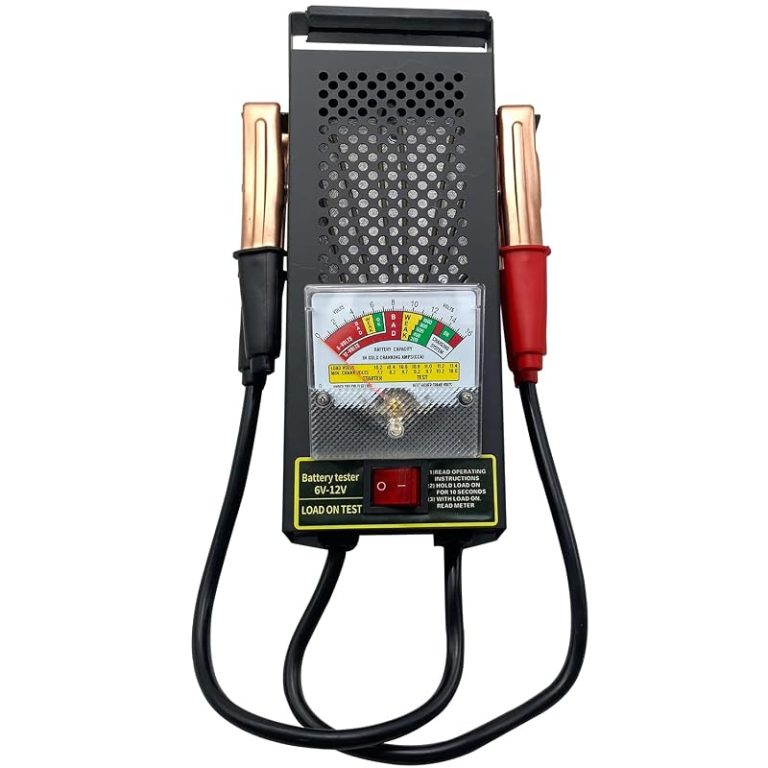
Load testers place a heavier demand on the battery and can reveal how it behaves under stress. They can be more revealing for starting problems, but they also require more care and can be harder to use safely.
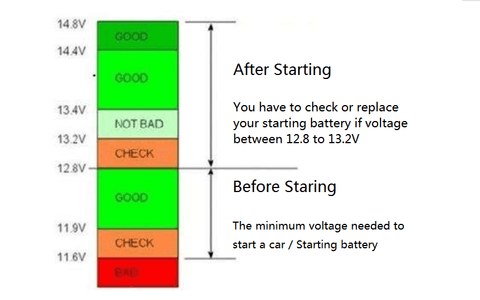
Multimeters are the simplest tool of all. They are excellent for measuring voltage, but voltage alone cannot prove that a battery is healthy. A battery can show decent voltage and still fail when the engine starts.
When app-based testers and smart chargers are useful, and where they fall short
App-based testers and smart chargers can be convenient because they store results, guide the user, or pair with a phone for easier reading. That can help owners track battery condition over time and keep records for maintenance.
The trade-off is that app-based tools depend on firmware, phone permissions, and stable connectivity. They are useful for everyday checks, but they still rely on the same basic battery data and can be limited by vehicle type or app support.
What affects accuracy: temperature, battery age, surface charge, and clamp quality
Cold weather can make a battery look weaker than it does on a warm day. Battery age matters too, because old batteries often test fine one day and fail the next under load.
Surface charge can also distort a reading right after charging or driving. Letting the battery rest before testing can improve consistency. Clean clamp contact matters as well, because corrosion or loose jaws can create a bad reading even when the tester itself is fine.
How to Use a Battery Tester Correctly for a Trustworthy Reading

Even a good tester can give misleading results if the setup is sloppy. The goal is simple: make clean contact, test under the right conditions, and stop if anything looks unsafe.
- Confirm battery type, voltage, and tool compatibility first
- Clean the terminals before testing
- Follow the tester’s order for positive and negative clamps
- Test a swollen, leaking, or overheating battery
- Use damaged cables or loose clamps
- Ignore the vehicle manual or the tester manual
Correct connection order and safe clamp placement
Most testers expect the clamps to go on the battery posts or clearly approved test points. A solid metal-to-metal connection is important, because paint, dirt, and corrosion can affect the result.
Keep the leads away from belts, fans, and other moving parts. If the battery is hard to reach, take your time and use the vehicle manual for the safest access point.
Damaged-battery stop conditions, swollen cases, leaks, and heat
Stop immediately if the battery case is swollen, cracked, leaking, or too hot to touch comfortably. Those are warning signs that the battery may be damaged and unsafe to test further.
Hybrid and EV cautions: when not to test at home
Many hybrids and EVs still have a 12V auxiliary battery, but the high-voltage system is a different matter. Do not assume every battery under the hood is safe to test the same way.
If the vehicle uses an unusual battery location, special service mode, or a high-voltage pack, the safest move is to check the owner manual or have a qualified technician handle it. That is especially true if warning lights, isolation faults, or crash damage are involved.
OBD2 and Diagnostic Scan Tools: What They Can and Cannot Tell You
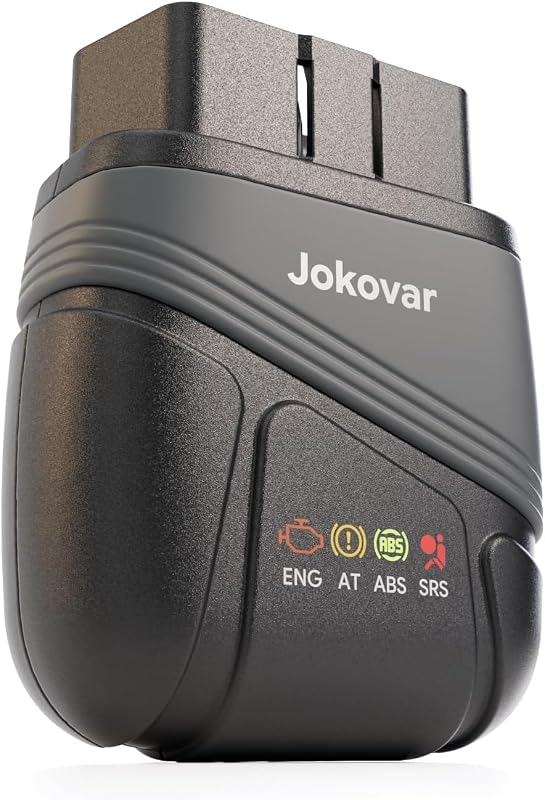
Some drivers confuse a battery tester with an OBD2 scanner. They overlap a little, but they solve different problems. A battery tester focuses on battery condition, while a scan tool reads vehicle computer data and fault codes.
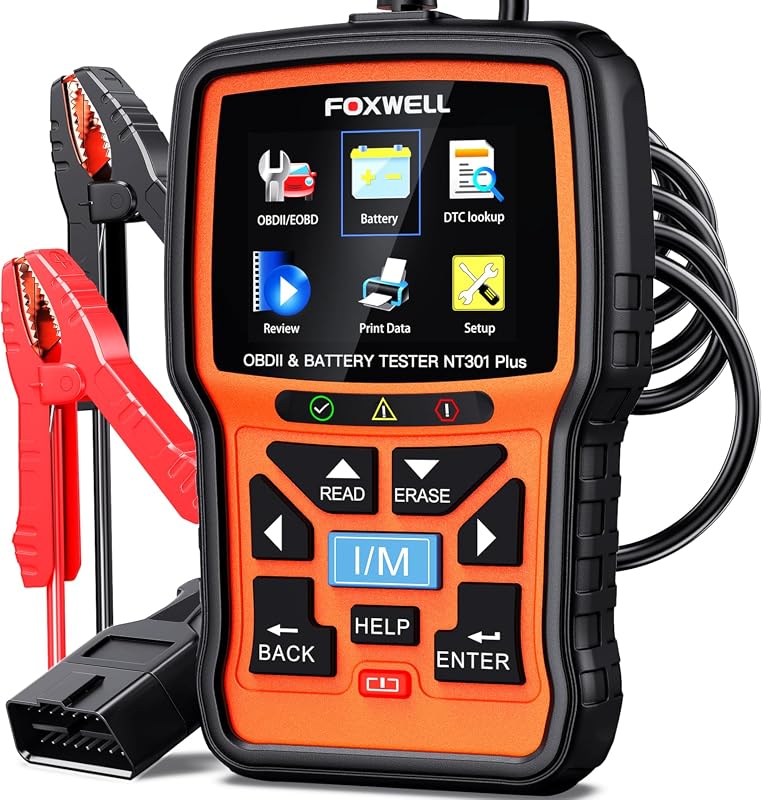
For drivers who want to compare scan-tool behavior too, our related guides on the Foxwell NT301 and OBDLink MX subscription needs are useful examples of how connected tools differ in real ownership.
Model-year and protocol coverage, plus port location and ignition mode
OBD2 coverage depends on the vehicle model year, protocol support, and whether the scan tool can communicate with your car’s specific system. The port is usually under the dash, but location and access vary by vehicle.
Some tools need the ignition on but the engine off. Others work best with the engine running. If the tool cannot connect, the issue may be compatibility, not accuracy.
Code reading, live data, emissions readiness, and reset limitations
Most scanners can read and clear basic trouble codes, show live sensor data, and check emissions readiness. That can help you understand whether a battery or charging issue is causing other symptoms.
But code clearing has limits. Clearing codes does not repair the problem, and some advanced resets or bidirectional commands may not be available on cheaper tools.
App permissions, firmware updates, and privacy considerations
Many modern scanners use an app, so permissions matter. Read the privacy policy, check what data is stored, and update firmware when the manufacturer recommends it.
Firmware can affect compatibility, especially on newer vehicles. A tool that worked last year may need an update to keep reading data correctly on a different model or software revision.
When battery or charging diagnosis needs a professional
If the battery tests weak, the alternator output looks unstable, or the vehicle keeps setting charging-related codes, a shop may be the better choice. That is especially true when the vehicle has a start-stop system, smart charging, or multiple batteries.
Battery Tester vs. OBD2 Scanner vs. Multimeter: Which Tool Fits Which Driver?
Each tool answers a different question. The best one for you depends on whether you want a fast yes/no answer, a deeper diagnosis, or a simple voltage check.
| Option | Best for | Owner consideration | Driver consideration |
|---|---|---|---|
| Battery tester | Quick battery health checks | Usually low maintenance and easy storage | Fast, simple, and low distraction |
| OBD2 scanner | Fault codes and live vehicle data | May need app support, updates, or subscriptions | Useful for diagnosis, but less direct for battery health |
| Multimeter | Basic voltage verification | Low cost and long service life | Best for simple checks, not full diagnosis |
Side-by-side comparison by accuracy, ease of use, vehicle coverage, and cost
A battery tester is usually the easiest way to judge battery condition quickly. A multimeter is the most universal, but it gives less context. An OBD2 scanner is best when the battery issue may be tied to the charging system or another vehicle fault.
For many owners, the right setup is not one tool but two. A battery tester plus a multimeter covers most basic needs, while a scan tool adds more detail when warning lights or drivability issues appear.
Best fit for daily drivers, DIY owners, older vehicles, hybrids, and fleet use
Daily drivers often want the fastest answer with the least hassle, so a simple battery tester is a strong fit. DIY owners may prefer a tester plus a scanner so they can separate battery problems from charging or code-related issues.
Older vehicles may work well with basic tools because the systems are simpler. Hybrids and fleet vehicles may need more coverage, more careful compatibility checks, and sometimes professional diagnosis.
Tire Pressure, TPMS, and Emergency Tools: Related Checks That Matter for Road Safety
Battery accuracy is only one part of safe roadside ownership. Tire pressure, TPMS behavior, and emergency tools matter too, especially for commuters and families who do not want a small issue to become a roadside delay.
If you also keep a portable inflator in the car, our guide on how to use a portable tire inflator can help you avoid common setup mistakes.
Door-jamb placard, cold pressure, and gauge accuracy
Always use the tire pressure listed on the door-jamb placard, not the number molded into the tire sidewall. Check pressure when the tires are cold for the most reliable reading.
A tire gauge is only as useful as its consistency. If the reading looks off, compare it with another gauge or have it checked against a known good reference.
Inflator duty cycle, TPMS relearn limits, and when a puncture needs professional repair
Portable inflators can help with top-offs and small corrections, but they are not all built for long continuous use. Duty cycle and heat limits vary by model, so read the instructions before relying on one for a flat tire.
TPMS can warn you about low pressure, but it cannot tell you whether a tire is safely repairable. If the puncture is in the sidewall or the tire is damaged beyond a standard repair zone, professional service is the safer path.
Temporary-repair limits, roadside visibility, storage conditions, and post-use inspection
Temporary repairs are not permanent fixes. After any roadside repair or inflation event, inspect the tire and recheck pressure soon after driving.
Store emergency tools where they are easy to reach but secure enough not to become a hazard in a sudden stop. For roadside use, visibility and safe placement matter as much as the tool itself.
What to Look for Before Buying: Compatibility, Warranty, Support, and Ownership Cost
Before you buy a battery tester, check what it supports today and what it may need later. A cheap tool that does not fit your vehicle or battery type is not really a bargain.
- Confirm battery chemistry and system voltage support
- Check cranking amp range and vehicle compatibility
- Review warranty, firmware, and app support
- Inspect clamp quality, cable length, and display readability
- Consider how often you will use it and where you will store it
Battery chemistry support, cranking amps, alternator testing, and vehicle compatibility
Look for support that matches your vehicle and battery type, such as standard lead-acid, AGM, EFB, or lithium if the manufacturer says it is supported. Also check the cranking amp range, because some testers are better for small cars while others are built for larger batteries.
Alternator testing can be helpful if you suspect charging trouble. Still, that feature varies by model, so verify what the tool actually measures before you buy.
Cable length, clamp quality, display clarity, app stability, and firmware support
Good clamps and clear displays matter more than many shoppers expect. If the tool is hard to read in sunlight or the leads are too short to reach the battery comfortably, it becomes annoying fast.
For app-based models, stability and updates matter just as much as raw features. A well-supported app can make the tool easier to use, while poor firmware support can make it obsolete sooner.
Warranty, replacement policy, and total cost of ownership over time
Warranty terms and replacement policies can matter more than a small price difference. If a tool is going to live in a glove box, garage drawer, or fleet kit, durability and support shape long-term value.
Final Verdict: What Drivers Can Trust About Battery Tester Accuracy in 2026
A battery tester is accurate enough for most drivers when you want a practical answer, not a laboratory report. It is most trustworthy when the tool matches your battery type, the battery is in decent condition, and the test is done with clean connections and proper setup.
For simple ownership, the best approach is to use the right tool for the right job: a battery tester for health, a multimeter for voltage, and an OBD2 scanner for charging-system clues or stored codes. That combination catches more real-world problems than any single device alone.
- Best for: Drivers who want a quick, practical battery check before a no-start problem gets worse.
- Think twice if: Your vehicle has a hybrid system, multiple batteries, or signs of battery damage.
- Next step: Verify battery type, voltage, and tool compatibility before you trust any reading.
Frequently Asked Questions
A good battery tester is usually accurate enough to tell whether a battery is healthy, weak, or likely failing. It is less exact than lab equipment, so the reading works best as a practical decision tool.
Some do, but not all. You should check the tool’s supported battery chemistry before buying or connecting it, because the wrong setting can produce misleading results.
Some testers can check charging-system output, but many only evaluate the battery itself. If you suspect alternator trouble, an OBD2 scanner or shop diagnosis may give more complete information.
No. A swollen, cracked, leaking, or hot battery should be treated as a safety risk. Stop testing and follow the vehicle and battery manufacturer’s instructions.
They can. Many connected tools may store battery results, VIN data, or app usage information, so it is smart to review permissions, account settings, and privacy terms before pairing.
Check battery chemistry support, system voltage, clamp quality, display clarity, warranty, and firmware or app support. Also make sure the tool fits the kind of testing you actually plan to do.



One Comment