What Does the TOPDON BT200 Test? Battery Health and Charging
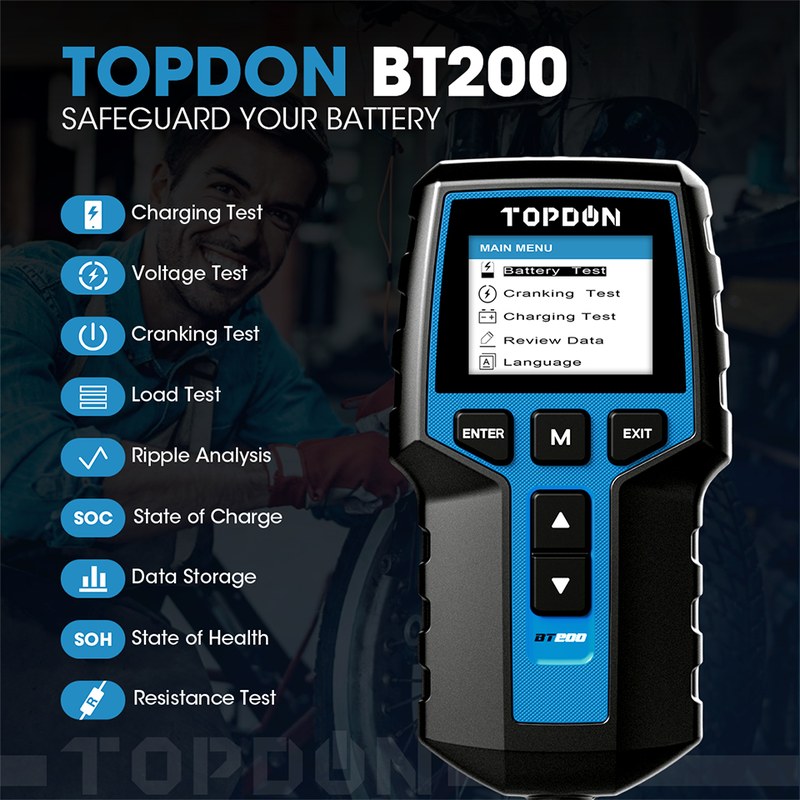
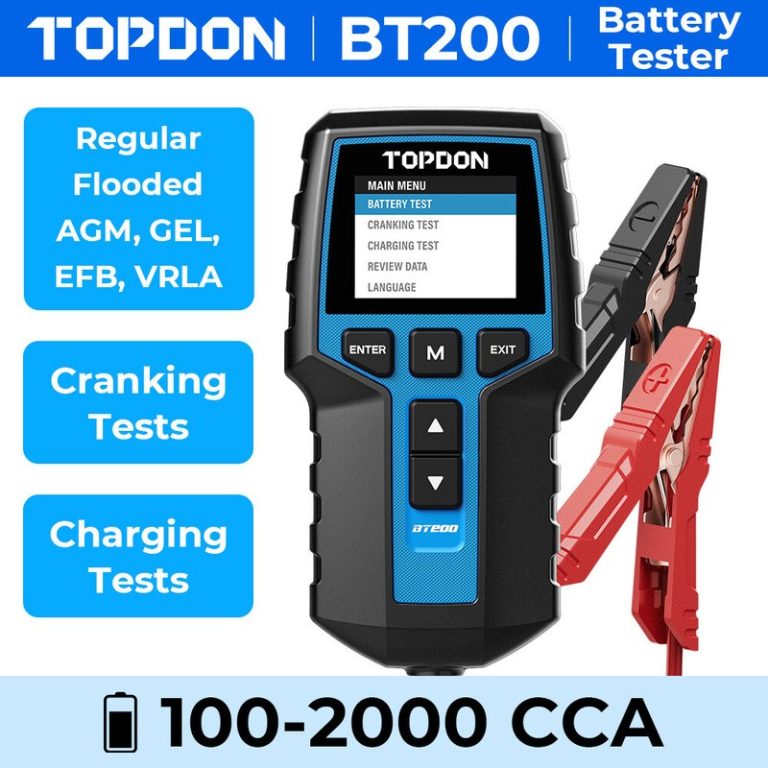
The TOPDON BT200 mainly tests 12V battery health, cranking performance, and charging-system output, plus basic OBD2 functions on many compatible vehicles. It is useful for quick diagnosis, but it is not a full professional scan tool or a high-voltage hybrid/EV service device.
What Does the TOPDON BT200 Test? In simple terms, it is built to check a 12V battery’s condition, starting performance, and charging-system output, with OBD2 scan functions for many gas vehicles. For US drivers, that means it can help separate a weak battery from a charging problem before you replace parts you may not need.
- Battery focus: It checks battery condition, starting load, and charging output.
- Compatibility matters: Vehicle year, battery type, and OBD2 support can change results.
- Not a full scan tool: It does basic code reading, not deep module diagnostics.
- Safety first: Stop if the battery is swollen, cracked, leaking, or very hot.
- Best use case: DIY owners who want fast answers before replacing parts.
What Does the TOPDON BT200 Test? Quick Answer for Battery and Charging Checks
The BT200 is mainly a battery and electrical tester. It is designed to evaluate battery state of charge, battery health, cranking performance, and alternator or charging output, then display that information in the app or handheld interface depending on the product version and setup.
It can also function as a basic OBD2 scanner on many compatible vehicles, so you may be able to read and clear common engine codes and view limited live data. If you want a broader view of scan-tool coverage, our guide on what vehicles the Innova 5610 works on shows how model-year and protocol support can shape real-world compatibility.
That said, the BT200 is not a full professional diagnostic platform. It can point you toward a battery, cranking, or charging issue, but it cannot always tell you the exact failed part inside the system.
How the TOPDON BT200 Works: Battery Health, Cranking, and Charging System Basics
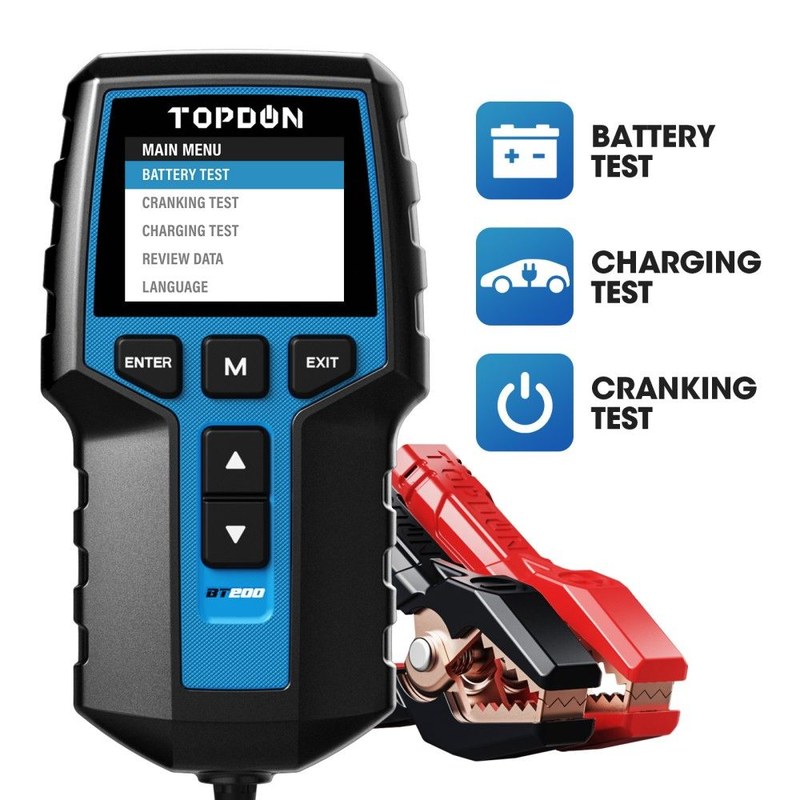
The BT200 works by measuring electrical behavior while the battery and charging system are at rest and while the engine is starting or running. From those readings, it estimates whether the battery still has usable reserve, whether the starter is drawing the system down too far, and whether the alternator is producing enough voltage.
For many drivers, that is the practical value. A slow crank, dim lights, or repeated jump-starts can come from an aging battery, poor connections, or a charging fault. A tester like this helps narrow the problem before you spend money on parts.
State of Charge vs. Battery Health: What the BT200 Can and Cannot Tell You
State of charge is the battery’s current fill level. Battery health is more about how much capacity and power the battery can still deliver compared with when it was new. Those are related, but they are not the same thing.
The BT200 can help estimate both, but it does not perform a full laboratory battery analysis. In plain English, it can tell you whether a battery looks weak, but it cannot guarantee that a battery will fail tomorrow or pass every real-world load condition forever.
That limitation matters on older vehicles, seasonal cars, and short-trip commuters. A battery may test “okay” after charging but still struggle after sitting for a few days. For owners comparing battery tools, our article on how Topdon battery testers work is a useful companion read.
System Voltage, Cold Cranking Performance, and Alternator Output
On a healthy 12V system, the tester looks at voltage behavior during cranking and charging. Cranking checks help show whether the battery can deliver enough power to start the engine. Charging checks help show whether the alternator and regulator are keeping voltage in a normal range while the engine runs.
That matters because a battery can be fine while the alternator is weak, and a good alternator cannot rescue a failing battery forever. If your car needs jump-starts often, the BT200 can help you decide whether the issue is battery-related, charging-related, or both.
If you are comparing Topdon options, this also pairs well with our Topdon BT100 vs. BT200 battery tester comparison and the broader look at which Topdon battery tester is best.
Vehicle Compatibility in the U.S.: Model Years, Battery Types, and OBD2 Support
Compatibility is one of the most important things to check before buying. The BT200 is aimed at common 12V automotive batteries and OBD2-equipped vehicles, but exact support can vary by battery type, vehicle year, and the app or firmware version you are using.
Check: Verify make, model, year, trim, voltage, ports, mounting space, and OEM requirements. Limitations: State verified exclusions.
For most US owners, the useful question is not just “Will it connect?” It is “Will it give me the functions I actually need on my vehicle?” That includes battery testing, OBD2 code reading, and whether the app can access the data your car exposes.
OBD2 Port Location, Ignition Mode, and Supported Protocols
Most OBD2 vehicles sold in the US have a 16-pin diagnostic port under the dash, but the exact location varies. The BT200 can only scan through that port if the vehicle supports the needed protocol and the ignition state is correct for the test you want to run.
Some functions require key-on, engine-off. Others need the engine running. If the app or tester cannot communicate, the first things to verify are port access, ignition position, adapter fit, and vehicle protocol support.
Code Reading, Live Data Limits, and Emissions Readiness Checks
Basic OBD2 coverage usually means reading generic powertrain trouble codes, clearing certain codes, and viewing some live data. It does not automatically mean full-system access to ABS, airbag, transmission, or manufacturer-specific modules.
Emissions readiness is another useful feature for many drivers in inspection states. Still, clearing codes can reset readiness monitors, which may matter before a state inspection. If you are unsure how a tool’s scan depth compares to a more advanced unit, see what is the best bidirectional scan tool for the money.
When a Scan Tool Is Not Enough and a Professional Diagnosis Is Needed
If the vehicle has repeated no-starts, charging warnings, parasitic drain, hybrid-system faults, or intermittent electrical problems, a basic tester may only show part of the picture. At that point, a shop with load-testing equipment, wiring diagrams, and module-level scan access may be the safer next step.
That is especially true when the battery tests okay but the vehicle still dies overnight, or when the alternator output looks normal but accessories act erratically. A single tester cannot replace a full diagnostic process.
How to Use the TOPDON BT200 Safely: Connection Order, App Permissions, and Firmware
Safe use starts with the vehicle parked, the area ventilated, and the battery condition assessed before you connect anything. Corroded, swollen, leaking, or physically damaged batteries need extra caution and may require professional handling.
Correct Clamp Connection Order and Damaged-Battery Stop Conditions
Follow the product manual for the exact clamp order. In general, clean contact matters more than force. Loose or dirty clamps can create false readings or poor communication with the tester.
Stop immediately if the battery case is swollen, cracked, leaking, or extremely hot. Do not continue testing a battery that shows signs of damage or chemical leakage. That is a safety issue, not just a measurement issue.
A damaged battery can vent gas, leak acid, or fail suddenly. If you see swelling, cracking, heat, or fluid, stop and follow the vehicle and product instructions before proceeding.
Bluetooth Pairing, App Permissions, and Firmware Updates in 2026
If your BT200 version uses Bluetooth and a phone app, pairing usually depends on location, Bluetooth, and sometimes notification permissions. Give the app only the permissions it needs, and review any account or data-sharing settings before you start a scan.
Firmware updates can improve compatibility or fix bugs, but they should be done carefully and only from the official app or manufacturer instructions. A failed update can leave you with a tool that is harder to use when you need it most.
Hybrid and EV Cautions: What Owners Should Avoid
The BT200 is aimed at 12V battery and OBD2 work, not high-voltage hybrid or EV service. Owners should not open orange cables, service traction batteries, or assume a 12V tester can diagnose the full high-voltage system.
Hybrid and EV electrical systems can be dangerous. If your concern involves the traction battery, inverter, or high-voltage charging hardware, use the vehicle manual and a qualified technician.
TPMS and Tire-Related Checks: What the BT200 Helps With and What It Does Not
The BT200 is primarily a battery and diagnostic tool, so it is not a TPMS programmer or tire repair machine. Still, tire pressure and electrical health often get mixed together in real ownership because a weak battery can make dash warnings more confusing, and low tire pressure can affect how a driver interprets warning lights.
Door-Jamb Placard, Cold Tire Pressure, and Gauge Accuracy
For tire checks, always use the pressure listed on the driver-door jamb placard, not the number molded into the tire sidewall. Measure pressure when the tires are cold for the most accurate reading.
If you are using any separate pressure gauge or inflator alongside the BT200, remember that gauge accuracy varies. A bad reading can lead you to overinflate or underinflate, which affects ride quality, wear, and safety.
Inflator Duty Cycle, TPMS Relearn Limits, and Temporary Repair Boundaries
If a roadside setup includes an inflator or compressor, duty cycle matters. Small portable compressors are not meant to run continuously for long periods. Let the tool cool as directed by its manual.
The BT200 itself does not replace TPMS service tools, and it does not perform tire relearns. It also cannot turn a temporary plug, sealant, or roadside inflation into a permanent repair. If you need more guidance on emergency electrical tools, you may also want our article on whether the Topdon battery tester is any good.
Puncture Location and When Tire Damage Requires Professional Repair
Not every puncture can be safely repaired. Sidewall damage, shoulder damage, large punctures, or repeated air loss usually call for professional inspection and often replacement. A quick roadside fix is only a temporary measure in many cases.
If the tire is losing air fast or the damage is near the sidewall, do not assume a compressor or sealant will solve it. Use the spare, roadside assistance, or a tire shop if the vehicle is unsafe to drive.
Roadside and Emergency Use: Power Limits, Storage, and Post-Use Inspection
Some owners keep a battery tester or compact diagnostic tool in the car for emergencies. That can be useful, but only if the tool is stored correctly and you understand its limits in a roadside situation.
Safe Location, Traffic Visibility, and Tool Completeness Before Use
Use the tool only in a safe, visible location away from traffic. Turn on hazard lights if appropriate, and keep yourself out of moving lanes while checking the battery or electrical system.
Before relying on the BT200 in an emergency, make sure the clamps, cable, app access, and phone battery are all ready. A missing cable or dead phone can make a simple diagnostic check impossible when time matters.
Any roadside diagnostic work can distract you from traffic and moving vehicles. Park safely first, then keep the setup simple so you are not juggling cables, phones, and traffic at the same time.
Current Limits, Cable or Pack Condition, and Storage Conditions
Electrical tools can only work within their rated limits, and those limits vary by product version. Do not assume a tester can handle every battery size or every emergency-start situation.
Inspect cables, clamps, and connectors regularly. Store the tool in a dry place away from extreme heat and moisture. If the product uses an internal battery or a connected device, charge it on a normal schedule so it is ready when needed.
Post-Use Inspection and Recharging After an Emergency Start
After any emergency electrical use, inspect the clamps for heat, wear, or corrosion. If the tester was exposed to dirt, road spray, or battery residue, clean it according to the manual before storing it.
Recharge or reconnect the tool as directed so it is not left depleted. That small habit can make the difference between a useful emergency tool and one that is dead the next time you need it.
TOPDON BT200 vs. Similar Battery Testers and Jump Tools: Which Driver Should Choose What?
The BT200 sits in a middle ground between a simple battery checker and a full scan tool. That makes it appealing for many DIY owners, but not every driver needs the same level of function.
Battery Tester vs. Jump Starter vs. Full Diagnostic Scanner
A battery tester tells you about battery and charging health. A jump starter gives you temporary starting power. A full diagnostic scanner goes deeper into vehicle modules, codes, and service functions.
If you mainly want to know whether a battery is weak, a tester is the right first step. If you need emergency starting power, a jump starter is more useful. If you want deeper fault isolation, a more advanced scanner may be worth the extra cost.
| Option | Best for | Owner consideration | Driver consideration |
|---|---|---|---|
| BT200 battery tester | Battery, cranking, and charging checks | Lower complexity than a full scan tool | Quick checks with limited distraction |
| Jump starter | Emergency no-start situations | Needs regular charging and storage care | Useful when the battery is already dead |
| Full diagnostic scanner | Deeper module-level troubleshooting | Usually higher cost and more features to learn | Better for complex warning lights and data |
How the BT200 Compares on Accuracy, Convenience, and Vehicle Fit
For everyday use, the BT200’s strength is convenience. It can give a fast answer about a battery or charging system without requiring a shop visit. Its weakness is depth, because it cannot replace advanced module diagnostics or hands-on electrical testing.
That trade-off is why many owners pair a battery tester with a separate scan tool or keep one for home and one in the car. If you are comparing broader Topdon scan options, our guide to the Topdon TopScan review can help you see the difference between basic and more advanced app-based diagnostics.
Best Match for Daily Drivers, DIY Owners, and Seasonal Vehicles
Daily drivers benefit from quick battery checks when starting gets slow or warning lights appear. DIY owners benefit because they can separate a weak battery from a charging issue before replacing parts. Seasonal vehicle owners benefit because storage-related battery problems are common after long periods of inactivity.
If your vehicle is older, heavily modified, hybrid, or already showing complex electrical symptoms, a more advanced scan tool or professional diagnosis may be the better fit.
Ownership Costs, Warranty, Support, and Long-Term Maintenance
Ownership cost is not only the purchase price. It also includes app support, firmware updates, replacement accessories, storage, and the time you spend learning the tool.
Battery Tester Maintenance, Cable Care, and Storage Best Practices
Keep the clamps clean and dry. Do not coil cables tightly around hot or dirty parts, and do not store the tester where battery acid, oil, or water can reach it. Small habits like that help preserve accuracy and reduce connection problems.
It is also smart to check the app and firmware from time to time. Compatibility can change as phones update, so a tool that worked last season may need a fresh pairing or software update later.
Warranty Coverage, Support Expectations, and Replacement Considerations
Warranty terms can change by seller, region, and product revision, so check the current US listing or manual before you buy. Support quality matters because app-based diagnostic tools depend on updates and device compatibility.
If you plan to keep the tool for several years, look at how easy it is to get firmware support, replacement clamps, and troubleshooting help. That long-term service matters as much as the feature list.
Final Verdict: Who Should Buy the TOPDON BT200 in 2026?
The BT200 makes the most sense for drivers who want a practical, low-friction way to check battery health, cranking performance, and charging output without moving up to a more expensive scan tool. It is especially useful for home garages, commuters, and seasonal-vehicle owners who want faster answers before they replace parts.
Ideal User and Ideal Vehicle Types
It fits best with 12V gas vehicles, common daily drivers, and owners who want a straightforward battery-and-OBD2 helper. It is less compelling for people who need deep module diagnostics, hybrid high-voltage service, or advanced repair functions.
For a broader buying decision, compare it with the needs outlined in our which Topdon scanner is best guide before choosing a battery tester or a full scan tool.
Main Strengths, Limitations, and Safer Alternatives
The main strengths are simplicity, quick battery and charging checks, and useful OBD2 coverage on many vehicles. The main limitations are limited diagnostic depth, vehicle-by-vehicle compatibility differences, and the need to use app permissions and updates carefully.
If your electrical problem is complex, or if you need emergency starting power instead of diagnosis, a jump starter or professional scan tool may be the safer alternative.
- Best for: Drivers who want a simple battery, cranking, charging, and basic OBD2 check in one compact tool.
- Think twice if: You need deep module diagnostics, hybrid/EV high-voltage service, or a tool that replaces a professional scan setup.
- Next step: Confirm your vehicle year, battery type, and app/firmware support before you buy.
Frequently Asked Questions
It is aimed at common 12V automotive batteries and OBD2-equipped vehicles, but exact support varies by model year, battery type, and app or firmware version. Always verify your vehicle before buying.
On many compatible OBD2 vehicles, it can read and clear basic engine codes. Clearing codes may also reset readiness monitors, which can matter for emissions inspections.
No. If the battery is swollen, cracked, leaking, or unusually hot, stop and follow the manufacturer’s instructions or get professional help.
Some versions use Bluetooth and a phone app, while setup details can vary by product revision. Check the current manual, app permissions, and firmware instructions before pairing.
It is meant for 12V battery and OBD2 work, not high-voltage hybrid or EV service. Do not use it as a substitute for traction-battery or orange-cable procedures.
Confirm your vehicle compatibility, supported battery type, app requirements, warranty terms, and whether you need basic testing or deeper diagnostics. That helps you avoid paying for features you will not use.




One Comment