Can an OBD2 Scanner Read Manufacturer Specific Codes? Only Some
Yes, an OBD2 scanner can read manufacturer specific codes, but only enhanced models with the right software. Basic code readers are limited to generic emissions codes that all cars share.
Wondering can an OBD2 scanner read manufacturer specific codes? The short answer is yes, but only some scanners can. A basic code reader pulls generic powertrain codes from any 1996 or newer car, while enhanced scanners go deeper into manufacturer-specific systems like transmission, ABS, airbag, and body control modules. This guide explains exactly what each scanner tier can and cannot see, so you can pick the right tool without wasting money.
- Scanner tiers: Basic readers pull generic P0xxx codes; enhanced scanners unlock P1xxx, U, B, and C.
- Protocol coverage: 1996+ cars use OBD2, but CAN became standard around 2008, so older cars may.
- Firmware matters: Manufacturer-specific coverage depends on updates, and some makers charge for new coverage.
- Privacy: Connected scanner apps may collect VIN, codes, and location data, so check permissions.
- Reset limits: Clearing codes does not fix faults and resets emissions monitors to “not ready.”
The Short Answer: Yes — But Only Some Scanners Read Manufacturer-Specific Codes
Every OBD2 scanner speaks a common language for emissions-related diagnostics. That language covers the check engine light and the powertrain codes that all automakers must share. Manufacturer-specific codes live outside that common language, so the scanner needs extra software and licensing to translate them.
Generic OBD2 vs. Enhanced Diagnostics
Generic OBD2 diagnostics are standardized by federal emissions rules. Any scanner that meets the standard can read them on any compatible car. Enhanced diagnostics are the automaker’s own data, covering modules like the transmission control unit, anti-lock brake system, airbag controller, and body control module. These require the scanner maker to license or reverse-engineer the automaker’s protocols.
That is why a $20 code reader can read a check engine code on a Ford, Toyota, and BMW, but it cannot read a BMW-specific chassis code or a Ford-specific transmission code. The hardware is the same; the software is not.
Why “Only Some” Is the Real Answer
Scanner makers decide how much manufacturer-specific coverage to build into each model. Entry-level readers often skip enhanced codes entirely. Mid-range scanners add coverage for popular makes like Toyota, Honda, Ford, and GM. Professional tools cover dozens of makes and let you update the software as new models arrive.
Even within one brand, coverage varies. A scanner that reads Toyota ABS codes may not read Toyota body control codes. Check the manufacturer’s coverage list before you buy, not after. If a scanner cannot communicate with a module, it may show a message like “vehicle not supported,” which usually means the scanner lacks the software for your car’s system.
OBD2 Protocols and Model-Year Coverage: What Your Car Actually Speaks
OBD2 is not one single language. It is a family of protocols, and your car uses one or more of them depending on the model year and manufacturer.
The 1996 Mandate and the 2008 CAN Transition
Since 1996, all cars and light trucks sold in the United States must have an OBD2 port and support standard emissions diagnostics. That does not mean every car uses the same wiring or data format. In 2008, Controller Area Network (CAN) became the required protocol for new vehicles, but older cars may still use one of the earlier protocols.
If you buy a scanner that only supports CAN, it will not work on a 2003 car that uses an older protocol. Most modern scanners support all five OBD2 protocols, but budget readers sometimes cut corners.
Protocol Types: CAN, KWP2000, VPW, PWM, and ISO 9141
- CAN (ISO 15765): Used on most 2008 and newer vehicles and many earlier models.
- KWP2000 (ISO 14230): Common on 2000s-era Asian and European vehicles.
- VPW (SAE J1850): Used by many General Motors vehicles.
- PWM (SAE J1850): Used by many Ford vehicles.
- ISO 9141: Found on many 1990s and early 2000s Chrysler, European, and Asian vehicles.
If your scanner does not support the protocol your car uses, it will not connect at all. That is a different problem from missing manufacturer-specific codes, but it feels the same when you are staring at a blank screen. Our guide on why an OBD2 scanner says protocol not supported walks through the common causes and fixes.
Generic vs. Enhanced Codes: What Each Scanner Tier Unlocks
P0xxx Codes Are Universal; P1xxx, P2xxx, U, B, and C Codes Are Not
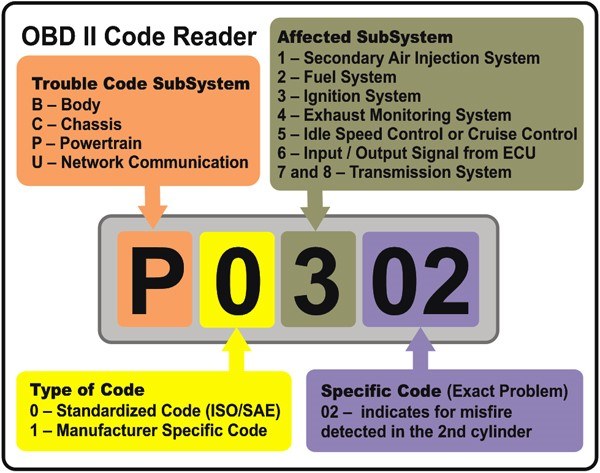
Diagnostic trouble codes follow a letter-and-number pattern. The letter tells you the system: P for powertrain, B for body, C for chassis, and U for network communication. The first digit tells you whether the code is generic or manufacturer-specific.
- P0xxx: Generic powertrain codes, readable by any OBD2 scanner.
- P1xxx: Manufacturer-specific powertrain codes, often requiring enhanced software.
- P2xxx: A mix of generic and manufacturer-specific codes.
- U, B, and C codes: Usually manufacturer-specific beyond a small set of generic network codes.
A scanner that only reads generic codes will show P0300 (random misfire) but may not show the manufacturer-specific code that tells you which cylinder or which fuel system is involved. That extra detail is often the difference between a quick fix and a guessing game.
Live Data, Freeze Frame, and Graphing Limits
Manufacturer-specific diagnostics are not just about codes. Enhanced scanners also unlock live data streams from modules that generic readers cannot see. That includes transmission fluid temperature, ABS wheel speed sensors, airbag system status, and battery management data in hybrids.
Basic readers usually show freeze frame data and a few live values like engine RPM and coolant temperature. Enhanced scanners add graphing, recording, and the ability to compare multiple sensors at once. If you want to diagnose an intermittent problem, that recording ability matters. See our guide on how to find live data on an OBD2 scanner for the step-by-step process.
Scanner Features That Matter for Manufacturer-Specific Diagnostics
Firmware Updates and Model-Year Coverage
Manufacturer-specific coverage is not permanent. Automakers update their software, and scanner makers release firmware updates to keep up. A scanner that covers 2020 models may not cover 2026 models until the maker releases an update.
Check whether updates are free or paid before you buy. Some scanners require an annual subscription for new coverage. Others offer lifetime updates for the current software version but charge for major revisions.
App Permissions, Bluetooth Pairing, and Data Privacy
Many enhanced scanners pair with a smartphone app. That app needs Bluetooth access, and it may ask for location, storage, and account permissions. Some apps upload your VIN, diagnostic trouble codes, and GPS location to the cloud.
Bi-Directional Controls, TPMS Relearn, and Other Enhanced Functions
Some enhanced scanners go beyond reading codes. Bi-directional controls let you command components like fuel injectors, cooling fans, or ABS solenoids to turn on and off for testing. That is a powerful feature, but it also means you can command a system to do something while a part is failing. Use it carefully and only with the vehicle’s service information in front of you.
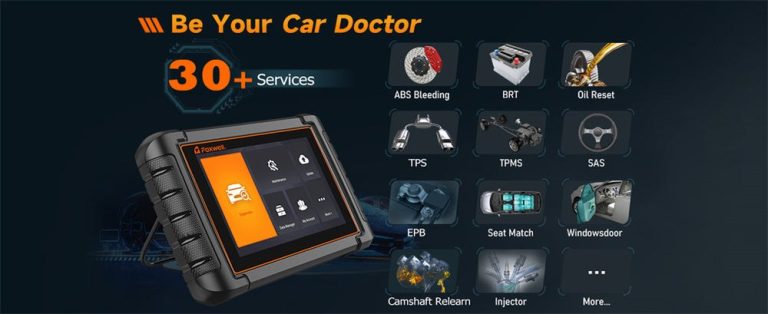
Other enhanced functions include TPMS sensor relearn, oil life reset, brake pad service mode, and steering angle sensor calibration. These are exactly the tasks that a generic code reader cannot do. If you plan to do your own maintenance, these features can save you trips to a shop.
Before You Scan: Port Location, Ignition Mode, and Battery Voltage
Finding the DLC and Getting the Ignition Right
The OBD2 port, officially called the Data Link Connector (DLC), is usually under the driver’s side dash, near the steering column or the hood release. If you cannot find it, check the owner’s manual. Some vehicles hide it behind a small panel or above the footwell.
Most scanners need the ignition in the “on” position with the engine off to read codes. Some need the engine running for live data. The scanner’s instructions will tell you which mode to use. If you plug in and get no response, try turning the ignition on first.
Why Low Battery Voltage Causes False Codes
A weak battery can cause all kinds of false diagnostic results. Low voltage can make modules fail to communicate, trigger random low-voltage codes, or prevent the scanner from completing a full system scan. If the dashboard lights dim when you plug in the scanner, charge or replace the battery before you trust any codes.
This is also why you should not clear codes on a weak battery. The act of clearing codes can leave the system in an incomplete state, and the next drive cycle may set codes that have nothing to do with the real problem.
Emissions Readiness and Reset Limitations: What Scanners Can and Can’t Do
Readiness Monitors, Drive Cycles, and State Emissions Laws
Modern cars run continuous and non-continuous emissions monitors. When you clear codes, the monitors reset to “not ready.” Your car must complete a specific drive cycle before the monitors run again. If your state requires an OBD2 emissions test, a car with incomplete monitors can fail even if no check engine light is on.
Reset Limitations: When Clearing Codes Isn’t a Fix
Clearing a code does not fix the underlying problem. If the fault is still present, the code will return, often within the same drive cycle. Some codes are permanent and cannot be cleared by any aftermarket scanner until the vehicle’s own monitors confirm the repair. That is a safety feature, not a scanner limitation.
If you are wondering whether a cheap OBD2 scanner can clear a check engine light, the answer is usually yes for generic codes, but the light will come back if the fault remains.
When a Manufacturer-Specific Code Requires a Professional
Proprietary Tools, Security Gateways, and Programming
Some manufacturers use security gateways that block aftermarket scanners from accessing certain modules. BMW, Mercedes-Benz, and some newer vehicles require a login or a special tool to reach programming functions. Even a high-end aftermarket scanner may not be able to perform module coding or key programming.
If your car needs a software update, module replacement, or component coding, a professional scan tool with the automaker’s software is usually the right choice. This is not a failure of your scanner; it is a deliberate security measure.
Hybrid and EV High-Voltage Cautions
Most OBD2 scanners are safe to plug into the diagnostic port of a hybrid or EV, because that port is isolated from the high-voltage system. But reading a code is not the same as servicing the high-voltage battery. If a manufacturer-specific code points to the hybrid battery or inverter, stop and consult a professional.
The Cost of Guessing vs. Professional Diagnosis
A manufacturer-specific code can give you a strong clue, but it rarely tells you exactly which part to replace. For example, a transmission code may point to a faulty solenoid, but the wiring, the connector, or the transmission control module could be the real cause. Replacing the solenoid first is a gamble that can cost hundreds of dollars.
A professional diagnosis usually costs less than a wrong guess. Many shops charge a diagnostic fee that covers a full scan and a technician’s interpretation. If you have already spent money on parts that did not fix the problem, that fee starts to look like a bargain.
Matching the Right Scanner to Your Vehicle and Budget
Entry-Level Code Readers
Entry-level readers cost roughly $20 to $60 and read generic powertrain codes. They are useful for checking a check engine light, reading freeze frame data, and clearing codes on a car you plan to sell. They will not read manufacturer-specific codes, ABS, airbag, or transmission codes.
Mid-Range Enhanced Scanners
Mid-range scanners cost roughly $80 to $300 and add manufacturer-specific coverage for popular makes. Many support ABS and airbag codes, live data, and basic service functions like oil reset or TPMS relearn. Coverage varies by make, so check the model’s compatibility list before buying.
Professional-Grade Diagnostic Tools
Professional-grade tools cost $500 to several thousand dollars. They offer broad manufacturer coverage, bi-directional controls, coding, and frequent updates. Some are tablet-based and can perform functions that used to require a dealership tool. These are overkill for most DIY owners but valuable for serious home mechanics or small shops.
| Scanner tier | Best for | Owner consideration | Driver consideration |
|---|---|---|---|
| Entry-level | Check engine light checks | Low cost, no subscription | No manufacturer-specific or ABS/airbag codes |
| Mid-range enhanced | DIY maintenance on one or two makes | Update fees may apply | Reads ABS, airbag, and transmission codes on supported models |
| Professional-grade | Shops and serious home mechanics | High upfront and update costs | Bi-directional controls and coding functions |
If you are not sure which tier fits, our guide to the best OBD2 scanner for the money compares the most practical options for US drivers.
Next Steps After Reading a Manufacturer-Specific Code
Verify Before You Replace Parts
A manufacturer-specific code is a starting point, not a verdict. Check the code against the vehicle’s service information, look for related technical service bulletins, and inspect the wiring and connectors before replacing parts. A loose ground or corroded connector can trigger the same code as a failed component.
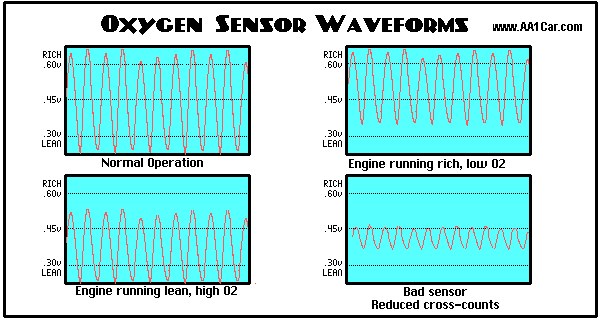
Use the scanner’s live data to confirm the condition. For example, if an oxygen sensor code points to a slow response, watch the sensor’s voltage and switching rate while the engine runs. The data will tell you whether the sensor is actually lazy or whether the wiring is the problem.
Maintenance, Safety, and Knowing When to Stop
Keep a log of the codes you read, the date, and the mileage. That record helps you spot patterns and gives a shop useful history if you need professional help. It also helps if you sell the car, because you can show the buyer that the check engine light was diagnosed and repaired.
Know when to stop. If a manufacturer-specific code involves airbags, steering, brakes, or high-voltage systems, a misdiagnosis is not just expensive, it is dangerous. In those cases, the safest next step is a qualified technician with the proper scan tool and service information.
- Best for: DIY owners who want ABS, airbag, transmission, and body control codes on a specific make should choose a mid-range enhanced scanner with verified coverage for that vehicle.
- Think twice if: You only need to read a check engine light on a 1996 or newer car; a basic code reader will do the job for far less money.
- Next step: Check the scanner’s official coverage list for your exact make, model, and year before ordering, and confirm whether updates require a subscription.
Frequently Asked Questions
No. Only enhanced scanners with manufacturer-specific software can read those codes. Basic code readers are limited to generic powertrain codes that all automakers share.
Generic codes (P0xxx) are standardized emissions codes readable by any scanner. Enhanced codes (P1xxx, U, B, C) come from manufacturer-specific systems like transmission, ABS, airbag, and body control modules.
Not always. Many mid-range enhanced scanners can read ABS and airbag codes on popular makes. Professional tools add broader coverage, bi-directional controls, and programming, but they cost much more.
No. Clearing codes only erases the stored fault information. If the underlying problem remains, the code will return, and emissions monitors will reset to not ready.
Usually not. Transmission codes are often manufacturer-specific, so a basic reader may show nothing or only a generic code. You need an enhanced scanner with transmission coverage for your vehicle’s make and model.
Check the scanner manufacturer’s official coverage list for your exact make, model, and year. Coverage varies by scanner model, firmware version, and sometimes by subscription level.