Will Foxwell NT301 Clear Codes? What It Can and Cannot Erase

Code Clearing Pick: Foxwell NT301
The NT301 is a practical choice if you mainly need to read and erase generic check-engine codes and confirm emissions readiness after repairs.
Quick Answer: Will Foxwell NT301 OBD2 Scanner Clear Codes?
Yes, the Foxwell NT301 can clear standard OBD-II check-engine codes after the problem is fixed. It should not be treated as a repair by itself, and it may not clear manufacturer-specific service, ABS, airbag, or oil warning messages unless the vehicle and function are supported.
Quick Answer for Range Rover Evoque Owners
The Foxwell NT301 can clear standard OBD2 engine codes, but it is not the best tool for clearing a critical oil warning or service/oil reset message on a 2015 Range Rover Evoque. If the warning is tied to low oil pressure, oil level, or a Land Rover service module, diagnose the cause first instead of just erasing the message.
- Use Foxwell NT301 for: check-engine light codes, emissions readiness, freeze-frame data, and generic powertrain DTCs.
- Do not rely on NT301 for: oil service reset, critical oil pressure warnings, ABS/SRS/body module faults, or Land Rover-specific service functions.
- Better fit for Evoque service resets: a Land Rover/Range Rover-compatible Foxwell service scanner such as the NT530/NT710 coverage family.
The Foxwell NT301 can clear diagnostic trouble codes from many vehicles that support standard OBDII or EOBD functions. I’ll explain what the tool can erase, what you should check before clearing a fault, and how to use its menu safely.
Yes, the Foxwell NT301 can clear engine fault codes, but the problem may return if you do not repair the cause. Clearing codes can also reset emissions readiness monitors, so I’ll cover what to expect after the reset and when further diagnosis may be needed.
Key Takeaways
- The NT301 can read and clear many engine codes.
- Fix the fault before erasing its code.
- Recheck the vehicle if the warning light returns.
Code Clearing Capability
I can use the Foxwell NT301 to read and erase many engine-related diagnostic trouble codes through a vehicle’s OBD2 port. The scanner can also show live data and emissions readiness, but clearing a code does not repair the fault or guarantee that the warning light will stay off.

Foxwell NT301: Good for Engine Code Clearing
Pick the NT301 if your main job is reading and clearing standard OBD2 check-engine codes. For a Range Rover Evoque oil/service warning, use it only as a first diagnostic check, not as a guaranteed oil reset tool.
Supported Diagnostic Systems
I use the NT301 mainly for OBD2 and EOBD engine diagnostics. It supports the standard OBD2 service functions, including reading stored and pending powertrain codes, viewing some freeze-frame data, checking emissions readiness monitors, and displaying live sensor readings when the vehicle provides them.
The NT301 is not a full-system scanner. It generally does not clear codes from systems such as ABS, air bags, transmission, or body control modules unless the vehicle and scanner version specifically support that function. Manufacturer-specific coverage can also vary by model year and market.
Before I erase a code, I record its exact number and description. Some versions include a built-in code library or help information, but I still confirm the code with the vehicle’s service information before replacing parts.
Erase Codes Function
How to Erase Codes With Foxwell NT301 Plus
Plug in the Foxwell NT301 Plus, turn the ignition to ON, scan the engine control module, read and save the code details, fix the cause, then use the erase/clear function. If the fault is still active, the warning light may return after a drive cycle.
Some listings write the model name as Foxwell NT301Plus. If you are searching how to erase codes Foxwell NT301Plus, use the same process: scan first, record the fault codes, repair the issue, then clear the codes from the OBD2 menu.
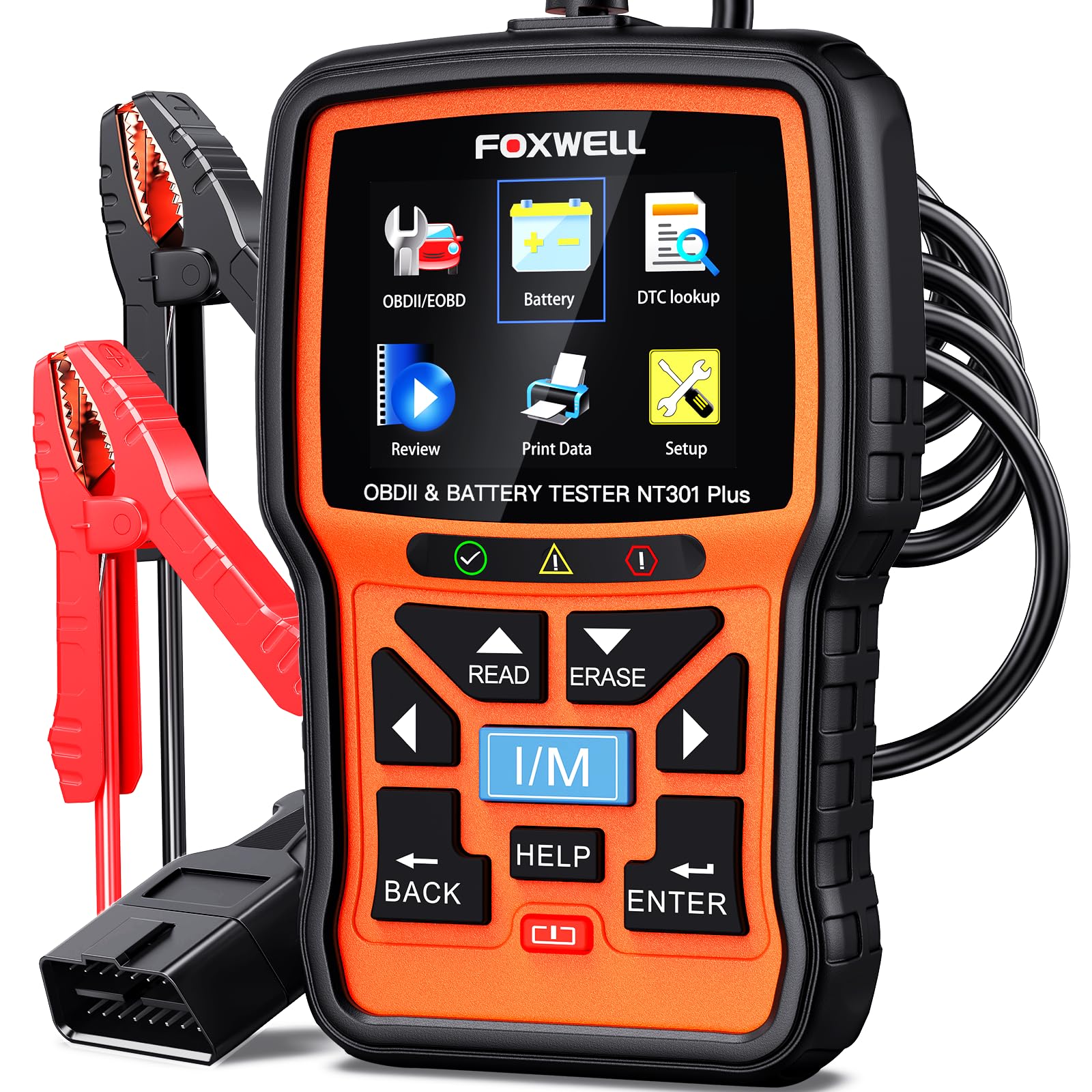
Foxwell NT301 Plus
Choose the NT301 Plus if you want basic OBD2 code clearing plus battery-test features in the same tool.
FAQ
How do you erase codes with Foxwell NT301 Plus?
Connect the NT301 Plus to the OBD2 port, switch the ignition ON, run the OBD2 scan, review the stored codes, repair the issue, then select erase or clear codes. Do not clear codes before saving them if you still need diagnostic information.
I access the Erase Codes option after connecting the NT301 with the ignition switched on and the engine stopped. The tool asks for confirmation, then sends the clear command to the vehicle’s control module. This removes stored and pending emissions-related codes and usually turns off the check-engine light.
Clearing codes also resets some readiness monitors. The vehicle may need several normal drive cycles before those monitors run again, which can affect an emissions test. I check the system again after erasing codes to confirm whether the fault returns.
The function will not fix the cause of a fault. If a sensor, wiring problem, vacuum leak, or other issue remains, the code and warning light may return soon after driving.
Requirements Before Erasing Fault Codes
I first confirm that the vehicle uses a supported OBD-II system, then I prepare a stable connection before clearing any codes. I also record the stored codes and check that I have repaired the related fault, because erasing codes does not fix the cause.
Foxwell NT301 Plus: Better if You Also Test Battery Health
The NT301 Plus is a stronger choice if you want basic OBD2 code clearing plus battery/charging-system checks. That helps when warning lights appear with a weak battery, but it still should not be treated as a Land Rover oil service reset scanner.

Foxwell NT530 for Land Rover/Range Rover: Better for Service Functions
If your 2015 Range Rover Evoque needs oil reset, EPB, TPMS, SRS, ABS, or brand-specific service functions, a Land Rover/Range Rover-compatible scanner is the safer buying direction. Verify 2015 Evoque coverage on the Amazon listing before ordering.
Vehicle Compatibility
I use the Foxwell NT301 with vehicles that support OBD-II or EOBD, usually passenger vehicles sold in the United States from 1996 onward. Compatibility can vary by country, model, engine, and connector type, so I check the vehicle manual or Foxwell’s compatibility information when uncertain.
The NT301 mainly accesses the engine and emissions control system. It may not read or clear codes from systems such as the airbag, ABS, transmission, or body control module unless the vehicle and tool specifically support those functions.
Before erasing anything, I write down each code and its description. I also check whether the code is current, stored, or pending. Clearing codes can remove useful diagnostic information and reset emissions monitors, which may prevent the vehicle from passing an emissions test until it completes its drive cycles.
Ignition And Connection Setup
I park the vehicle safely, switch off accessories, and set the parking brake. I locate the 16-pin diagnostic connector, usually beneath the driver-side dashboard, and plug in the NT301 firmly. I never force the connector or use a damaged cable.
I turn the ignition to ON without starting the engine, unless the scanner’s instructions state otherwise. The scanner should power on through the diagnostic connector. If it does not, I check the connection, ignition position, and vehicle fuse before continuing.
I keep the ignition on while reading or erasing codes and avoid disconnecting the scanner during the process. I save the code information first, confirm that repairs are complete, and make sure the vehicle battery has enough charge to keep power stable.
How To Clear Codes With The NT301
I use the NT301 to read the stored engine codes, record their details, and erase them only after checking the likely cause. Clearing a code can turn off the check-engine light, but it does not repair the fault or prevent it from returning.
Reading Stored Trouble Codes
I plug the NT301 into the vehicle’s OBD-II port with the ignition off, then turn the ignition on without starting the engine. The scanner powers up through the vehicle’s data link. I select the diagnostic function, allow it to identify the vehicle, and choose Read Codes or the matching menu option.
I write down every code before erasing anything. A code such as P0301 identifies a detected fault, but it does not prove that one specific part has failed. I also check whether the scanner lists the code as current, stored, or pending. Pending codes may not have triggered the warning light yet.
I save the freeze-frame information when available. This data can show engine conditions, such as temperature and speed, when the vehicle recorded the fault. I inspect and address the related problem before clearing the codes.
Confirming Successful Erasure
After recording the codes, I return to the diagnostic menu and select Erase Codes, Clear Codes, or the equivalent option. I follow the screen prompt and confirm the command. The vehicle may need the ignition switched off and back on during this process.
I then select Read Codes again. The scanner should show no stored or confirmed codes if the erasure worked. I also check the instrument panel; the check-engine light should turn off after the ignition cycle, although some vehicles may require a short drive.
Clearing codes resets emissions-monitor readiness tests. I do not schedule an emissions inspection immediately afterward because the monitors may show Not Ready. If the same code returns, I treat it as an active fault and diagnose the vehicle instead of repeatedly erasing it.
Limits Of Code Erasure
I can use the Foxwell NT301 to erase stored engine fault codes, but clearing a code does not repair the cause. Some warnings return after the vehicle runs its checks again, while other control modules remain outside the scanner’s coverage.
Persistent Faults
If the engine computer still detects the problem, it will set the code again. For example, a loose fuel cap, failed oxygen sensor, damaged wiring, or ignition problem can cause the check-engine light to return after I erase it.
Erasing codes also removes freeze-frame data, which records conditions such as engine speed, temperature, and load when the fault occurred. I should record the code and its details before clearing anything.
The NT301 can also reset emissions readiness monitors. These monitors then show as not ready until the vehicle completes the required drive cycles. A cleared light does not prove that the vehicle will pass an emissions test.
I should clear a code only after making a repair or confirming that the code resulted from a temporary issue. If the light flashes, the engine runs poorly, or the vehicle loses power, I should stop driving and seek qualified service.
Non-Engine Control Modules
The NT301 primarily supports OBDII and EOBD engine-related diagnostics. It can read and clear supported powertrain codes, but it generally does not provide full access to modules such as the airbag, anti-lock brake, body control, transmission, or tire-pressure systems.
A warning light from one of these systems may remain on even after I clear an engine code. The tool may display no code because the fault belongs to a module it cannot access, not because the vehicle has no problem.
For module-specific faults, I need a scanner that supports the vehicle’s manufacturer systems and communication protocols. I should also avoid clearing safety-system codes without diagnosing the fault, especially when the airbag or brake warning light remains active.
What To Do After Clearing Codes
I confirm that the warning light stays off, then I verify the repair through normal driving. I also check whether the vehicle completes its emissions tests and watch for symptoms that require further diagnosis.
Drive Cycle Verification
After I clear codes with the Foxwell NT301, I turn the ignition off and restart the vehicle. I check that the Check Engine light remains off. Clearing codes resets the vehicle’s readiness monitors, so the car may need several trips before it completes its self-checks.
I drive under mixed conditions, including city traffic, steady cruising, and a full warm-up. I avoid turning the ignition off during the test unless necessary. I then use the NT301’s I/M Readiness function to check monitor status.
| Result | Meaning |
|---|---|
| Light stays off and monitors complete | The repair may have corrected the fault |
| Light returns | The problem remains or another fault exists |
| Monitors show “Not Ready” | More driving is needed before an emissions test |
I record any returned code instead of repeatedly clearing it. Repeatedly erasing codes can hide an active problem and delay repairs.
When To Seek Professional Diagnosis
I seek professional help when the same code returns, the vehicle runs poorly, or the warning light flashes. A flashing light can indicate a severe misfire that may damage the catalytic converter. I reduce driving and arrange service promptly.
I also get help when the NT301 shows a code I cannot test safely or interpret with confidence. The scanner identifies a system fault, but it does not prove that the named part has failed. A technician may need to perform wiring checks, pressure tests, or manufacturer-specific scans.
I stop driving if the engine overheats, loses power suddenly, produces heavy smoke, or shows low oil pressure. I provide the technician with the original code, freeze-frame data, repair details, and information about when the symptoms occur.
Frequently asked questions
Can I use a Foxwell NT301 to clear a critical oil warning display on my 2015 Range Rover Evoque?
Usually, no. The Foxwell NT301 can clear standard OBD2 engine codes when the fault has been repaired, but a critical oil warning on a 2015 Range Rover Evoque may involve oil pressure, oil level, service reset, or a Land Rover-specific module. Check the oil level and warning cause first. If it is a service/oil reset message, use a Land Rover-compatible service scanner or have the vehicle checked by a qualified technician.
Can the Foxwell NT301 clear codes?
Yes. I can use the NT301 to read and erase standard OBD-II or EOBD diagnostic trouble codes. It mainly covers engine and emissions-related faults.
Will clearing a code fix the problem?
No. Clearing removes the stored code and may turn off the check engine light, but it does not repair the cause. If the fault remains, the code and warning light may return.
How do I clear a code with the NT301?
- I connect the scanner to the vehicle’s OBD-II port.
- I switch on the ignition without starting the engine.
- I select Read Codes and record the results.
- I choose Erase Codes and confirm the action.
I should read and save the codes before erasing them. The scanner may also clear freeze-frame data and reset emissions readiness monitors.
Can I clear ABS or airbag codes?
Usually not. The NT301 is designed for standard powertrain and emissions codes. I need a scanner that supports the vehicle’s ABS, airbag, or other control modules to diagnose and clear those faults.
What if the code will not clear?
I should check that the ignition is on, the connector is secure, and the vehicle supports OBD-II. A code may return immediately when the underlying problem still exists.
Conclusion
I can use the Foxwell NT301 to read and clear engine-related OBD-II trouble codes. The scanner connects through the vehicle’s OBD-II port and receives power from that connection, so it does not need a separate battery.
I should read and record the codes before clearing them. After I repair the cause of the fault, I can use the scanner’s Erase function to delete stored codes and switch off the check engine light.
Clearing a code does not repair the vehicle. If the problem remains, the light may return, and the vehicle may continue to have drivability or emissions issues. I should also note that the NT301 mainly covers standard powertrain codes; it may not access manufacturer-specific systems such as air bags, ABS, or transmission modules.




2 Comments