Can foxwell nt301 check emissions? What tests it can run
Yes, the Foxwell NT301 can check the emissions-related OBD2 data most U.S. drivers need, including codes and readiness information. It cannot do advanced repair functions, so it is best for basic inspection prep and simple diagnosis.
can foxwell nt301 check emissions is a fair question for any driver who wants a quick answer before a state inspection or a check-engine light visit. The short answer is yes, it can read the emissions-related OBD2 information most U.S. drivers need, but it does not replace a full repair-level scan tool.
- Emissions check: The NT301 can read core OBD2 data tied to check-engine and inspection issues.
- Inspection prep: Readiness monitors matter, and clearing codes can reset them.
- Compatibility: Verify your exact vehicle, model year, and OBD2 support before buying.
- Limits: It does not offer advanced coding, bi-directional control, or full service resets.
- Safety: Scan while parked and stop if the battery, wiring, or high-voltage system looks damaged.
Can Foxwell NT301 check emissions? Short answer and what that means for drivers
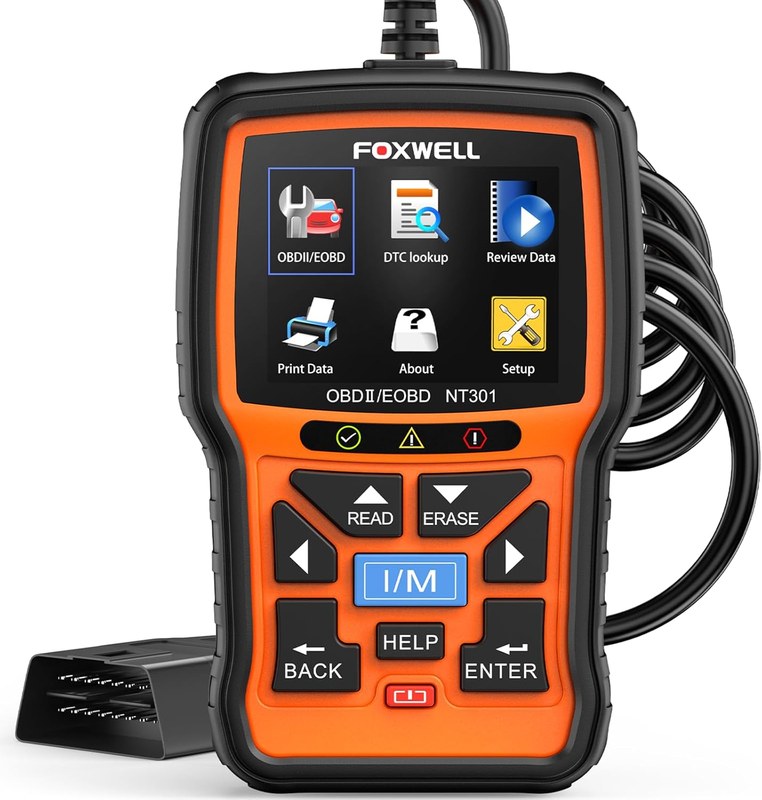
The Foxwell NT301 can help you check the emissions side of an OBD2 problem by reading trouble codes, pending codes, freeze frame data, live data, and readiness status on many gasoline vehicles sold for the U.S. market. That makes it useful for pre-inspection checks, but it is still a basic code reader, not a full diagnostic tablet.
In plain terms, the NT301 can tell you whether the vehicle has emissions-related faults stored in the engine computer and whether the monitors are ready for an inspection. It cannot perform advanced bi-directional tests, module coding, or deeper system-level repairs.
How the Foxwell NT301 handles emissions-related OBD2 checks in the U.S.
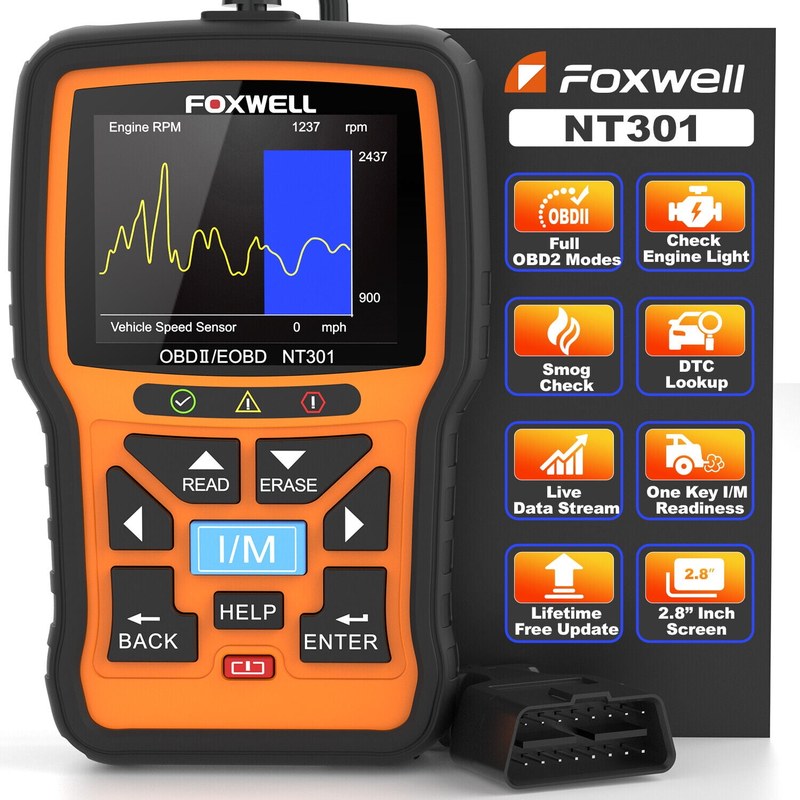
For most U.S. drivers, “emissions check” means reading the check-engine system that inspection stations use as part of an OBD2 test. The NT301 is built around that job, so it can be a practical first step before you head to a testing lane or a shop.
Model-year and protocol coverage: which cars it can read and which it cannot
The NT301 is aimed at OBD2-compliant vehicles, which generally means many 1996-and-newer gasoline passenger vehicles in the United States. Coverage can still vary by model year, engine type, and communication protocol, so the safest move is to confirm your exact vehicle before buying.
It is also important to separate OBD2 from older OBD1 systems and from nonstandard platforms. If your vehicle is outside standard OBD2 coverage, the scanner may not read emissions data at all, which is why vehicle compatibility matters first.
Check: Verify make, model, year, trim, voltage, ports, mounting space, and OEM requirements. Limitations: State verified exclusions.
Ignition mode, OBD2 port location, and the basic setup sequence
To check emissions data, the vehicle usually needs the ignition in the correct key-on mode so the scanner can communicate with the engine computer. The OBD2 port is commonly under the dash near the steering column, but exact placement varies by vehicle.
Set up the scanner with the vehicle parked, the transmission in Park or Neutral as appropriate, and the parking brake engaged. If you want a step-by-step overview of the interface, this NT301 usage guide is a helpful companion.
Keep setup simple and stationary. Reading the screen while the vehicle is moving is distracting and unnecessary for emissions checks.
What it can show: stored codes, pending codes, freeze frame, and live data
The main emissions-related value of the NT301 is information. Stored diagnostic trouble codes can point to a fault already confirmed by the vehicle computer. Pending codes can show a problem that has started but not fully matured yet.
Freeze frame data can show the engine conditions at the moment the fault was recorded, such as speed, load, or temperature. Live data can help you see sensor behavior in real time, which is useful when a code points to an oxygen sensor, fuel trim issue, or another emissions-related concern.
Emissions readiness, inspection prep, and the limits of reset functions
For many drivers, the real value of a scanner is not just reading the code. It is figuring out whether the car is ready for an emissions inspection and whether a repair actually fixed the problem.
Readiness monitors and why they matter for state inspections
Readiness monitors are self-checks the vehicle runs after a repair or battery disconnect. If too many monitors are incomplete, a state inspection can fail even when the check-engine light is off.
The NT301 can help you see readiness status before you visit the inspection station. That is especially useful after maintenance, a dead battery, or a repair that cleared the computer memory. For readers comparing scanner value, our buying guide on whether the NT301 is worth it explains where that basic inspection-prep value fits.
Why clearing codes can temporarily fail an emissions test
Clearing codes may turn off the warning light, but it also resets many readiness monitors. That means a vehicle can look “fixed” on the dash while still being unready for inspection.
That is why code clearing should usually come after you record the codes and freeze frame data, not before. If you want the scanner’s erase function explained in more detail, see our separate guide on whether the Foxwell NT301 can clear codes.
Do not clear codes first if you still need the fault history. Clearing too early can erase useful clues and force the vehicle to relearn readiness monitors from zero.
What the NT301 cannot do: advanced bi-directional controls, coding, and full repair resets
The NT301 is not a professional scan tablet. It does not give you broad bi-directional control, module programming, key coding, or the deep service functions found on higher-end tools.
That limitation matters because emissions problems are sometimes tied to systems beyond the engine computer. If you need advanced diagnostics, compare the NT301 with a more capable scanner instead of expecting the same repair depth from a basic reader.
- Reads key emissions-related OBD2 data for inspection prep
- Helps identify stored and pending faults before a test
- Simple enough for many DIY owners and commuters
- Does not replace advanced diagnostics or service programming
- May not support every vehicle or every manufacturer-specific feature
- Clearing codes can reset readiness and delay inspection approval
Power, battery, and electrical safety before you scan
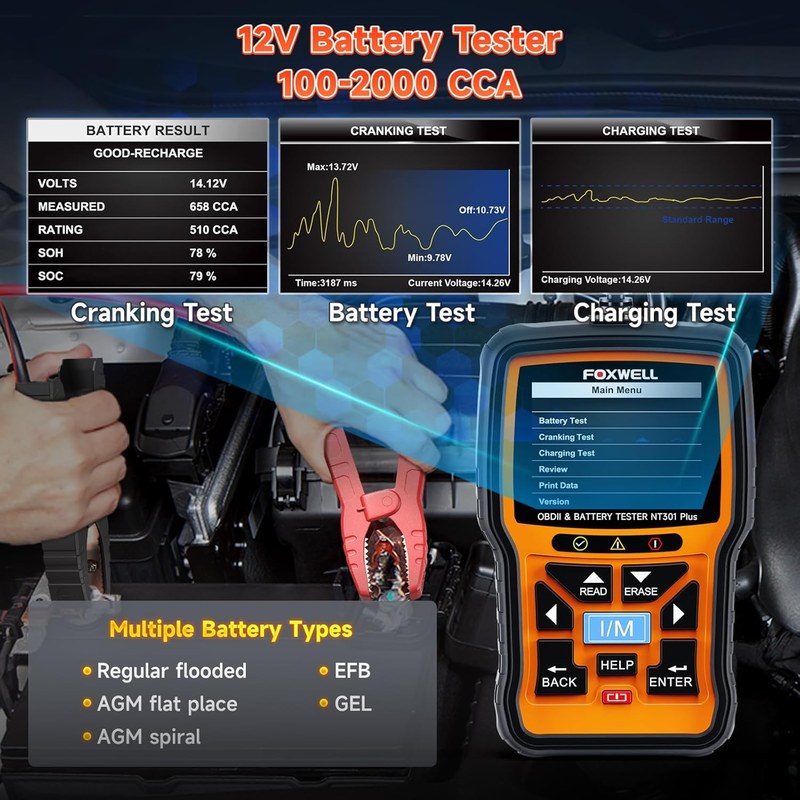
Even a simple scanner depends on stable vehicle power. If the battery or charging system is weak, the scanner may not communicate reliably, and the car may throw extra symptoms that confuse the diagnosis.
System voltage basics: healthy 12V behavior, low-voltage warnings, and scan reliability
Most conventional passenger vehicles use a 12V electrical system. If voltage is too low, electronic modules can act erratically, and the scanner may disconnect or return incomplete data.
A low battery can also create false confidence. A scanner may still power up while the vehicle computer is too unstable to give a clean emissions picture, so charging or testing the battery first is often smarter than chasing codes immediately.
Battery chemistry, state of charge vs. battery health, and damaged-battery stop conditions
State of charge is not the same as battery health. A battery can show some charge and still be weak, sulfated, or unable to support a stable scan session.
If the battery case is swollen, leaking, hot, cracked, or damaged, stop and follow the vehicle manual or a qualified technician’s advice. That is a safety issue, not just a scan issue.
Keep the scanner cable, connector, and screen clean and dry. Store it where heat, moisture, and crushed cables will not damage the unit between uses.
Correct connection order, hybrid/EV cautions, and when to stop and call a pro
Use the vehicle and scanner instructions in the correct order, and do not force the connector. If the port is hard to access, avoid awkward body positions that put pressure on pedals, steering, or trim panels.
Hybrid and EV owners should be extra careful because some systems involve high voltage and service procedures that are not the same as a standard gasoline car. When the vehicle manual gives a warning, follow it and stop if you are unsure.
TPMS and tire-related checks: what the NT301 does not replace
Some shoppers expect a code reader to solve every dashboard light. It does not. The NT301 is for OBD2 diagnostics, not tire pressure service, TPMS relearns, or inflation work.
Door-jamb placard pressure, cold inflation, and gauge accuracy
For tire pressure, use the door-jamb placard as the reference, not a guess or the sidewall number. Measure pressure when the tires are cold for the most accurate reading.
A scanner cannot replace a reliable tire gauge. If your tire light is on, start with the pressure check before assuming the problem is electronic.
Inflator duty cycle, TPMS relearn limits, puncture location, and temporary-repair boundaries
If you are dealing with a low tire, remember that inflators have duty-cycle and heat limits, and temporary sealants are not a permanent fix. Puncture location matters too; damage near the sidewall is often more serious than a simple tread puncture.
The NT301 will not relearn TPMS sensors or tell you whether a tire is safely repairable. For those tasks, you need the right tire tools or a tire shop.
When tire damage or warning lights require professional repair
If a tire is losing air quickly, shows sidewall damage, has a bulge, or has been driven flat, professional inspection is the safer choice. A code reader cannot judge internal tire damage.
Do not rely on a scanner to confirm tire safety. Visible damage, rapid air loss, or vibration means the tire may need immediate service or replacement.
Roadside and emergency use: practical value, storage, and safety limits
The NT301 can be a useful glove-box or trunk tool for drivers who want to know why a warning light appeared. That said, it should be stored and used like any other vehicle tool: clean, protected, and ready when needed.
Safe location, traffic visibility, and keeping the tool accessible in the vehicle
If you scan roadside, choose a safe location away from traffic. Turn on hazard lights when appropriate, stay aware of passing vehicles, and avoid standing in a lane or shoulder where visibility is poor.
Keep the scanner where you can reach it without digging through loose cargo. A tool that is buried under luggage or groceries is less useful in a real roadside moment.
Cable and device condition, storage conditions, current limits, and post-use inspection
Check the cable, connector pins, and screen for wear before you depend on the unit. If the cable is frayed or the connector is loose, scan reliability can suffer.
The NT301 is not a jump starter or power bank, so it should not be treated as an electrical rescue device. After use, inspect it, unplug it carefully, and store it where temperature swings and moisture are limited.
Tool completeness: what should be in the kit before you depend on it
A practical scanner kit should include the scanner itself, the cable, the manual or quick-start guide, and a safe storage spot in the vehicle. If you keep it for inspection prep, also keep a note of the vehicle’s last repair and battery service history.
NT301 vs. other OBD2 scanners: which driver or vehicle it fits best
The best scanner depends on how much detail you want. If you only need emissions checks and basic code reading, the NT301 can make sense. If you want app syncing, deeper diagnostics, or service functions, another tool may fit better.
Side-by-side comparison criteria: emissions checks, live data, readiness, and repair depth
When comparing scanners, look at the same core features: emissions data, readiness monitors, live data access, code clearing, vehicle coverage, and whether the tool can go beyond basic OBD2. That keeps the decision focused on actual use, not marketing language.
| Option | Best for | Owner consideration | Driver consideration |
|---|---|---|---|
| Foxwell NT301 | Basic emissions checks and code reading | Lower ownership complexity, but limited repair depth | Simple to use while parked, with less screen clutter |
| App-based scanner | Drivers who want phone integration and extra data | May involve app permissions or subscriptions | Phone alerts can add distraction if used carelessly |
| Advanced scan tool | DIYers who need deeper diagnostics | Higher cost and more learning time | More capability, but more complexity |
Best fit for daily drivers, DIY owners, inspection prep, and budget-conscious shoppers
The NT301 is often the best fit for a daily driver who wants a basic answer before paying for a shop visit. It also suits budget-conscious owners who mainly need emissions readiness, stored codes, and live data without extra software.
It is less attractive for people who expect one tool to handle every repair job. If that sounds like you, compare it with a more advanced option such as the best Foxwell NT301 scanner roundup or a broader platform.
Alternatives for advanced diagnostics, app-based scanning, and hybrid/EV owners
Drivers who want deeper system coverage may prefer a more advanced scanner or an app-connected tool. Owners of hybrids and EVs should pay close attention to support for the exact vehicle platform, because not every basic reader covers those systems equally well.
Before buying, compare the scanner to the vehicle you actually own, not the one you may buy later. That is especially important if you plan to keep the tool for several years.
Compatibility, privacy, firmware, support, and ownership cost in 2026
For a scanner like the NT301, long-term value is not just about what it reads today. It also depends on support, update policy, and how comfortable you are with a standalone tool versus a connected device.
App permissions and privacy considerations, even when the scanner is standalone
The NT301 itself is a standalone scanner, so it does not work like a phone app that asks for location, contacts, or cloud access. That lowers privacy exposure compared with some connected diagnostic platforms.
Still, any tool that stores vehicle data deserves basic care. Keep the unit secure, avoid sharing screenshots with sensitive VIN or repair details unless needed, and review any support registration terms from the manufacturer.
Even a standalone scanner can store vehicle trouble codes and freeze-frame data. Protect that information the same way you would protect a repair receipt or VIN record.
Firmware updates, support expectations, warranty coverage, and long-term value
Before buying, check whether the seller and manufacturer still support updates, manuals, and warranty claims in the U.S. Support matters because a scanner is only useful if it can be updated or serviced when needed.
Long-term value also depends on how often you will use it. A scanner that solves one inspection question every year may still be worth it if it saves a few trips to the shop, but only if it stays compatible with your vehicle.
For the right driver, a basic scanner can save time, reduce guesswork, and help document whether a repair cleared emissions-related faults before an inspection.
Transparent verdict: who should buy the Foxwell NT301 and who should skip it
The NT301 makes sense for drivers who want a simple emissions and code-reading tool without app dependence or advanced repair complexity. It is less useful for shoppers who need service resets, bidirectional control, or deep module access.
If your main goal is to understand a check-engine light, confirm readiness, and avoid an unnecessary shop visit, the NT301 is in the right lane. If you need more than that, spend up for a scanner that matches the job.
- Best for: U.S. drivers who need basic emissions checks, readiness status, and simple OBD2 code reading.
- Think twice if: You want advanced diagnostics, app-based features, or repair functions beyond basic scanning.
- Next step: Verify your vehicle’s OBD2 compatibility and confirm the scanner’s support for your model year before buying.
Frequently Asked Questions
It can read emissions-related OBD2 data such as codes, readiness, freeze frame, and live data on many U.S. vehicles. That helps you prepare, but it does not guarantee inspection pass status because the vehicle still has to meet your state’s rules.
No. It is meant for OBD2-compliant vehicles, so coverage can vary by model year, engine type, and protocol. Always confirm your exact make, model, and year before buying.
Usually, yes. Clearing codes can reset readiness monitors and make a vehicle temporarily unready for an emissions test, even if the check-engine light turns off.
A weak battery can make scan results unreliable or cause communication problems. If the battery is swollen, leaking, or damaged, stop and follow the vehicle manual or a qualified technician’s guidance.
The NT301 is a standalone scanner, so it does not depend on a phone app for basic use. That lowers privacy concerns compared with connected tools, and ongoing costs are usually limited unless you choose accessories or support services.
Check vehicle compatibility, emissions-readiness features, warranty support, and whether you need more than basic code reading. If you want bidirectional controls, service resets, or app integration, a different scanner may fit better.



2 Comments