10 Best Bluetooth OBD2 Scanner for Accurate Car Diagnostics
Bluetooth OBD2 scanners connect to a car’s diagnostic port and send data to a phone or tablet. They can read engine fault codes, clear warning lights, and show live information such as engine speed, coolant temperature, and fuel-trim readings. This makes them useful for drivers who want basic insight before visiting a repair shop.
The best Bluetooth OBD2 scanner should offer reliable connections, support the diagnostic features your vehicle needs, and work with a clear, regularly updated app. We also consider compatibility, code accuracy, setup, data privacy, and whether the scanner works with both Android and iPhone devices. We tested and researched leading models to find the Bluetooth OBD2 scanners that make vehicle diagnostics easier and more useful.
10 Best Bluetooth OBD2 Scanners
We reviewed the top Bluetooth OBD2 scanners for ease of use, compatibility, features, and value. Our list includes reliable options for checking engine codes, monitoring vehicle data, and supporting basic car diagnostics.
BlueDriver Bluetooth Pro OBD2 Scanner

We recommend this scanner for drivers who want detailed vehicle codes and repair guidance without paying subscription fees.
Pros
- Reads several systems, including ABS, airbag, SRS, and TPMS on supported vehicles
- Provides repair reports, live data, and video guidance through the app
- Works with iPhone and Android devices without extra add-ons
Cons
- Advanced system coverage depends on the vehicle make and model
- Requires a phone or tablet to view scan results
- May take some setup time when pairing Bluetooth
We plugged the compact BlueDriver sensor into the OBD2 port and used the app to check fault codes and live engine data. The connection worked well after pairing, and the app presented the results in a more useful format than a basic code reader.
The repair reports stood out during testing. Instead of showing only a code, the app listed possible causes and suggested fixes. That information can help us decide whether a problem needs immediate attention or whether we can handle further checks at home.
BlueDriver also reaches beyond engine codes on many supported vehicles. We could access systems such as ABS, airbag, SRS, and TPMS, though coverage varies by make and model. The scanner supports gas-powered vehicles from 1996 onward in North America, so we should confirm compatibility before buying.
We liked that the purchase includes the app without a recurring subscription. The main drawback remains the phone-based design: we need our device nearby, and pairing can occasionally require troubleshooting.
OBDLink MX+ Bluetooth Scanner

We recommend the OBDLink MX+ for drivers who want reliable app-based diagnostics across iPhone, Android, and Windows devices.
Pros
- Connects quickly and stays stable during testing
- Works with apps such as FORScan, Torque, BimmerCode, and OBDFusion
- Can access more vehicle systems than basic code readers
Cons
- Some advanced functions require paid software
- Vehicle support varies by make, model, and app
- Costs more than simple Bluetooth scanners
We found setup straightforward, and the adapter paired smoothly with both phones and a Windows PC. It worked well for reading engine data and monitoring live readings during normal driving.
The MX+ also supports enhanced functions on many Ford, GM, Mazda, Nissan, Toyota, Honda, Hyundai, and Kia vehicles. Depending on the car and app, we could check systems such as ABS, SRS, and TPMS instead of only reading check-engine codes.
We liked the stable connection and built-in protection against voltage problems and battery drain. However, advanced tasks such as service resets, programming, or reinitializing systems may require a paid app, and we would check the compatibility guide before buying.
Veepeak OBDCheck BLE

We recommend this scanner for basic check-engine diagnostics because it connects reliably with many iPhone and Android apps.
Pros
- Connects quickly through Bluetooth Low Energy
- Reads and clears standard engine codes
- Works with several popular third-party apps
Cons
- Requires a separate app to operate
- Does not handle most ABS, SRS, or service resets
- App features and costs vary
We found the Veepeak compact and easy to keep in its included case. Instead of pairing through the phone’s Bluetooth settings, we connected it from inside the chosen app. This setup worked smoothly once we selected Bluetooth LE.
With apps such as Car Scanner, Torque, and OBD Fusion, we could view trouble codes, freeze-frame data, readiness checks, and live sensor readings. These tools make it useful for checking a warning light or watching basic engine data.
The scanner does not provide every function found on a professional tool. ABS, airbag, oil-light resets, injector coding, and other advanced features depend on the vehicle and app, and many are not supported. We also recommend checking app compatibility before buying, especially for hybrids, electric vehicles, and vehicle-specific coding.
Veepeak OBDCheck BLE+

We recommend this compact scanner for affordable check-engine diagnostics when we pair it with a compatible phone app.
Pros
- Quick Bluetooth LE connection with iOS and Android phones
- Reads, clears, and monitors standard OBD-II data
- Works with several popular third-party apps
Cons
- Requires a separate app, and some features cost extra
- Advanced vehicle data varies by car and model year
- Does not support service resets or special functions
We plugged the Veepeak into the OBD-II port and used it with a compatible scanning app. It connected reliably after we selected the correct Bluetooth setting, and the small case stayed out of the way while we checked live sensor readings.
For basic work, the scanner can read and clear trouble codes, show freeze-frame data, and check emissions readiness. We found those tools useful for deciding whether a warning light needed immediate attention or further testing.
The main limitation comes from the app and vehicle combination. Advanced systems such as ABS, SRS, and battery data may work on some vehicles, but users often need a paid app. It also does not perform functions such as oil resets, injector coding, or electronic parking brake service.
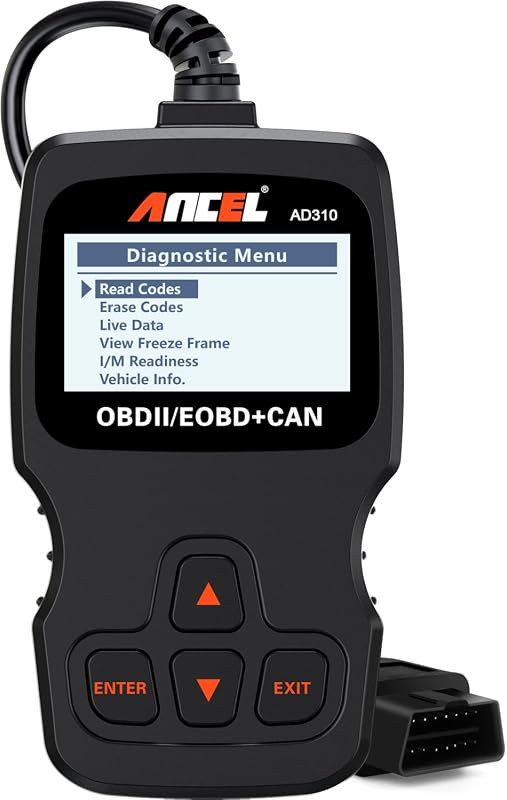
ANCEL AD310 OBD2 Scanner

We recommend the ANCEL AD310 for drivers who want a simple, wired tool to read and clear common check-engine codes.
Pros
- Clear screen and labeled controls
- Fast code reading and live-data access
- No batteries or charging needed
Cons
- Only handles emission-related engine codes
- Not compatible with older OBD1 vehicles
- Lacks advanced system scans
The AD310 feels sturdy and easy to handle. Its thick, flexible cable gives us enough reach from the diagnostic port, while the compact body fits neatly in a glove box or small tool bag.
We found the controls simple to learn, and the screen showed codes clearly. The scanner powered on through the car’s OBD2 port, so we did not need batteries, a charger, or a phone app.
It can read and clear engine codes, show freeze-frame information, display live data, and check emissions readiness. Those features make it useful for basic troubleshooting before visiting a repair shop.
This scanner does have clear limits. It works with OBD2 vehicles and focuses on emission-related engine faults, so it cannot scan systems such as airbags or ABS. We should also confirm vehicle compatibility before buying, especially with unusual imports or older models.
UMEIJA V011 Bluetooth OBD2 Scanner
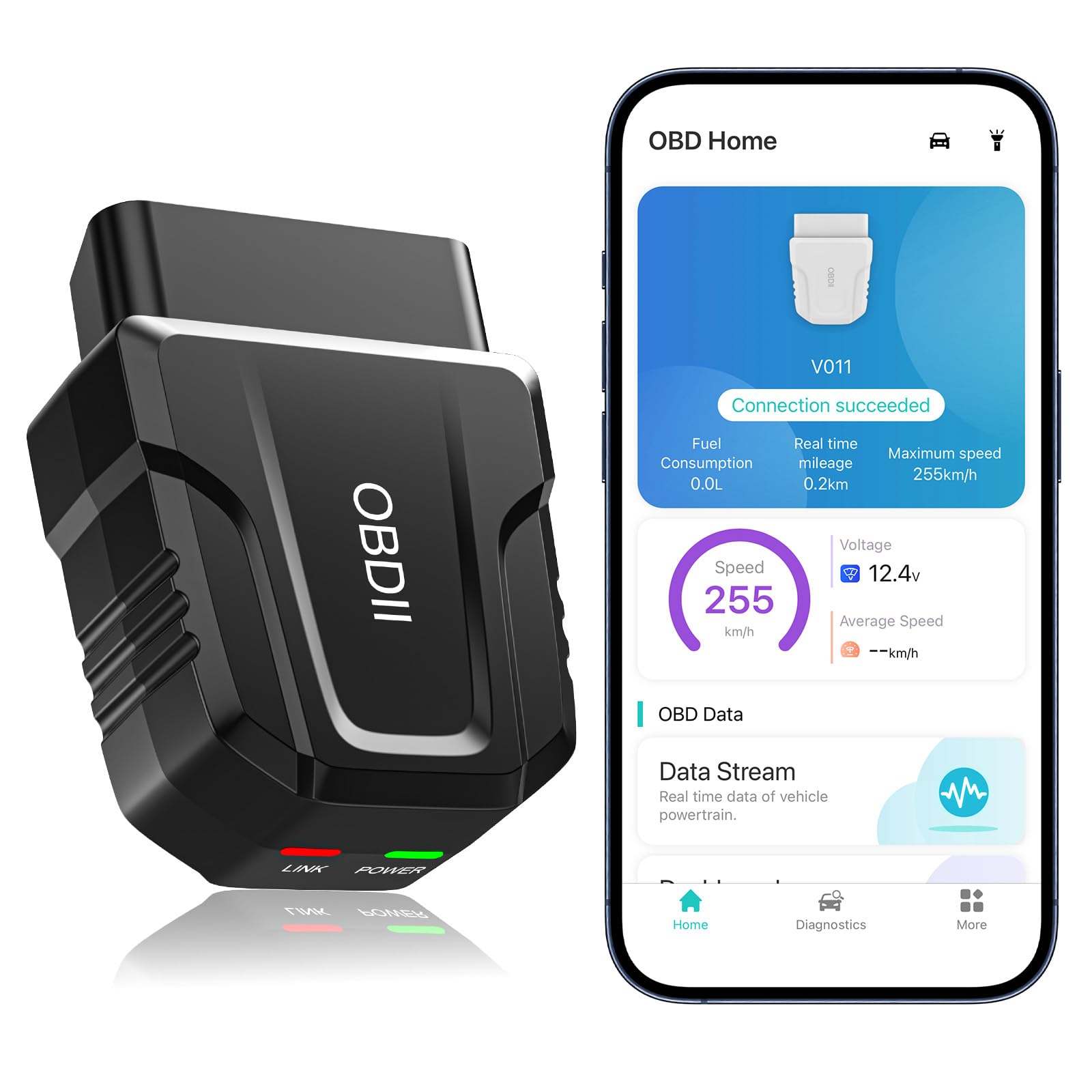
We recommend this scanner for drivers who want affordable check-engine diagnostics, live data, and phone-based testing without a dedicated display.
Pros
- Quick Bluetooth connection with Android and iOS phones
- Reads codes, live data, VIN details, and emissions readiness
- Clear charts and helpful code explanations in the app
Cons
- Requires the OBD Home app to work
- Cannot replace advanced shop-level diagnostic equipment
- We need to unplug it after use to avoid battery drain
We found the V011 easy to set up after plugging it into the vehicle’s OBD2 port and turning on the ignition. The app connected quickly, and its charts made readings such as engine speed, coolant temperature, and voltage easier to understand.
Code scanning worked well for basic check-engine diagnostics. The app also provided explanations and possible repair guidance, which helped us decide whether an issue needed immediate attention. We should still confirm repairs before clearing a code.
This scanner supports many vehicles from 1996 onward and works with both Android and Apple devices. Its compact design fits easily in a glove box, although we had to follow the app’s connection instructions rather than pair it like a standard Bluetooth accessory.
The V011 offers useful features for its price, including freeze-frame data, emissions checks, performance tests, and fault-code clearing. It remains best for basic engine diagnostics, since it does not replace a professional scanner for airbag, transmission, or other advanced systems.
BLCKTEC 440 Bluetooth OBD2 Scanner

We recommend the BLCKTEC 440 for drivers who want simple code reading, live data, and emissions checks without paying for a professional shop tool.
Pros
- Clear color screen and simple controls
- Live data, battery tests, and emissions checks
- Free lifetime updates and expert support
Cons
- Lacks some advanced sensor reset functions
- Requires an internet connection to research unfamiliar codes
- Some buyers may receive a returned unit
We found the 2.8-inch screen easy to read while checking a vehicle. The tool connects through the car’s OBD2 port and draws power from the vehicle, so we did not need to charge or replace batteries.
Reading and clearing trouble codes took little effort. Live data helped us watch vehicle readings as the engine ran, while the color indicators made emissions readiness checks quick to understand.
The BLCKTEC 440 works with OBD2-compliant cars, SUVs, light trucks, and some 12-volt diesel vehicles. We also liked the battery and charging-system test, which adds value for basic home troubleshooting.
This scanner remains focused on common diagnostics rather than advanced shop-level repairs. Buyers should also note that it may not include every reset function, such as crankshaft or camshaft sensor resets.
XTOOL A30M Bluetooth OBD2 Scanner

We recommend the XTOOL A30M for DIY users who want full-system scans and active tests without paying for software updates.
Pros
- Full-system diagnostics and bidirectional controls
- Lifetime software updates with no subscription
- Works with Android and iOS devices
Cons
- Vehicle coverage varies by model
- FCA AutoAuth requires a separate account and fee
- Setup may take some time
We connected the A30M to a tablet and found the wireless link stable during routine testing. The app provided access to engine, transmission, ABS, SRS, and other available systems instead of limiting us to basic engine codes.
The active tests added useful depth. We could command supported components, such as windows, wipers, and other systems, to help confirm whether a part worked. Available tests depend on the vehicle, so we would check compatibility before buying.
We also found the reset tools useful for common maintenance tasks, including oil service, electronic parking brake, steering angle, throttle, and battery-related functions. Live data graphs made it easier to watch sensor readings while the vehicle ran.
Its compact design stores easily, but the scanner depends on a phone or tablet for operation. The app supports newer protocols, including CAN FD on certain GM vehicles, while FCA functions require separate AutoAuth registration and payment. Overall, the A30M offers strong coverage for home garages and small repair shops.
Vgate iCar Pro Bluetooth OBD2 Scanner

We recommend this compact scanner for basic engine diagnostics, live data, and code clearing through a compatible iOS or Android app.
Pros
- Connects easily with popular apps such as Torque, Car Scanner, and Dr. Prius
- Compact design with low standby power use
- Supports firmware updates for continued compatibility
Cons
- Does not scan ABS, SRS, or TPMS systems
- Android users must pair with a PIN
- Advanced app features may cost extra
We found the Vgate iCar Pro easy to install. After plugging it into the OBD2 port, we connected it to an app and began reading engine data without using a separate display or cable.
The Bluetooth connection worked well during testing, and the adapter handled common tasks such as reading and clearing check-engine codes. Its small size also made it less intrusive when left connected during short trips.
This model fits most 12V gasoline vehicles built after 1996 and some light-duty diesel vehicles. We would not choose it for 24V systems, hybrid or electric vehicles with unreliable auto-wake behavior, or buyers who need manufacturer-level diagnostics.
It works with both iOS and Android, though Android setup requires pairing with “Android-Vlink” using PIN 1234. We also found the standard OBD2 functions useful for monitoring values such as coolant temperature and fuel trims, while advanced repairs may require another tool.
TOPDON TopScan Pro
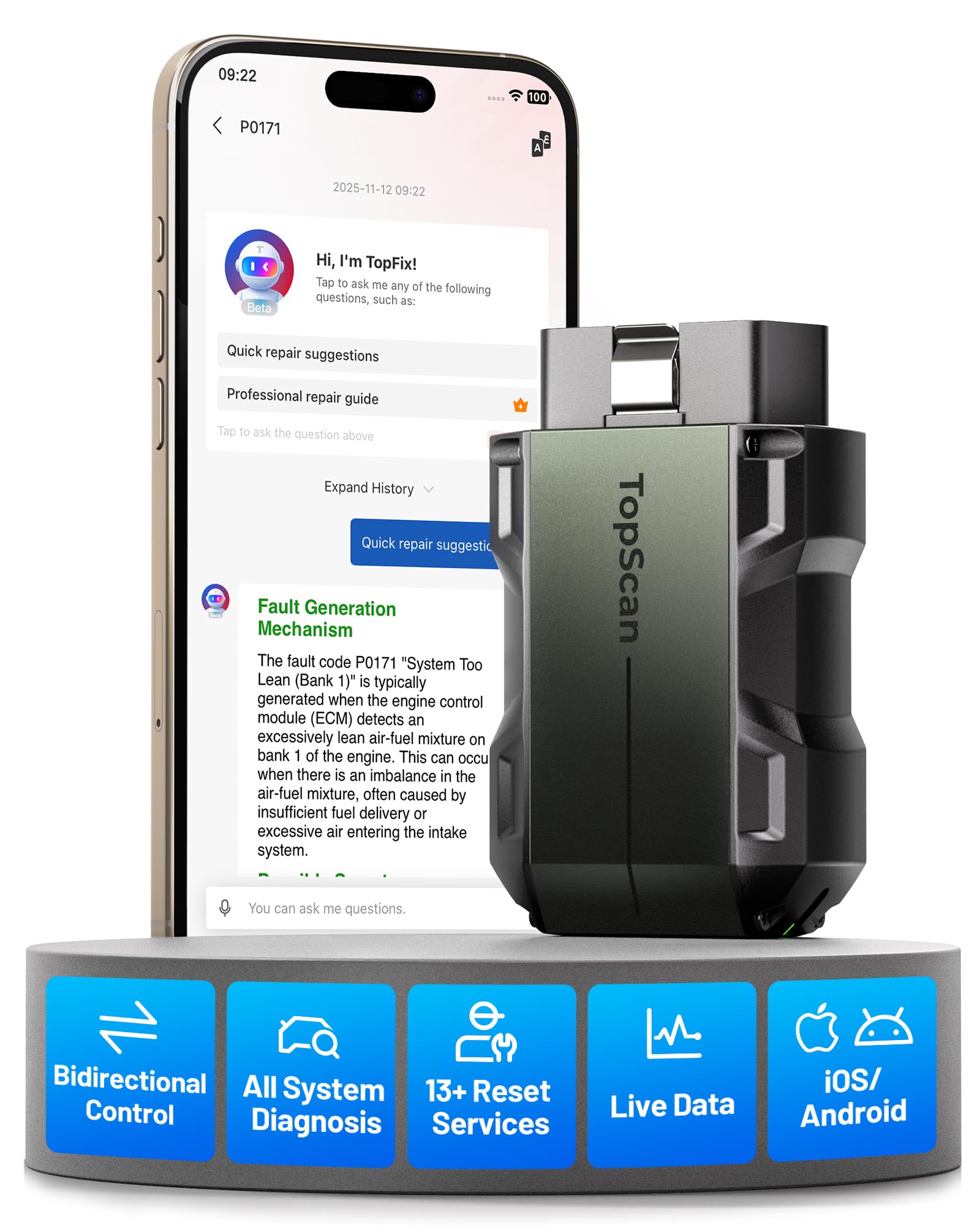
We recommend the TOPDON TopScan Pro for DIY users who want full-system scans, active tests, and service resets through a phone app.
Pros
- Performs bidirectional tests on supported vehicles
- Scans systems beyond the engine computer
- Includes lifetime access to core diagnostics
Cons
- Advanced features require a subscription after one year
- Vehicle coverage and functions vary by model
- Bluetooth and app performance may not suit every user
After pairing the small adapter with our phone, we could read engine, ABS, transmission, and airbag faults. The app also showed live data and helped us check whether a warning light came from a current issue or a stored code.
Its strongest feature is bidirectional control. On compatible vehicles, we could command parts such as cooling fans, windows, wipers, and fuel injectors. These tests can help confirm a fault before we remove parts or order replacements.
The scanner also supports service tasks such as oil resets, electronic parking brake resets, battery registration, steering angle calibration, and throttle relearns. We found the phone-based controls convenient, although the available functions depend on the vehicle.
Core OBD2 diagnostics remain available without an ongoing fee. However, advanced features, including active tests and many resets, require renewal after the included 12-month period. We would check both vehicle compatibility and long-term subscription costs before buying.
With a 4.4-star rating from 229 customer reviews, the TopScan Pro offers more capability than a basic code reader. Its compact size suits a glove box, but users who want simple plug-and-read operation may find the app and subscription system more involved.
Buying Guide
We should first check vehicle compatibility. Most Bluetooth OBD2 scanners work with cars that support standard OBD2 protocols, but coverage can vary by model year, engine, and region. We should confirm compatibility before buying.
Key features to compare include:
| Feature | What to look for |
|---|---|
| Connection | Bluetooth 4.0 or newer for stable pairing |
| App support | Clear apps with regular updates and useful reports |
| Diagnostic data | Fault codes, live data, readiness monitors, and freeze-frame data |
| Operating system | Support for our Android or iOS device |
| Security | Strong pairing controls and a trusted app source |
| Power use | Low standby drain when left connected |
We should choose a scanner that provides more than basic code reading if we want to monitor engine data. Live data, sensor readings, and emissions readiness checks can help us understand a problem before visiting a repair shop.
App quality matters as much as the adapter. We should look for simple menus, clear code descriptions, reliable updates, and transparent privacy policies. Some apps charge extra for advanced tools, so we should check pricing before choosing.
We should also consider size and build quality. A compact adapter fits better in tight spaces, while a secure connection and durable casing can support regular use. Bluetooth range matters less than stable communication inside the vehicle.
Finally, we should match the scanner to our needs. A basic model may suit occasional warning-light checks, while advanced users may need broader data access, logging, and support for more diagnostic functions.
Editor’s picks
We selected these Bluetooth OBD2 scanners based on compatibility, app quality, diagnostic features, and ease of use. Check your vehicle’s model year and the app’s supported systems before buying.
| Scanner | Best for | Key strength |
|---|---|---|
| OBDLink MX+ | Advanced users | Fast data and broad vehicle support |
| Veepeak OBDCheck BLE+ | Most drivers | Simple setup and reliable basic scans |
| BlueDriver | Guided troubleshooting | Clear reports and repair suggestions |
| FIXD Sensor | Maintenance tracking | Easy monitoring through a mobile app |
OBDLink MX+ suits drivers who want live data, enhanced diagnostics, and strong connection stability. Its app support varies by vehicle, so we should confirm coverage before purchase.
Veepeak OBDCheck BLE+ offers a practical choice for reading and clearing common engine fault codes. We can pair it with compatible Android or iOS apps, but the scanner itself does not provide repair advice.
BlueDriver works well for users who prefer guided results. Its app can show possible causes and reported fixes for some vehicles, although advanced functions may require a paid report or subscription.
FIXD Sensor focuses on routine maintenance and simple explanations. We should treat its alerts as guidance and verify serious faults with a qualified technician.
Frequently asked questions
What does a Bluetooth OBD2 scanner do?
We use a Bluetooth OBD2 scanner to read data from a vehicle’s onboard diagnostic system. It can show trouble codes, live sensor data, and emissions readiness information through a compatible phone or tablet app.
Will every scanner work with every vehicle?
Most scanners work with vehicles built for the OBD2 standard, which became common in the United States in 1996. We should still check the scanner’s compatibility list, especially for diesel vehicles, hybrids, electric vehicles, and models sold outside North America.
Can a Bluetooth scanner clear a check engine light?
Many models can clear stored trouble codes after we repair the related problem. Clearing a code does not fix the cause, and the light may return if the issue remains.
Do we need a paid app?
Some scanners work with free apps, while others require a paid app for advanced features. We should confirm app costs, supported devices, and included functions before buying.
Is a Bluetooth OBD2 scanner safe to leave plugged in?
We can leave some low-power scanners connected, but not every model enters sleep mode. We should remove the scanner when the vehicle sits unused for long periods if its power use is unknown.
What should we look for when choosing one?
We should check vehicle coverage, app quality, connection stability, diagnostic features, update support, and data security. A basic model suits code reading, while advanced diagnostics may require a more capable scanner.
Conclusion
Choosing the best Bluetooth OBD2 scanner depends on how we plan to use it. A basic model can read and clear common engine codes, while an advanced scanner may show live data, run system tests, and support more vehicle networks.
We should check vehicle compatibility, app quality, connection stability, and update support before buying. A scanner that works with both Android and iOS gives us more flexibility, while a reliable app makes the diagnostic data easier to understand.
For occasional checks, a simple and affordable scanner may meet our needs. For regular repairs or deeper testing, we should choose a model with broader coverage, better live-data tools, and ongoing software updates.